Anti-Virus-XP.com
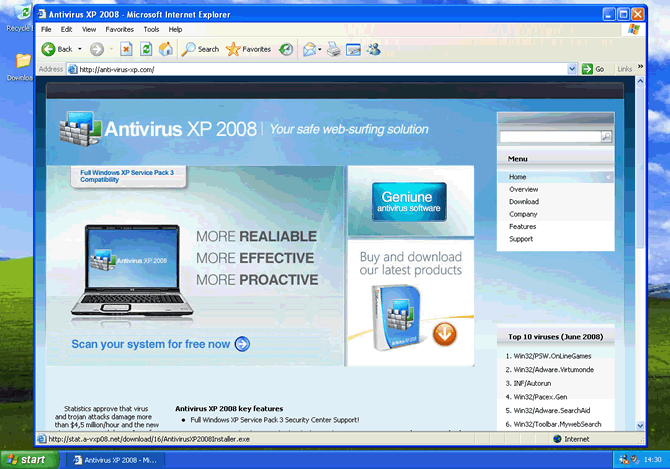 Anti-Virus-XP.com is a dangerous website that is set up to promote Antivirus XP 2008 which is a well known rogue anti-spyware program. Anti-Virus-XP.com is somewhat convincing to be part of a security tool because of the fake security scan that it performs.
Usually Antivirus XP 2008 redirects you to Anti-Virus-XP.com in hopes that you purchase the full version of Antivirus XP 2008. It would be best to block Anti-Virus-XP.com so that you are not prompted to purchase Antivirus XP 2008 which happens to be a useless program for your computer. Manual remove of Antivirus XP 2008 may be possible but is difficult for most computer users. It may be best to use an up-to-date spyware scan tool to locate the Antivirus XP 2008 on your system.

File System Modifications
- The following files were created in the system:
# File Name 1 %ProgramFiles%\[RANDOM NAME]\rhccv9j0e1b1.exe 2 %ProgramFiles%\[RANDOM NAME]\Uninstall.exe 3 %ProgramFiles%\antivirusxp2008 4 %System%\[RANDOM NAME].exe 5 mfc71.dll 6 mfc71enu.dll 7 msvcp71.dll 8 msvcr71.dll
Registry Modifications
- The following newly produced Registry Values are:
HKEY..\..\..\..{Subkeys}HKEY_LOCAL_MACHINE\SOFTWARE\Microsoft\Windows\CurrentVersion\Internet Settings\User Agent\Post Platform\"AntivirXP08" = "AntivirXP08"HKEY_LOCAL_MACHINE\SOFTWARE\Microsoft\Windows\CurrentVersion\[RANDOM NAME]HKEY_LOCAL_MACHINE\SOFTWARE\[RANDOM NAME]HKEY_LOCAL_MACHINE\SOFTWARE\Microsoft\..{RunKeys}HKEY_LOCAL_MACHINE\SOFTWARE\Microsoft\Windows\CurrentVersion\Run\"[RANDOM NAME]" = "C:\Program Files\[RANDOM NAME]\[RANDOM NAME].exe"HKEY_LOCAL_MACHINE\Software\[APPLICATION]\Microsoft\Windows\CurrentVersion\Uninstall..{Uninstaller}[RANDOM NAME]
RSTART MY COMPEUTR
I'm having regular problem with my prowser freezing up on me so often i cant work properly on my computer. I will appreciate any help i can get to get rid of this problem
I am unable to locate the above noted files & I'm still infected by XP Security 2012