HomeSecurePage.com
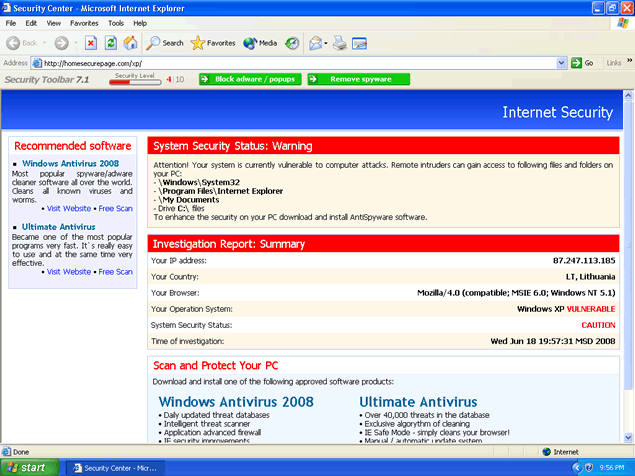 HomeSecurePage.com is a rogue website and browser hijacker from the Trojan.Zlob family. HomeSecurePage.com/xp and HomeSecurePage.com/vista originates from Russia. HomeSecurePage.com may seem like a regular websites, but once you've roamed this website you'll see that there's only links to rogue anti-spyware programs like Windows Antivirus 2008 and Ultimate Antivirus 2008. You may also suddenly see HomeSecurePage.com as your default homepage on your browser. HomeSecurePage.com is similar to SoftHomePage.com, ManageDNS404.com, SafetyAlertings.com, Secureinvites.com, among other browser hijackers.
HomeSecurePage.com will also display misleading error messages alleging to detect virus threats. If you click on the fake error message, it will that take you to a program that promises to alleviate the problem but instead it only leads you to the purchase page of a rogue anti-spyware program. A false system alert message that starts "W32.Myzor.FK@yf has infected your PC..." will appear on your Taskbar.
HomeSecurePage.com fake error message states:
"Warning! W32.Myzor.FK@yf is a virus that infects files with .exe extensions. It attempts to steal passwords and private information from the infected computer.
Type: Virus
Infection Length: 138,293 bytes
Systems Affected: Windows 95, 98, ME, NT (all versions), 2003, Windows XP (all service packs)
Systems Not Affected: DOS, EPOC, Linux, Macintosh, Novell Netware, OS/2, UNIX
Technical details: Creates files in %Windir%\ directory. By default, this is C:\Windows.
Adds values to registry keys: HKEY_LOCAL_MNACHINE\Software\Microsoft\Windows\CurrentVersion\Run
Scans the hard drive for .exe files and infects any executable files. Searches for passwords/information, which it may send to a remote attacker.
Recomendations [SIC]: Click "OK" to download officially approved security software.
Always keep your patch levels up-to-date."
HomeSecurePage.com may prove dangerous to your security and privacy and, therefore, should be avoided at all costs. If HomeSecurePage.com has already infected your machine, we strongly recommend you to scan your system for Zlob and other possible infections.
File System Modifications
- The following files were created in the system:
# File Name 1 cfqbw.dll 2 fdpzgi.dll 3 gtawclv.dll 4 iesuninst.exe 5 isamini.exe 6 isamonitor.exe 7 khtbpdl.dll 8 pmmon.exe 9 pmsngr.exe 10 veptlh.dll 11 vjxwnn.dll 12 vmlwp.dll
Registry Modifications
- The following newly produced Registry Values are:
HKEY..\..\..\..{Subkeys}HKEY_LOCAL_MACHINE\SOFTWARE\Classes\CLSID\{70d17a5f-ef27-4295-90f5-20ad6f24834f}HKEY_LOCAL_MACHINE\SOFTWARE\Classes\CLSID\{80ced3d6-ece9-48ba-8df8-2503d8d87c2b}HKEY_LOCAL_MACHINE\SOFTWARE\Classes\CLSID\{D61D7E1A-6613-49CA-B6F9-51DB248E209D}HKEY_LOCAL_MACHINE\SOFTWARE\Classes\CLSID\{aa6d4f53-4c8d-4549-84d2-02d584acc4e9}HKEY_LOCAL_MACHINE\SOFTWARE\Microsoft\Windows\CurrentVersion\Explorer\Browser Helper objects\{D61D7E1A-6613-49CA-B6F9-51DB248E209D}HKEY_LOCAL_MACHINE\Software\[APPLICATION]\Microsoft\Windows\CurrentVersion\Uninstall..{Uninstaller}IExplorer Security Plug-inInternet Explorer Secure BarMessenger Service
Leave a Reply
Please note that we are not able to assist with billing and support issues regarding SpyHunter or other products. If you're having issues with SpyHunter, please get in touch with SpyHunter customer support through your SpyHunter . If you have SpyHunter billing questions, we recommend you check the Billing FAQ. For general suggestions or feedback, contact us.