Antispyware Pro 2012
Posted: May 22, 2012
Threat Metric
The following fields listed on the Threat Meter containing a specific value, are explained in detail below:
Threat Level: The threat level scale goes from 1 to 10 where 10 is the highest level of severity and 1 is the lowest level of severity. Each specific level is relative to the threat's consistent assessed behaviors collected from SpyHunter's risk assessment model.
Detection Count: The collective number of confirmed and suspected cases of a particular malware threat. The detection count is calculated from infected PCs retrieved from diagnostic and scan log reports generated by SpyHunter.
Volume Count: Similar to the detection count, the Volume Count is specifically based on the number of confirmed and suspected threats infecting systems on a daily basis. High volume counts usually represent a popular threat but may or may not have infected a large number of systems. High detection count threats could lay dormant and have a low volume count. Criteria for Volume Count is relative to a daily detection count.
Trend Path: The Trend Path, utilizing an up arrow, down arrow or equal symbol, represents the level of recent movement of a particular threat. Up arrows represent an increase, down arrows represent a decline and the equal symbol represent no change to a threat's recent movement.
% Impact (Last 7 Days): This demonstrates a 7-day period change in the frequency of a malware threat infecting PCs. The percentage impact correlates directly to the current Trend Path to determine a rise or decline in the percentage.
| Threat Level: | 2/10 |
|---|---|
| Infected PCs: | 78 |
| First Seen: | May 22, 2012 |
|---|---|
| OS(es) Affected: | Windows |
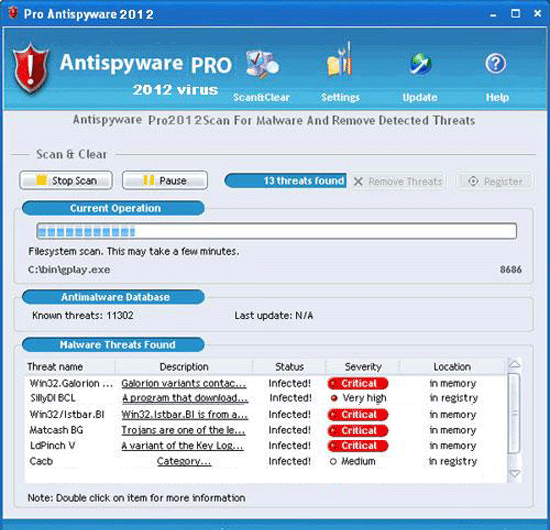 Sometimes referred to as the Theresa.URL Virus, Antispyware Pro 2012 is a variant of Trojan:Win32/WinSpywareProtect, a rogue anti-spyware program that's distributed via e-mail spam. Antispyware Pro 2012 acquired its nickname by creating Theresa.URL-named shortcuts on the desktops of infected PCs, but SpywareRemove.com malware researchers consider Antispyware Pro 2012's fraudulent security pop-up and system scans to be more serious than its shortcut additions. Like similar types of scamware, Antispyware Pro 2012 will claim that your PC is infected and will request a fee so that its purchasable version can remove all PC threats, but Antispyware Pro 2012 doesn't have any true ability to search or delete spyware (or any other type of hostile software, for that matter). Antispyware Pro 2012 should be removed as soon as you can launch anti-malware software to scan your PC, particularly since Antispyware Pro 2012's last-confirmed distribution method also uses a Trojan that may cause other attacks.
From 2008 to All the Way to Antispyware Pro 2012
Antispyware Pro 2012 can be considered a direct copy or descendant of other variants of rogue anti-spyware scanners from its family and includes their basic off-blue appearance as well as their attacks. Some examples of Antispyware Pro 2012 clones from the FakeRean that SpywareRemove.com malware researchers have unearthed include Antivirus 2008 Pro, Windows Antivirus 2008, Vista Antivirus 2008, Antivirus XP 2008, PC Clean Pro, Antivirus Pro 2009, AntiSpy Safeguard, ThinkPoint, Spyware Protection 2010, Internet Antivirus 2011, Palladium Pro, XP Anti-Virus 2011, CleanThis, Rogue.Vista Antivirus 2008, XP Home Security 2012, XP Security 2012 and AntiVirus PRO 2015. Although each of these fake anti-spyware programs pretend to be able to protect your PC from spyware-related PC threats, the only thing Antispyware Pro 2012 and its relatives can do is launch attacks as noted below:
- Adding unwanted icons to your Desktop that link to malicious and spam-oriented websites, potentially including pornographic domains.
- Launching with Windows and displaying fake system scans during startup. These scans will always return results that are dominated by various types of PC threats, and SpywareRemove.com malware researchers suggest that you ignore them as inaccurate.
- Launching various pop-up alerts as a secondary method of displaying fake security-related information.
Keeping the Antispyware Pro 2012 Hoax Far Away from Your Hard Drive
As of the time of this writing, Antispyware Pro 2012 and its variants have been found to be distributed primarily via fraudulent Microsoft security e-mail messages. These messages claim that Microsoft is using e-mail to distribute links for a free security program as protection against the infamous Conficker virus. Of course, SpywareRemove.com malware researchers note that Microsoft and equally reputable companies never distribute software in this fashion. Clicking the link in this e-mail, the only software you'll acquire is a Trojan, TrojanDownloader:Win32/Renos.HL, that installs Antispyware Pro 2012 or a relative.
Although, at this point, Antispyware Pro 2012's family is several years old, Antispyware Pro 2012 is still in distribution as of 2012, and SpywareRemove.com malware analysts recommend that you keep good anti-malware applications on your hard drive to detect or delete Antispyware Pro 2012 whenever it's necessary.
Technical Details
File System Modifications
Tutorials: If you wish to learn how to remove malware components manually, you can read the tutorials on how to find malware, kill unwanted processes, remove malicious DLLs and delete other harmful files. Always be sure to back up your PC before making any changes.
The following files were created in the system:%AppData%\result.db
File name: %AppData%\result.dbMime Type: unknown/db
Group: Malware file
%Desktop%\Antispyware Pro 2012.lnk
File name: %Desktop%\Antispyware Pro 2012.lnkMime Type: unknown/lnk
Group: Malware file
%CommonStartMenu%\Programs\Antispyware Pro 2012.lnk
File name: %CommonStartMenu%\Programs\Antispyware Pro 2012.lnkFile type: Shortcut
Mime Type: unknown/lnk
Group: Malware file
Registry Modifications
HKEY..\..\{Value}HKEY_CURRENT_USER\Software\Microsoft\Windows\CurrentVersion\Policies\System "DisableRegistryTools" = 0HKEY_CURRENT_USER\Software\Microsoft\Windows\CurrentVersion\Policies\System "DisableTaskMgr" = 0HKEY_CURRENT_USER\Software\Microsoft\Windows\CurrentVersion\Internet Settings "WarnOnHTTPSToHTTPRedirect" = 0HKEY_CURRENT_USER\Software\Microsoft\Windows\CurrentVersion\Policies\System "DisableRegedit" = 0HKEY_LOCAL_MACHINE\SOFTWARE\Microsoft\Windows\CurrentVersion\policies\system "EnableLUA" = 0HKEY_LOCAL_MACHINE\SOFTWARE\Microsoft\Windows\CurrentVersion\policies\system "ConsentPromptBehaviorAdmin" = 0HKEY_LOCAL_MACHINE\SOFTWARE\Microsoft\Windows\CurrentVersion\policies\system "ConsentPromptBehaviorUser" = 0HKEY_CURRENT_USER\Software\Microsoft\Windows\CurrentVersion\Settings "net" = "2012-5-12_7"HKEY_CURRENT_USER\Software\Microsoft\Windows\CurrentVersion\Settings "UID" = "ypjcmvvgbv"HKEY..\..\..\..{Subkeys}HKEY_CURRENT_USER\Software\Microsoft\Windows\CurrentVersion\Run "Inspector"HKEY_CURRENT_USER\Software\ASProtectHKEY_LOCAL_MACHINE\SOFTWARE\Microsoft\Windows NT\CurrentVersion\Image File Execution Options\emsw.exeHKEY_LOCAL_MACHINE\SOFTWARE\Microsoft\Windows NT\CurrentVersion\Image File Execution Options\init.exeHKEY_LOCAL_MACHINE\SOFTWARE\Microsoft\Windows NT\CurrentVersion\Image File Execution Options\AluSchedulerSvc.exeHKEY_LOCAL_MACHINE\SOFTWARE\Microsoft\Windows NT\CurrentVersion\Image File Execution Options\bisp.exeHKEY_LOCAL_MACHINE\SOFTWARE\Microsoft\Windows NT\CurrentVersion\Image File Execution Options\rwg.exeHKEY_LOCAL_MACHINE\SOFTWARE\Microsoft\Windows NT\CurrentVersion\Image File Execution Options\tfak5.exeHKEY_LOCAL_MACHINE\SOFTWARE\Microsoft\Windows NT\CurrentVersion\Image File Execution Options\mscache.exeHKEY_LOCAL_MACHINE\SOFTWARE\Microsoft\Windows NT\CurrentVersion\Image File Execution Options\patch.exeHKEY_LOCAL_MACHINE\SOFTWARE\Microsoft\Windows NT\CurrentVersion\Image File Execution Options\wnad.exe
Leave a Reply
Please note that we are not able to assist with billing and support issues regarding SpyHunter or other products. If you're having issues with SpyHunter, please get in touch with SpyHunter customer support through your SpyHunter . If you have SpyHunter billing questions, we recommend you check the Billing FAQ. For general suggestions or feedback, contact us.