Antivirus Action
Posted: December 20, 2010
Threat Metric
The following fields listed on the Threat Meter containing a specific value, are explained in detail below:
Threat Level: The threat level scale goes from 1 to 10 where 10 is the highest level of severity and 1 is the lowest level of severity. Each specific level is relative to the threat's consistent assessed behaviors collected from SpyHunter's risk assessment model.
Detection Count: The collective number of confirmed and suspected cases of a particular malware threat. The detection count is calculated from infected PCs retrieved from diagnostic and scan log reports generated by SpyHunter.
Volume Count: Similar to the detection count, the Volume Count is specifically based on the number of confirmed and suspected threats infecting systems on a daily basis. High volume counts usually represent a popular threat but may or may not have infected a large number of systems. High detection count threats could lay dormant and have a low volume count. Criteria for Volume Count is relative to a daily detection count.
Trend Path: The Trend Path, utilizing an up arrow, down arrow or equal symbol, represents the level of recent movement of a particular threat. Up arrows represent an increase, down arrows represent a decline and the equal symbol represent no change to a threat's recent movement.
% Impact (Last 7 Days): This demonstrates a 7-day period change in the frequency of a malware threat infecting PCs. The percentage impact correlates directly to the current Trend Path to determine a rise or decline in the percentage.
| Threat Level: | 10/10 |
|---|---|
| Infected PCs: | 7,729 |
| First Seen: | October 11, 2010 |
|---|---|
| OS(es) Affected: | Windows |
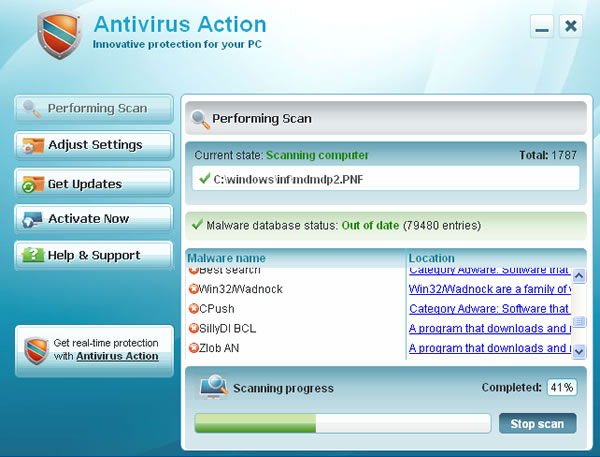 Antivirus Action, a.k.a AntivirusAction, is a rogue anti-virus program that uses Trojans to penetrate a system and misleading system scans to scare users into purchasing the program. Antivirus Action comes on the heels of Security Antivirus, Security Suite, AV Security Suite, Security Suite Pro, and Security Tool — other popular rogue anti-spyware programs proliferating on the Web.
The most common methods through which rogue anti-virus programs are distributed include corrupt video codecs downloads bundled with Trojans, e-mail spam attachments, fraudulent or questionable websites, misleading advertisements, malicious links found on social networks, browser hijacking attacks, "poisoned" search results, and other aggressive, stealthy tactics.
Antivirus Action installs itself through the constant use of Trojans that exploit browser security holes, so it can enter a system without the user's knowledge. When the Trojan-bundled download is activated, it will install Antivirus Action and then a series of alarming bogus security alerts will appear on the Desktop. Antivirus Action will also perform a system scan and report numerous malware infections on the computer. Antivirus Action's fake security alerts redirect users to a rogue website which provides the paid licensed version of the useless software. The rogue website that distributes and promotes Antivirus Action is pcsecurityland.com.
The authors behind Antivirus Action have a clear and obvious strategy: to trick innocent users into believing that they have all types of malware problems on their computer and to ask payment for Antivirus Action's so-called services. AntivirusAction does not have a spyware detection or removal engine, so it will not be able to remove any malware. It is highly recommended that you use a reliable anti-spyware program and remove Antivirus Action from your PC. Do not click on anything which seems related to this blatant scam and have AntivirusAction removed as soon as it has been detected.
Aliases
More aliases (19)
Technical Details
File System Modifications
Tutorials: If you wish to learn how to remove malware components manually, you can read the tutorials on how to find malware, kill unwanted processes, remove malicious DLLs and delete other harmful files. Always be sure to back up your PC before making any changes.
The following files were created in the system:%TEMP%\ixoyqwddd\tomgggctsbl.exe
File name: tomgggctsbl.exeSize: 240.64 KB (240640 bytes)
MD5: 0031942d0205335f097fe21c15ba2ee0
Detection count: 77
File type: Executable File
Mime Type: unknown/exe
Path: %TEMP%\ixoyqwddd
Group: Malware file
Last Updated: November 30, 2010
%TEMP%\ppihpaywy\jiswvkutsbl.exe
File name: jiswvkutsbl.exeSize: 240.64 KB (240640 bytes)
MD5: b0917d1066fce6ca5e3ee38dc4b12339
Detection count: 61
File type: Executable File
Mime Type: unknown/exe
Path: %TEMP%\ppihpaywy
Group: Malware file
Last Updated: November 30, 2010
%TEMP%\lpdbbcwkr\guqjvbhtsbl.exe
File name: guqjvbhtsbl.exeSize: 241.15 KB (241152 bytes)
MD5: 1f6d0d4ff9a73bd17682a451837b19df
Detection count: 49
File type: Executable File
Mime Type: unknown/exe
Path: %TEMP%\lpdbbcwkr
Group: Malware file
Last Updated: November 30, 2010
%TEMP%\ysggivppe\fligkfktsbl.exe
File name: fligkfktsbl.exeSize: 240.64 KB (240640 bytes)
MD5: dcd0b1c2e428fbd85d149b04173d8223
Detection count: 47
File type: Executable File
Mime Type: unknown/exe
Path: %TEMP%\ysggivppe
Group: Malware file
Last Updated: November 30, 2010
%TEMP%\scryfyegv\edbqjiptsbl.exe
File name: edbqjiptsbl.exeSize: 240.64 KB (240640 bytes)
MD5: e044872b0a14d73a2c496d27b6232f74
Detection count: 44
File type: Executable File
Mime Type: unknown/exe
Path: %TEMP%\scryfyegv
Group: Malware file
Last Updated: November 30, 2010
%TEMP%\bolkywoth\mhhvhtatsbl.exe
File name: mhhvhtatsbl.exeSize: 240.64 KB (240640 bytes)
MD5: 7d161d4cd66b72504455d3dd06166825
Detection count: 44
File type: Executable File
Mime Type: unknown/exe
Path: %TEMP%\bolkywoth
Group: Malware file
Last Updated: November 30, 2010
%TEMP%\fypsqpbap\hyimnjgtsbl.exe
File name: hyimnjgtsbl.exeSize: 240.64 KB (240640 bytes)
MD5: f02b140ddab36d3d9d9c572a0db3b210
Detection count: 42
File type: Executable File
Mime Type: unknown/exe
Path: %TEMP%\fypsqpbap
Group: Malware file
Last Updated: November 30, 2010
%TEMP%\dhearglll\fbwilfttsbl.exe
File name: fbwilfttsbl.exeSize: 240.64 KB (240640 bytes)
MD5: 38d7d7f7ffe6002612eb06ffe36d8e92
Detection count: 42
File type: Executable File
Mime Type: unknown/exe
Path: %TEMP%\dhearglll
Group: Malware file
Last Updated: November 30, 2010
%TEMP%\wgaqofdnx\locpogytsbl.exe
File name: locpogytsbl.exeSize: 240.64 KB (240640 bytes)
MD5: a6e0d5a876f6c098d0b89e3122aaac7f
Detection count: 40
File type: Executable File
Mime Type: unknown/exe
Path: %TEMP%\wgaqofdnx
Group: Malware file
Last Updated: November 30, 2010
%TEMP%\waupepdka\qqumhletsbl.exe
File name: qqumhletsbl.exeSize: 240.64 KB (240640 bytes)
MD5: 9d2b498694cca08670f7673c02546114
Detection count: 37
File type: Executable File
Mime Type: unknown/exe
Path: %TEMP%\waupepdka
Group: Malware file
Last Updated: November 30, 2010
%TEMP%\wfdkaoaqr\txqsqdutsbl.exe
File name: txqsqdutsbl.exeSize: 240.64 KB (240640 bytes)
MD5: a7be3c4f59c04663ff3faa05f3d90704
Detection count: 37
File type: Executable File
Mime Type: unknown/exe
Path: %TEMP%\wfdkaoaqr
Group: Malware file
Last Updated: November 30, 2010
%TEMP%\plrktqmdj\ikuekrqtsbl.exe
File name: ikuekrqtsbl.exeSize: 240.64 KB (240640 bytes)
MD5: 7dd0f0b6a0723f8ae65bb7e68de08dc3
Detection count: 35
File type: Executable File
Mime Type: unknown/exe
Path: %TEMP%\plrktqmdj
Group: Malware file
Last Updated: November 30, 2010
%TEMP%\xxmpijnus\eovhjxftsbl.exe
File name: eovhjxftsbl.exeSize: 240.64 KB (240640 bytes)
MD5: 957ea706776975b1f3f7572302fdea34
Detection count: 26
File type: Executable File
Mime Type: unknown/exe
Path: %TEMP%\xxmpijnus
Group: Malware file
Last Updated: November 30, 2010
%TEMP%\hvugnkqgb\nflthhetsbl.exe
File name: nflthhetsbl.exeSize: 246.78 KB (246784 bytes)
MD5: 80a49cc60c21619185970ccaad578cbd
Detection count: 26
File type: Executable File
Mime Type: unknown/exe
Path: %TEMP%\hvugnkqgb
Group: Malware file
Last Updated: November 30, 2010
%TEMP%\whyiqnmyx\lthdllhtsbl.exe
File name: lthdllhtsbl.exeSize: 240.64 KB (240640 bytes)
MD5: 8ada13b2881ca7fcd889d6b2a260a6a1
Detection count: 21
File type: Executable File
Mime Type: unknown/exe
Path: %TEMP%\whyiqnmyx
Group: Malware file
Last Updated: November 30, 2010
%TEMP%\bncdwkvdp\qalhtmxtsbl.exe
File name: qalhtmxtsbl.exeSize: 240.64 KB (240640 bytes)
MD5: 50183249bbfad7fb636c7f38c995b01b
Detection count: 21
File type: Executable File
Mime Type: unknown/exe
Path: %TEMP%\bncdwkvdp
Group: Malware file
Last Updated: November 30, 2010
%TEMP%\espmedwnu\xggrvhctsbl.exe
File name: xggrvhctsbl.exeSize: 240.64 KB (240640 bytes)
MD5: 05232ed8383e86081840b08e6c95de8e
Detection count: 21
File type: Executable File
Mime Type: unknown/exe
Path: %TEMP%\espmedwnu
Group: Malware file
Last Updated: November 30, 2010
%TEMP%\sgqgnokqm\unauenetsbl.exe
File name: unauenetsbl.exeSize: 240.64 KB (240640 bytes)
MD5: 303ed290f218207f3cd6dbb65a4d6e64
Detection count: 21
File type: Executable File
Mime Type: unknown/exe
Path: %TEMP%\sgqgnokqm
Group: Malware file
Last Updated: November 30, 2010
%TEMP%\ycouxscaj\oletxivtsbl.exe
File name: oletxivtsbl.exeSize: 240.64 KB (240640 bytes)
MD5: d5ddc3187fa7440bb21b31088ca2d469
Detection count: 21
File type: Executable File
Mime Type: unknown/exe
Path: %TEMP%\ycouxscaj
Group: Malware file
Last Updated: November 30, 2010
%TEMP%\ddpeagnpe\uhblmjjtsbl.exe
File name: uhblmjjtsbl.exeSize: 240.64 KB (240640 bytes)
MD5: 8394abc8b63e0afd6c6eac3f3f1ae7be
Detection count: 21
File type: Executable File
Mime Type: unknown/exe
Path: %TEMP%\ddpeagnpe
Group: Malware file
Last Updated: November 30, 2010
More files
Additional Information
| # | Message |
|---|---|
| 1 | Security Warning
Application cannot be executed. The file notepad.exe is infected. Do you want to activate your antivirus software now. |
| 2 | Windows Security Alert
Windows reports that computer is infected. Antivirus software helps to protect your computer against viruses and other security threats. Click here for the scan your computer. Your system might be at risk now. |
Related Posts
- PublicFraction
- ActionSpy
- TypicalFraction
- 'Transaction Received' Email Scam
- 'Action Required: Department of Health Invitation (COVID-19 Contact Tracing)' Email Virus
hep. cannot get rid of antivirus action. It seems to have found a way around your tools or blocks them.
I have a Security Tools antivirus on my computer which does not allow me to access any of the suggestions on how to get rid of it. What else can I do?
CREATE A NEW USER AND DELETE IT THEN
same as above, can't download any of suggested tools, blocks everything.
I'm having regular problem with my prowser freezing up on me so often i cant work properly on my computer. I will appreciate any help i can get to get rid of this problem