Browserseek.com
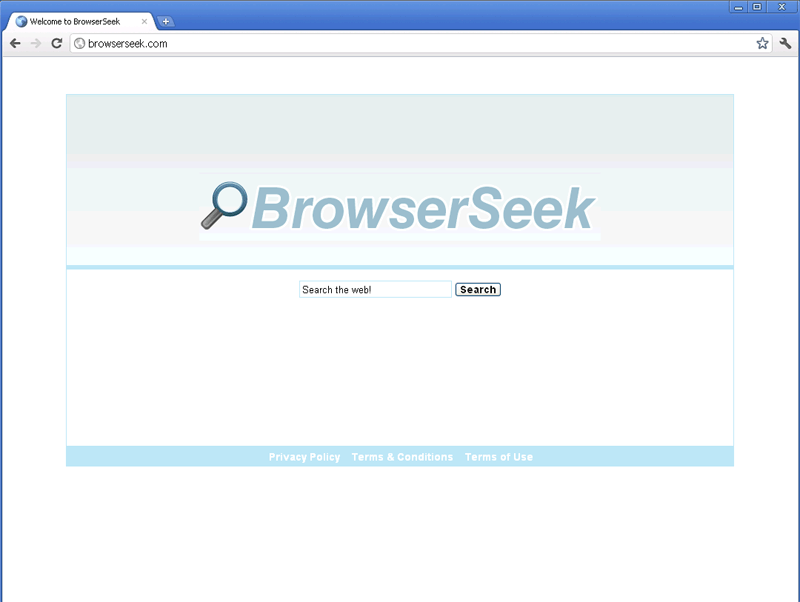 Browserseek.com is a malicious and fraudulent search engine site that offers up sponsored search results instead of genuine or relevant links. Since Browserseek.com doesn't monitor its results for safety or relevance, using Browserseek.com as an actual search engine is not only a waste of time but potentially dangerous for your PC. Browserseek.com has gained attention of late due to browser redirect attacks that have redirected web browsers to Browserseek.com. SpywareRemove.com malware experts warn that these redirects are a symptom of infection by a Trojan, rootkit or other form of browser hijacker and that they should be counteracted with powerful anti-malware software as soon as they begin to occur. Redirects to Browserseek.com can occur in most brands of web browsers, and you should never consider changing your web browser or deleting it to stop a stream of Browserseek.com redirect attacks.
Why Having a Browser That Seeks Out Browserseek.com isn't a Terrific Thing
Browserseek.com looks like a safe search engine but has no actual search engine-related functions that SpywareRemove.com malware researchers have been able to excavate. In lieu of this, Browserseek.com provides links to websites that deliver profit back to its web masters – even if these sites aren't related to your search terms or have your best interest at heart. This basic scam is reminiscent of similar types of fraudulent search engines like BigSeekPro.com, Seekdns.com, Fake Webcrawmer, Findxplorer and Resulturl. As such, it's recommended that you avoid unusual search engines that haven't been proven to be reputable by independent PC security institutions.
Contact with Browserseek.com or any of its partnered websites may result in some or all of the following dangers to your PC:
- Drive-by-download script attacks that install malicious software automatically and without permission. You can defend your browser against these attacks by preventing scripts (such as Flash or Java) from running by default.
- Phishing attacks that try to steal personal information via fake polls, contests or account login pages.
- Fake infection warnings and other forms of inaccurate error messages that try to waylay you into performing self-destructive actions for your PC.
Why Browserseek.com Doesn't Trust You to Make Your Own Web-Surfing Choices
Browserseek.com-related problems are primarily-instigated by browser hijackers that redirect web browsers to Browserseek.com from unrelated sites. Because Browserseek.com redirects can be a symptom of infection by a Trojan or rootkit, SpywareRemove.com malware researchers recommend an immediate and harsh response to any Browserseek.com browser hijacker – preferably one that incorporates the usage of a good anti-malware product. Manual removal of browser hijackers that are affiliated with Browserseek.com isn't recommended due to the high chance of damaging the Windows Hosts file, Registry and other components of your operating system.
Browserseek.com browser redirects and other browser hijacks most often take the following forms:
- Redirects to Browserseek.com after you try to use another search engine.
- Having your homepage changed to Browserseek.com.
- Inexplicable pop-ups, poor web browser performance and issues with changing your web browser's settings.
However, removing the malicious software that's causing these Browserseek.com redirect attacks will also remove other symptoms of browser hijacks.
Technical Details
File System Modifications
Tutorials: If you wish to learn how to remove malware components manually, you can read the tutorials on how to find malware, kill unwanted processes, remove malicious DLLs and delete other harmful files. Always be sure to back up your PC before making any changes.
The following files were created in the system:%AppData%BrowserSeektoolbarversion.xml
File name: %AppData%BrowserSeektoolbarversion.xmlMime Type: unknown/xml
%AppData%BrowserSeektoolbarstat.log
File name: %AppData%BrowserSeektoolbarstat.logMime Type: unknown/log
%AppData%BrowserSeektoolbarpreferences.dat
File name: %AppData%BrowserSeektoolbarpreferences.datFile type: Data file
Mime Type: unknown/dat
%AppData%BrowserSeektoolbaruninstallIE.dat
File name: %AppData%BrowserSeektoolbaruninstallIE.datFile type: Data file
Mime Type: unknown/dat
%AppData%BrowserSeektoolbarstats.dat
File name: %AppData%BrowserSeektoolbarstats.datFile type: Data file
Mime Type: unknown/dat
%AppData%BrowserSeektoolbarlog.txt
File name: %AppData%BrowserSeektoolbarlog.txtMime Type: unknown/txt
%AppData%BrowserSeektoolbarguid.dat
File name: %AppData%BrowserSeektoolbarguid.datFile type: Data file
Mime Type: unknown/dat
%AppData%BrowserSeektoolbarcouponsmerchants.xml
File name: %AppData%BrowserSeektoolbarcouponsmerchants.xmlMime Type: unknown/xml
%AppData%BrowserSeektoolbarcouponscategories.xml
File name: %AppData%BrowserSeektoolbarcouponscategories.xmlMime Type: unknown/xml
%AppData%BrowserSeektoolbardtx.ini
File name: %AppData%BrowserSeektoolbardtx.iniMime Type: unknown/ini
%AppData%BrowserSeektoolbarcouponsmerchants2.xml
File name: %AppData%BrowserSeektoolbarcouponsmerchants2.xmlMime Type: unknown/xml
%Temp%BrowserSeektoolbar-manifest.xml
File name: %Temp%BrowserSeektoolbar-manifest.xmlMime Type: unknown/xml
Registry Modifications
HKEY..\..\..\..{Subkeys}HKEY_LOCAL_MACHINESOFTWAREClassesCLSID{A40DC6C5-79D0-4ca8-A185-8FF989AF1115} "UrlHelper Class"HKEY_LOCAL_MACHINESOFTWAREClassesBrowserSeekIEHelper.DNSGuardCurVerHKEY_LOCAL_MACHINESOFTWAREClassesBrowserSeekIEHelper.DNSGuardCLSIDHKEY_LOCAL_MACHINESOFTWAREClassesBrowserSeekIEHelper.DNSGuardHKEY_LOCAL_MACHINESOFTWAREClassesBrowserSeekIEHelper.DNSGuard.1HKEY_LOCAL_MACHINESOFTWAREMicrosoftInternet ExplorerToolbar "BrowserSeek Toolbar"HKEY_LOCAL_MACHINESOFTWAREMicrosoftWindowsCurrentVersionExplorerBrowser Helper Objects{99079a25-328f-4bd4-be04-00955acaa0a7}"BrowserSeek BrowserSeek Toolbar"HKEY_LOCAL_MACHINESOFTWAREClassesCLSID{99079a25-328f-4bd4-be04-00955acaa0a7}InprocServer32 "C:PROGRA~1WINDOW~4ToolBarBrowserSeekdtx.dll"HKEY_LOCAL_MACHINESOFTWAREClassesCLSID{99079a25-328f-4bd4-be04-00955acaa0a7} "BrowserSeek Toolbar"HKEY_LOCAL_MACHINESOFTWAREClassesCLSID{A40DC6C5-79D0-4ca8-A185-8FF989AF1115}VersionIndependentProgID "BrowserSeekIEHelper.UrlHelper"HKEY_LOCAL_MACHINESOFTWAREClassesCLSID{A40DC6C5-79D0-4ca8-A185-8FF989AF1115}ProgID "BrowserSeekIEHelper.UrlHelper.1"
Leave a Reply
Please note that we are not able to assist with billing and support issues regarding SpyHunter or other products. If you're having issues with SpyHunter, please get in touch with SpyHunter customer support through your SpyHunter . If you have SpyHunter billing questions, we recommend you check the Billing FAQ. For general suggestions or feedback, contact us.