Get-Information.com
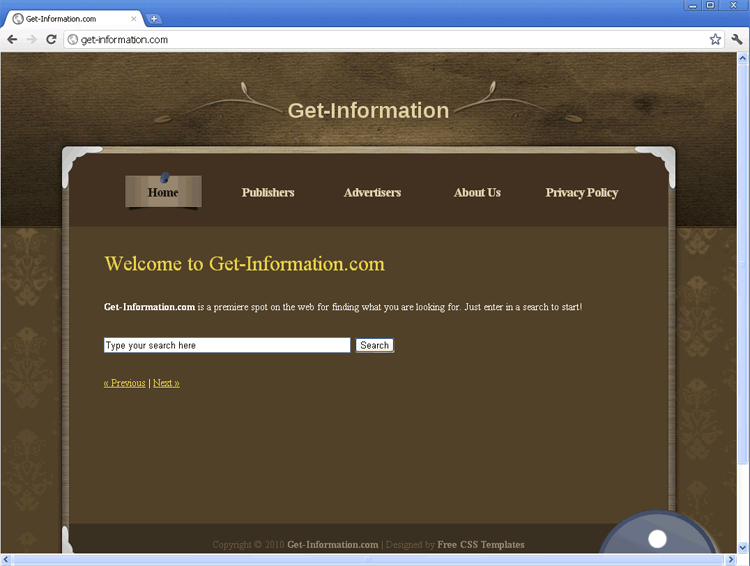 Get-Information.com is a fraudulent search engine that uses its front as a search site to expose visitors to rogue security software, browser hijackers and rootkits. Even though Get-Information.com may appear to offer links to useful sites, sites that are associated with Get-Information.com can compromise your computer's security, use drive-by-download scripts to install PC threats, create inaccurate infection warnings and redirect your browser to hostile sites without your permission. Since Get-Information.com is strongly-associated with a range of serious PC threats and may compromise your PC even after a single visit, SpywareRemove.com malware experts discourage any interaction with Get-Information.com and suggest that you scan your computer with anti-malware software after any incidental contact with Get-Information.com or its affiliates.
The Only Thing That Get-Information.com Gets for You: Malware
Beneath its comfortingly-professional (but, notably, freely-distributed) template and appearance as a search engine, Get-Information.com lacks all of the actual features and functions that a real search engine would use for your benefit. SpywareRemove.com malware researchers have found Get-Information.com to be just one more example of a fake search engine that uses its marketing to trick you into exposing yourself to a wide range of PC threats – most importantly, to browser hijackers that can redirect your searches to Get-Information.com even if you're trying to search via another site. Additional types of malicious software that searching through Get-Information.com may force you into contact with are:
- Rootkits such as the TDSS rootkit, TDL3 Rootkit and TDL4 Rootkit. Rootkits typically-infect your computer's boot sector or System Restore to launch themselves by default; they will almost always fail to show a distinct memory process (preferring, instead, to corrupt normal system processes , i.e. explorer.exe).
- Backdoor Trojans that create serious security vulnerabilities on your PC. These vulnerabilities can be exploited to allow criminals to control your computer for DDoS attacks and other purposes. SpywareRemove.com malware researchers also warn that backdoor Trojans, like rootkits, will attempt to conceal their presence so that they can't be removed easily via manual methods.
- Trojan droppers that can install other PC threats.
- Rogue security programs (such as fake defraggers, fake anti-spyware programs or fake anti-virus scanners) that create inaccurate alerts and warnings while they attempt to swindle you out of your money.
Solving the Get-Information.com Bug with Real Anti-Malware Info
If you see indications of your web browser being forced to redirect itself to Get-Information.com, you should scan your PC to remove Get-Information.com's browser hijacker by means of suitable anti-malware software. Deleting your web browser or changing its settings may or may not stop redirects to Get-Information.com, but the components of Get-Information.com's underlying software will remain on your PC and can be a security hazard.
SpywareRemove.com malware research team also encourages you to scan your entire PC even if you've only had incidental contact with Get-Information.com, since its reputation for propagating many types of PC threats makes the possibility of infection by multiple types of malicious software quite high. If you delay in this or fail to protect your PC from Get-Information.com at all, you may become a victim of stolen identity, account break-ins, remote attacks against your PC and other perils.
Technical Details
File System Modifications
Tutorials: If you wish to learn how to remove malware components manually, you can read the tutorials on how to find malware, kill unwanted processes, remove malicious DLLs and delete other harmful files. Always be sure to back up your PC before making any changes.
The following files were created in the system:%Temp%Get-informationtoolbar-manifest.xml
File name: %Temp%Get-informationtoolbar-manifest.xmlMime Type: unknown/xml
%AppData%Get-informationtoolbarcouponsmerchants2.xml
File name: %AppData%Get-informationtoolbarcouponsmerchants2.xmlMime Type: unknown/xml
%AppData%Get-informationtoolbardtx.ini
File name: %AppData%Get-informationtoolbardtx.iniMime Type: unknown/ini
%AppData%Get-informationtoolbarcouponscategories.xml
File name: %AppData%Get-informationtoolbarcouponscategories.xmlMime Type: unknown/xml
%AppData%Get-informationtoolbarcouponsmerchants.xml
File name: %AppData%Get-informationtoolbarcouponsmerchants.xmlMime Type: unknown/xml
%AppData%Get-informationtoolbarguid.dat
File name: %AppData%Get-informationtoolbarguid.datFile type: Data file
Mime Type: unknown/dat
%AppData%Get-informationtoolbarlog.txt
File name: %AppData%Get-informationtoolbarlog.txtMime Type: unknown/txt
%AppData%Get-informationtoolbarversion.xml
File name: %AppData%Get-informationtoolbarversion.xmlMime Type: unknown/xml
%AppData%Get-informationtoolbarpreferences.dat
File name: %AppData%Get-informationtoolbarpreferences.datFile type: Data file
Mime Type: unknown/dat
%AppData%Get-informationtoolbarstat.log
File name: %AppData%Get-informationtoolbarstat.logMime Type: unknown/log
%AppData%Get-informationtoolbarstats.dat
File name: %AppData%Get-informationtoolbarstats.datFile type: Data file
Mime Type: unknown/dat
%AppData%Get-informationtoolbaruninstallIE.dat
File name: %AppData%Get-informationtoolbaruninstallIE.datFile type: Data file
Mime Type: unknown/dat
%AppData%Get-informationtoolbaruninstallStatIE.dat
File name: %AppData%Get-informationtoolbaruninstallStatIE.datFile type: Data file
Mime Type: unknown/dat
Registry Modifications
HKEY..\..\..\..{Subkeys}HKEY_LOCAL_MACHINESOFTWAREMicrosoftWindowsCurrentVersionExplorerBrowser Helper Objects{99079a25-328f-4bd4-be04-00955acaa0a7} "Get-information Get-information Toolbar"HKEY_LOCAL_MACHINESOFTWAREClassesCLSID{99079a25-328f-4bd4-be04-00955acaa0a7} "Get-information Toolbar"HKEY_LOCAL_MACHINESOFTWAREClassesCLSID{A40DC6C5-79D0-4ca8-A185-8FF989AF1115}VersionIndependentProgID "Get-informationIEHelper.UrlHelper"HKEY_LOCAL_MACHINESOFTWAREClassesCLSID{99079a25-328f-4bd4-be04-00955acaa0a7}InprocServer32 "C:PROGRA~1WINDOW~4ToolBarGet-informationdtx.dll"HKEY_LOCAL_MACHINESOFTWAREClassesCLSID{A40DC6C5-79D0-4ca8-A185-8FF989AF1115}ProgID "Get-informationIEHelper.UrlHelper.1"HKEY_LOCAL_MACHINESOFTWAREClassesCLSID{A40DC6C5-79D0-4ca8-A185-8FF989AF1115} "UrlHelper Class"HKEY_LOCAL_MACHINESOFTWAREClassesGet-informationIEHelper.DNSGuardHKEY_LOCAL_MACHINESOFTWAREClassesGet-informationIEHelper.DNSGuard.1HKEY_LOCAL_MACHINESOFTWAREClassesGet-informationIEHelper.DNSGuardCurVerHKEY_LOCAL_MACHINESOFTWAREClassesGet-informationIEHelper.DNSGuardCLSIDHKEY_LOCAL_MACHINESOFTWAREMicrosoftInternet ExplorerToolbar "Get-information Toolbar"
Leave a Reply
Please note that we are not able to assist with billing and support issues regarding SpyHunter or other products. If you're having issues with SpyHunter, please get in touch with SpyHunter customer support through your SpyHunter . If you have SpyHunter billing questions, we recommend you check the Billing FAQ. For general suggestions or feedback, contact us.