Home Security Solutions
Posted: December 25, 2011
Threat Metric
The following fields listed on the Threat Meter containing a specific value, are explained in detail below:
Threat Level: The threat level scale goes from 1 to 10 where 10 is the highest level of severity and 1 is the lowest level of severity. Each specific level is relative to the threat's consistent assessed behaviors collected from SpyHunter's risk assessment model.
Detection Count: The collective number of confirmed and suspected cases of a particular malware threat. The detection count is calculated from infected PCs retrieved from diagnostic and scan log reports generated by SpyHunter.
Volume Count: Similar to the detection count, the Volume Count is specifically based on the number of confirmed and suspected threats infecting systems on a daily basis. High volume counts usually represent a popular threat but may or may not have infected a large number of systems. High detection count threats could lay dormant and have a low volume count. Criteria for Volume Count is relative to a daily detection count.
Trend Path: The Trend Path, utilizing an up arrow, down arrow or equal symbol, represents the level of recent movement of a particular threat. Up arrows represent an increase, down arrows represent a decline and the equal symbol represent no change to a threat's recent movement.
% Impact (Last 7 Days): This demonstrates a 7-day period change in the frequency of a malware threat infecting PCs. The percentage impact correlates directly to the current Trend Path to determine a rise or decline in the percentage.
| Threat Level: | 10/10 |
|---|---|
| Infected PCs: | 13 |
| First Seen: | December 25, 2011 |
|---|---|
| OS(es) Affected: | Windows |
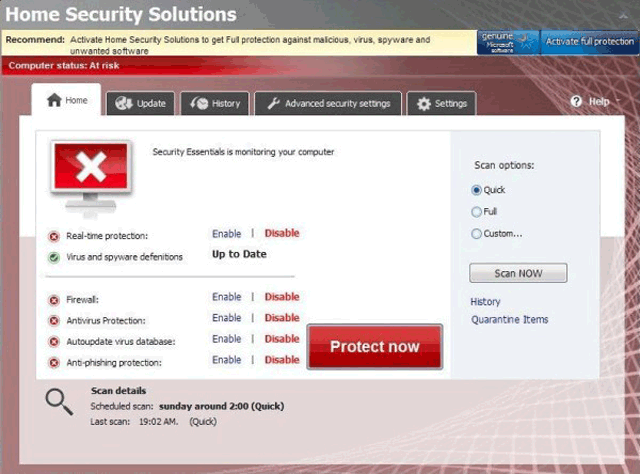 Home Security Solutions is a fraudulent anti-malware scanner that detects nonexistent spyware in-between making requests for money to remove said infections. Purchasing Home Security Solutions is entirely-unnecessary for the well-being of your PC, and SpywareRemove.com malware experts instead recommend that you remove Home Security Solutions with a legitimately-functional anti-malware program. Because Home Security Solutions may attempt to block your PC security software under the pretense that these programs are infected or otherwise damaged, you should try to disable Home Security Solutions before you delete it; Safe Mode or equivalently-secure methods of accessing your OS are recommended.
Home Security Solutions: Another Iteration of Anti-Security Software Whether at Home or at Work
Home Security Solutions is a relatively-new version of other types of rogue anti-malware applications from a vast family of such programs named FakeScanti. Examples of Home Security Solutions's many relatives include Security Guard, Sysinternals Antivirus, WireShark Antivirus, Milestone Antivirus, BlueFlare Antivirus, Wolfram Antivirus, OpenCloud Antivirus, OpenCloud Security, Data Restore, AV Guard Online, Cloud Protection, AV Protection Online, System Protection 2012, AV Security 2012, Sphere Security 2012, AV Protection 2011, Security Guard 2012, Super AV 2013 and OpenCloud AV. Despite a new brand name and minor changes to its appearance, Home Security Solutions uses the same attacks that other types of fake anti-malware products in its subgroup utilize.
Common Home Security Solutions-based attacks that SpywareRemove.com malware researchers have noted include:
- Fake scanner results that display wide ranges of high-priority infections – regardless of whether or not these PC threats are on your computer.
- Fake popup warnings that contain similar types of fake information about the presence of trojans, rootkits, spyware or viruses.
- Automatic start-up functionality that allows Home Security Solutions to launch whenever Windows starts and remain present in the form of a background process even if you attempt to close it.
Samples of some of the many alerts that Home Security Solutions dabbles in to create paranoia for its victims include:
Security Center Alert
To help protect your computer, Security Center has blocked some features of this program.
Name: Win64.BIT.Looker.exe
Risk: High
Security Center
Unauthorized remote connection!
Your system is making an unauthorized personal data transfer to a remote computer!
Warning! Unauthorized personal data transfer is detected! It may be your personal credit card details, logins and passwords, browsing habits or information about files you have downloaded.
To protect your private data, please click “Prevent Connection” button below.
WARNING! 371 threats detected
Detected malicious programs can damage your computer and compromise your privacy. It’s strongly recommended to remove them immediatly [sic]!
Potential risks: Infecting other computers on your network
Continue unprotected Remove all threats now
Insecurity Internet activity. Threat of virus attack
Due to insecure Internet browsing your PC can easily get infected with viruses, worms and trojans without knowledge, and that can lead to system slowdown, freezes and crashes. Also insecure Internet activity can result in revealing your personal information. To get full advanced real-time protection for PC and Internet activity, register your antivirus software.
The Genuine Security That Will Kick Home Security Solutions Out of Your PC
Rogue security programs in the Home Security Solutions family have been known to be able to be registered by the following code, which is freely-circulated to allow victims of Home Security Solutions infections to disable this rogue anti-malware scanner: 'U2FD-S2LA-H4KA-UEPB.' However, registering Home Security Solutions is, ultimately, unnecessary for removing Home Security Solutions and under no circumstances is buying an activation key for Home Security Solutions ever recommended.
To stop Home Security Solutions's fake warnings and any other types of symptoms that it may cause (such as browser redirects to its web page), SpywareRemove.com malware analysts recommend that you scan your PC for Home Security Solutions and related PC threats via appropriate anti-malware products. Disabling Home Security Solutions by registering it, rebooting in Safe Mode or using alternative methods to start Windows is recommended prior to attempting a scan, since an active Home Security Solutions may try to avoid deletion by blocking your program.
Technical Details
File System Modifications
Tutorials: If you wish to learn how to remove malware components manually, you can read the tutorials on how to find malware, kill unwanted processes, remove malicious DLLs and delete other harmful files. Always be sure to back up your PC before making any changes.
The following files were created in the system:%AllUsersProfile%\[RANDOM]\
File name: %AllUsersProfile%\[RANDOM]\Group: Malware file
%AllUsersProfile%\[RANDOM]\3178.mof
File name: %AllUsersProfile%\[RANDOM]\3178.mofMime Type: unknown/mof
Group: Malware file
%AllUsersProfile%\[RANDOM]\6113.mof
File name: %AllUsersProfile%\[RANDOM]\6113.mofMime Type: unknown/mof
Group: Malware file
%AllUsersProfile%\[RANDOM]\14.mof
File name: %AllUsersProfile%\[RANDOM]\14.mofMime Type: unknown/mof
Group: Malware file
%AllUsersProfile%\[RANDOM]\46.mof
File name: %AllUsersProfile%\[RANDOM]\46.mofMime Type: unknown/mof
Group: Malware file
%AllUsersProfile%\[RANDOM]\HSE.ico
File name: %AllUsersProfile%\[RANDOM]\HSE.icoMime Type: unknown/ico
Group: Malware file
%AllUsersProfile%\[RANDOM]\HSESys
File name: %AllUsersProfile%\[RANDOM]\HSESysGroup: Malware file
%AllUsersProfile%\[RANDOM]\Quarantine Items
File name: %AllUsersProfile%\[RANDOM]\Quarantine ItemsGroup: Malware file
%AllUsersProfile%\HSYITSQGE\
File name: %AllUsersProfile%\HSYITSQGE\Group: Malware file
%AllUsersProfile%\HSYITSQGE\HSLGILTOGE.cfg
File name: %AllUsersProfile%\HSYITSQGE\HSLGILTOGE.cfgMime Type: unknown/cfg
Group: Malware file
%UserProfile%\Desktop\Home Security Solutions.lnk
File name: %UserProfile%\Desktop\Home Security Solutions.lnkFile type: Shortcut
Mime Type: unknown/lnk
Group: Malware file
%AppData%\Home Security Solutions\
File name: %AppData%\Home Security Solutions\Group: Malware file
%AppData%\Home Security Solutions\Instructions.ini
File name: %AppData%\Home Security Solutions\Instructions.iniMime Type: unknown/ini
Group: Malware file
%AppData%\Microsoft\Windows\Recent\DBOLE.dll
File name: %AppData%\Microsoft\Windows\Recent\DBOLE.dllFile type: Dynamic link library
Mime Type: unknown/dll
Group: Malware file
%AppData%\Microsoft\Windows\Recent\PE.sys
File name: %AppData%\Microsoft\Windows\Recent\PE.sysFile type: System file
Mime Type: unknown/sys
Group: Malware file
%AppData%\Microsoft\Windows\Recent\CLSV.tmp
File name: %AppData%\Microsoft\Windows\Recent\CLSV.tmpFile type: Temporary File
Mime Type: unknown/tmp
Group: Malware file
%AppData%\Microsoft\Windows\Recent\gid.tmp
File name: %AppData%\Microsoft\Windows\Recent\gid.tmpFile type: Temporary File
Mime Type: unknown/tmp
Group: Malware file
%AppData%\Microsoft\Windows\Recent\pal.sys
File name: %AppData%\Microsoft\Windows\Recent\pal.sysFile type: System file
Mime Type: unknown/sys
Group: Malware file
%AppData%\Microsoft\Windows\Recent\eb.dll
File name: %AppData%\Microsoft\Windows\Recent\eb.dllFile type: Dynamic link library
Mime Type: unknown/dll
Group: Malware file
%AppData%\Microsoft\Windows\Recent\ppal.drv
File name: %AppData%\Microsoft\Windows\Recent\ppal.drvFile type: Device Driver
Mime Type: unknown/drv
Group: Malware file
%AppData%\Microsoft\Windows\Recent\SICKBOY.sys
File name: %AppData%\Microsoft\Windows\Recent\SICKBOY.sysFile type: System file
Mime Type: unknown/sys
Group: Malware file
%AppData%\Microsoft\Windows\Recent\delfile.dll
File name: %AppData%\Microsoft\Windows\Recent\delfile.dllFile type: Dynamic link library
Mime Type: unknown/dll
Group: Malware file
%AppData%\Microsoft\Windows\Recent\SICKBOY.drv
File name: %AppData%\Microsoft\Windows\Recent\SICKBOY.drvFile type: Device Driver
Mime Type: unknown/drv
Group: Malware file
%AppData%\Microsoft\Windows\Recent\eb.sys
File name: %AppData%\Microsoft\Windows\Recent\eb.sysFile type: System file
Mime Type: unknown/sys
Group: Malware file
%AppData%\Microsoft\Windows\Recent\energy.dll
File name: %AppData%\Microsoft\Windows\Recent\energy.dllFile type: Dynamic link library
Mime Type: unknown/dll
Group: Malware file
%AppData%\Microsoft\Windows\Recent\runddlkey.exe
File name: %AppData%\Microsoft\Windows\Recent\runddlkey.exeFile type: Executable File
Mime Type: unknown/exe
Group: Malware file
%AppData%\Microsoft\Windows\Recent\snl2w.drv
File name: %AppData%\Microsoft\Windows\Recent\snl2w.drvFile type: Device Driver
Mime Type: unknown/drv
Group: Malware file
%AppData%\Microsoft\Windows\Start Menu\Home Security Solutions.lnk
File name: %AppData%\Microsoft\Windows\Start Menu\Home Security Solutions.lnkFile type: Shortcut
Mime Type: unknown/lnk
Group: Malware file
%AppData%\Microsoft\Windows\Start Menu\Programs\Home Security Solutions.lnk
File name: %AppData%\Microsoft\Windows\Start Menu\Programs\Home Security Solutions.lnkFile type: Shortcut
Mime Type: unknown/lnk
Group: Malware file
%AppData%\Microsoft\Internet Explorer\Quick Launch\Home Security Solutions.lnk
File name: %AppData%\Microsoft\Internet Explorer\Quick Launch\Home Security Solutions.lnkFile type: Shortcut
Mime Type: unknown/lnk
Group: Malware file
%StartMenu%\Home Security Solutions.lnk
File name: %StartMenu%\Home Security Solutions.lnkFile type: Shortcut
Mime Type: unknown/lnk
Group: Malware file
%Programs%\Home Security Solutions.lnk
File name: %Programs%\Home Security Solutions.lnkFile type: Shortcut
Mime Type: unknown/lnk
Group: Malware file
%Desktop%\Home Security Solutions.lnk
File name: %Desktop%\Home Security Solutions.lnkFile type: Shortcut
Mime Type: unknown/lnk
Group: Malware file
%CommonAppData%\[RANDOM]\[RANDOM].exe
File name: %CommonAppData%\[RANDOM]\[RANDOM].exeFile type: Executable File
Mime Type: unknown/exe
Group: Malware file
%CommonAppData%\[RANDOM]\HSS.ico
File name: %CommonAppData%\[RANDOM]\HSS.icoMime Type: unknown/ico
Group: Malware file
%CommonAppData%\[RANDOM]\[RANDOM].cfg
File name: %CommonAppData%\[RANDOM]\[RANDOM].cfgMime Type: unknown/cfg
Group: Malware file
%AppData%\Home Security Solutions\ScanDisk_.exe
File name: %AppData%\Home Security Solutions\ScanDisk_.exeFile type: Executable File
Mime Type: unknown/exe
Group: Malware file
Registry Modifications
HKEY..\..\{CLSID Path}HKEY_LOCAL_MACHINE\SOFTWARE\Classes\CLSID\{3F2BBC05-40DF-11D2-9455-00104BC936FF}HKEY..\..\..\..{RegistryKeys}HKEY_CURRENT_USER\Software\Microsoft\Internet Explorer\Download "RunInvalidSignatures" = '1'HKEY_CURRENT_USER\Software\Microsoft\Internet Explorer\PRS http://127.0.0.1:27777/?inj=%ORIGINAL%HKEY_CURRENT_USER\Software\Microsoft\Internet Explorer\SearchScopes\URL http://findgala.com/?&uid=231&q={searchTerms}HKEY_CURRENT_USER\Software\Microsoft\Windows\CurrentVersion\Internet Settings\5.0\User Agent\Post Platform\89770803HKEY_CURRENT_USER\Software\Microsoft\Windows\CurrentVersion\Internet Settings\5.0\User Agent\Post Platform\lib/5.00231HKEY_CURRENT_USER\Software\Microsoft\Windows\CurrentVersion\Internet Settings\UID 231HKEY_CURRENT_USER\Software\Microsoft\Windows\CurrentVersion\Policies\Explorer\DisallowRunHKEY_CURRENT_USER\Software\Microsoft\Windows\CurrentVersion\Policies\Explorer\DisallowRun "1"HKEY_CURRENT_USER\Software\Microsoft\Internet Explorer\Download\CheckExeSignatures "no"HKEY_LOCAL_MACHINE\SOFTWARE\Classes\HS2d7_231.DocHostUIHandlerHKEY_CURRENT_USER\Software\Classes\Software\Microsoft\Internet Explorer\SearchScopes\URL http://findgala.com/?&uid=231&q={searchTerms}HKEY_CURRENT_USER\Software\Classes\Local Settings\Software\Microsoft\Windows\Shell\Bags\91\Shell\{5C4F28B5-F869-4E84-8E60-F11DB97C5CC7}\Vid {137E7700-3573-11CF-AE69-08002B2E1262}HKEY_LOCAL_MACHINE\SOFTWARE\Microsoft\Windows\CurrentVersion\Policies\System\EnableLUA "1"HKEY_LOCAL_MACHINE\SOFTWARE\Microsoft\Windows\CurrentVersion\Policies\System\ConsentPromptBehaviorAdmin "2"HKEY_LOCAL_MACHINE\SOFTWARE\Microsoft\..{RunKeys}HKEY_CURRENT_USER\Software\Microsoft\Windows\CurrentVersion\Run\Home Security Solutions
Leave a Reply
Please note that we are not able to assist with billing and support issues regarding SpyHunter or other products. If you're having issues with SpyHunter, please get in touch with SpyHunter customer support through your SpyHunter . If you have SpyHunter billing questions, we recommend you check the Billing FAQ. For general suggestions or feedback, contact us.