Karmaklick.com
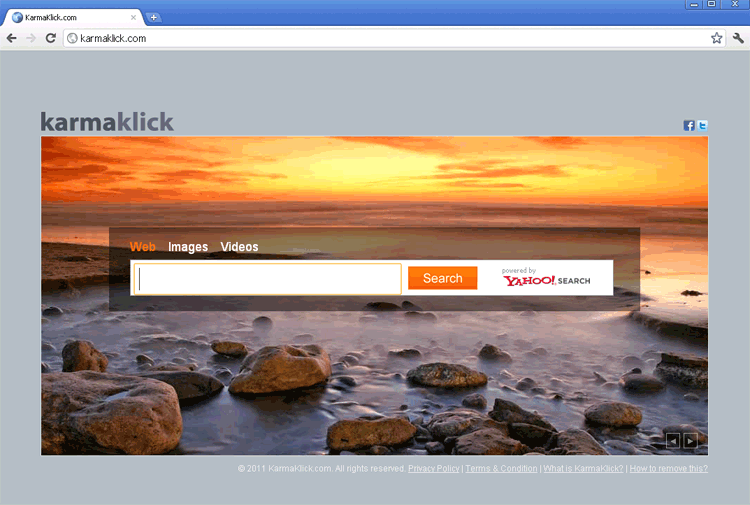 Karmaklick.com is a search engine that claims to use Yahoo to provide its results, but, in reality, Karmaklick.com only provides affiliate links and advertisements that are disguised to make them appear like relevant websites. As an essentially valueless website for the function that Karmaklick.com claims to perform, Karmaklick.com wouldn't be much of a threat to your PC – except that SpywareRemove.com malware experts have also found that Karmaklick.com is being pushed by web browser hijackers that are disguised as friendly add-ons for your browser. Although these add-ons may appear to be removable by normal methods, using these methods may fail to remove hidden components that can continue redirects to Karmaklick.com or other attacks against your computer; thus, it's recommended that you preferentially use anti-malware software whenever such is available.
Why No One Deserves the Kind of Karma That Karmaklick.com is Willing to Give
Karmaklick.com may use a template that's similar to Bing's, pretend to be 'powered by Yahoo' and even include links to a privacy policy, but all of these trappings are just visual glitter on top of a search engine with questionable usage. Search results from Karmaklick.com have been noted for both their deceptive presentation (Karmaklick.com may make them look more relevant to your search term than they really are) and their poor content, which is typically filled with advertisements and questionable offers.
Since Karmaklick.com misrepresents its capabilities and lacks most of the characteristics one would anticipate from a good search engine, you should select a reputable search engine for your online searches, instead of trusting links from a site that lies about its own functions. However, because browser hijackers have been known to force browsers to load Karmaklick.com, you should be alert for fraudulent search-enhancing toolbars and other forms of commonly marketed browser hijackers that should be removed by appropriate anti-malware programs.
Breaking the Cycle of Karmaklick.com
Since browser hijackers for Karmaklick.com can redirect you to Karmaklick.com from other search sites to disrupt your ability to browse the web in safety, you should consider such PC threats to be a minor but definite danger to your PC. In many circumstances, browser-hijacking toolbars for Karmaklick.com may be installed with other applications, although you may be capable to reject them by carefully watching the installation process. However, in other cases, browser hijackers for Karmaklick.com can be acquired as a symptom of attack by a Trojan, rootkit or other form of high-level PC threat.
Regardless of why you're experiencing redirects to Karmaklick.com, as long as you have access to anti-malware programs to scan your PC and remove all PC threats, long term harm to your computer should be nonexistent. SpywareRemove.com malware researchers also warn against trying to remove malicious toolbars for Internet Explorer and other browsers by normal methods, since their removal routines have been known to leave behind system changes and other types of undesirable components that can continue to cause Karmaklick.com redirects and other attacks.
Technical Details
File System Modifications
Tutorials: If you wish to learn how to remove malware components manually, you can read the tutorials on how to find malware, kill unwanted processes, remove malicious DLLs and delete other harmful files. Always be sure to back up your PC before making any changes.
The following files were created in the system:%AppData%[trojan name]toolbarversion.xml
File name: %AppData%[trojan name]toolbarversion.xmlMime Type: unknown/xml
%Temp%[trojan name]toolbar-manifest.xml
File name: %Temp%[trojan name]toolbar-manifest.xmlMime Type: unknown/xml
%AppData%[trojan name]toolbarcouponsmerchants2.xml
File name: %AppData%[trojan name]toolbarcouponsmerchants2.xmlMime Type: unknown/xml
%AppData%[trojan name]toolbardtx.ini
File name: %AppData%[trojan name]toolbardtx.iniMime Type: unknown/ini
%AppData%[trojan name]toolbarcouponscategories.xml
File name: %AppData%[trojan name]toolbarcouponscategories.xmlMime Type: unknown/xml
%AppData%[trojan name]toolbarcouponsmerchants.xml
File name: %AppData%[trojan name]toolbarcouponsmerchants.xmlMime Type: unknown/xml
%AppData%[trojan name]toolbarguid.dat
File name: %AppData%[trojan name]toolbarguid.datFile type: Data file
Mime Type: unknown/dat
%AppData%[trojan name]toolbarlog.txt
File name: %AppData%[trojan name]toolbarlog.txtMime Type: unknown/txt
%AppData%[trojan name]toolbarpreferences.dat
File name: %AppData%[trojan name]toolbarpreferences.datFile type: Data file
Mime Type: unknown/dat
%AppData%[trojan name]toolbaruninstallIE.dat
File name: %AppData%[trojan name]toolbaruninstallIE.datFile type: Data file
Mime Type: unknown/dat
%AppData%[trojan name]toolbaruninstallStatIE.dat
File name: %AppData%[trojan name]toolbaruninstallStatIE.datFile type: Data file
Mime Type: unknown/dat
%AppData%[trojan name]toolbarstat.log
File name: %AppData%[trojan name]toolbarstat.logMime Type: unknown/log
%AppData%[trojan name]toolbarstats.dat
File name: %AppData%[trojan name]toolbarstats.datFile type: Data file
Mime Type: unknown/dat
Registry Modifications
HKEY..\..\..\..{Subkeys}HKEY_LOCAL_MACHINESOFTWAREClassesCLSID{99079a25-328f-4bd4-be04-00955acaa0a7} "[trojan name] Toolbar"HKEY_LOCAL_MACHINESOFTWAREClassesCLSID{A40DC6C5-79D0-4ca8-A185-8FF989AF1115}VersionIndependentProgID "[trojan name]IEHelper.UrlHelper"HKEY_LOCAL_MACHINESOFTWAREClassesCLSID{99079a25-328f-4bd4-be04-00955acaa0a7}InprocServer32 "C:PROGRA~1WINDOW~4ToolBar[trojan name]dtx.dll"HKEY_LOCAL_MACHINESOFTWAREClassesCLSID{A40DC6C5-79D0-4ca8-A185-8FF989AF1115} "UrlHelper Class"HKEY_LOCAL_MACHINESOFTWAREClassesCLSID{A40DC6C5-79D0-4ca8-A185-8FF989AF1115}ProgID "[trojan name]IEHelper.UrlHelper.1"HKEY_LOCAL_MACHINESOFTWAREClasses[trojan name]IEHelper.DNSGuardCurVerHKEY_LOCAL_MACHINESOFTWAREClasses[trojan name]IEHelper.DNSGuardCLSIDHKEY_LOCAL_MACHINESOFTWAREClasses[trojan name]IEHelper.DNSGuardHKEY_LOCAL_MACHINESOFTWAREMicrosoftWindowsCurrentVersionExplorerBrowser Helper Objects{99079a25-328f-4bd4-be04-00955acaa0a7} "[trojan name] Toolbar"HKEY_LOCAL_MACHINESOFTWAREMicrosoftInternet ExplorerToolbar "[trojan name] Toolbar"HKEY_LOCAL_MACHINESOFTWAREClasses[trojan name]IEHelper.DNSGuard.1
Leave a Reply
Please note that we are not able to assist with billing and support issues regarding SpyHunter or other products. If you're having issues with SpyHunter, please get in touch with SpyHunter customer support through your SpyHunter . If you have SpyHunter billing questions, we recommend you check the Billing FAQ. For general suggestions or feedback, contact us.