MyStart.Incredibar.com
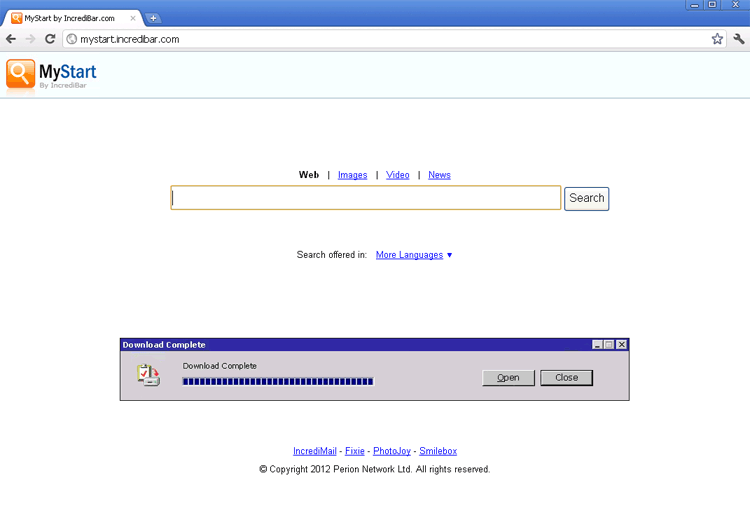 MyStart.Incredibar.com is a malicious website that uses browser-hijacking toolbars to force your web browser to use its search functions even if you're trying to load an entirely different web page. Because results from MyStart.Incredibar.com are peppered with irrelevant advertisements and may even be dangerous for your PC, SpywareRemove.com malware analysts discourage any attempts to interact with MyStart.Incredibar.com or sites that MyStart.Incredibar.com promotes. Although browser add-ons that cause MyStart.Incredibar.com redirects may also have a removal tool, you should always remove browser hijackers for MyStart.Incredibar.com and other malicious sites by using appropriate anti-malware programs to scan your PC.
The Not-So-Incredible Results of a Visit to MyStart.Incredibar.com
MyStart.Incredibar.com markets itself in a twofold manner as both a search engine and a source of a 'helpful' search bar for your web browser. However, although MyStart.Incredibar.com looks just like Google, its results are somewhat less than legitimate than Google's would be.
Some dangers that SpywareRemove.com malware experts have spied with prolonged interaction with MyStart.Incredibar.com include:
- Exposure to malicious websites that promote fake security products. One common means of attack by rogue security program-based sites is to create fake infection warnings and recommend that you install a vague form of scamware to remove the nonexistent PC threat.
- Exposure to sites that use drive-by-download attacks to install other PC threats, including ransomware Trojans and scamware. Drive-by-downloads commonly-use scripts, such as Flash or Java, to attack your PC and don't require your consent to install their malicious software.
- Contact with sites that use phishing attacks to steal private information.
However, by and large, MyStart.Incredibar.com's results are primarily-deduced as being worthless due to their usage of excessive advertisements and other forms of neutral clutter that don't add to the content value of the results list. Hence, although MyStart.Incredibar.com can be considered a minor threat to your PC by itself, MyStart.Incredibar.com may also be complicit in redirecting you to sites that can be more serious dangers than MyStart.Incredibar.com itself.
Scrubbing Off MyStart.Incredibar.com's Unwanted Browser Helper
MyStart.Incredibar.com's toolbar, although complicit in browser redirects to MyStart.Incredibar.com, shouldn't be removed by manual methods if other options are open. The possibility of MyStart.Incredibar.com's product willingly removing all of its components is very unlikely, and that normal uninstallation methods may allow a Trojan or other PC threats to remain on your computer. Deleting your web browser, similarly, may prevent redirects to MyStart.Incredibar.com from occurring but will leave the actual PC threat intact.
Accordingly, a full scan of your PC with a trustworthy anti-malware scanner should be considered the most-thorough method of expunging a MyStart.Incredibar.com browser hijacker or Google Redirect Virus. Until this is done, your web browser may also suffer from other symptoms that are common to hijacks – such as pop-ups, unsafe browser settings or having MyStart.Incredibar.com locked in as your starting page.
Technical Details
File System Modifications
Tutorials: If you wish to learn how to remove malware components manually, you can read the tutorials on how to find malware, kill unwanted processes, remove malicious DLLs and delete other harmful files. Always be sure to back up your PC before making any changes.
The following files were created in the system:%Temp%\[RANDOM CHARACTERS].class
File name: %Temp%\[RANDOM CHARACTERS].classMime Type: unknown/class
%AppData%\[RANDOM CHARACTERS].exe
File name: %AppData%\[RANDOM CHARACTERS].exeFile type: Executable File
Mime Type: unknown/exe
%Windows%\system32\DRIVERS\[RANDOM CHARACTERS].sys
File name: %Windows%\system32\DRIVERS\[RANDOM CHARACTERS].sysFile type: System file
Mime Type: unknown/sys
%Windows%\system32\consrv.dll (counterfeit file)
File name: %Windows%\system32\consrv.dll (counterfeit file)Mime Type: unknown/dll (counterfeit file)
%Windows%\system32\svchost.exe (counterfeit file)
File name: %Windows%\system32\svchost.exe (counterfeit file)Mime Type: unknown/exe (counterfeit file)
Does not work