Strathclyde Police Ukash Virus
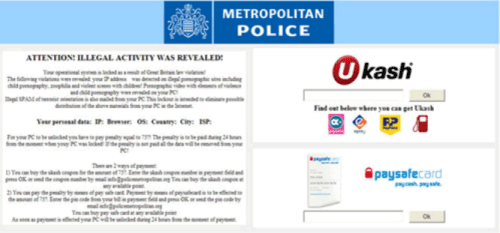 Strathclyde Police Ukash virus is a singular example of a subgroup of ransomware Trojans that fake warnings from lawful authorities to extract money via a ransom fee. Because Strathclyde Police Ukash virus locks down your PC and prevents you from accessing any significant programs while Strathclyde Police Ukash virus is active, the first step to combating a Strathclyde Police Ukash virus is to disable Strathclyde Police Ukash virus so that Strathclyde Police Ukash virus can be removed with an appropriate anti-malware scanner. Although Strathclyde Police Ukash viruses create realistic-sounding messages about unlawful file-transfers that are supposedly the cause of your PC's lockdown, Strathclyde Police Ukash viruses are unable to detect criminal activities and doesn't portray a message from any legitimate form of legal authority. SpywareRemove.com malware researchers encourage you to avoid falling for the Strathclyde Police Ukash virus's scam and be ready to recognize the fraudulent nature of both itself and other types of ransomware Trojans that issue similar threats against your PC.
Don't Feel Guilty When the Strathclyde Police Ukash Virus Pulls You Over
The Strathclyde Police Ukash virus is just one member of a prolific family of ransomware Trojans that all use the same tactic: posing as a legal authority for a given region, announcing that the infected PC has been used in some form of crime, and then claiming that the PC will remain locked until a fine is paid. These threatening error messages will block you from being able to use most programs if you launch Windows by normal methods and typically-accuse the victim of being involved in trafficking of child pornography. Strathclyde Police Ukash virus and other types of ransomware Trojans from the same subgroup will request a cash payment via UKash and may even threaten to delete the contents of your PC if you don't pay them; however, SpywareRemove.com malware analysts are happy to note that neither the Strathclyde Police Ukash virus nor any other ransomware Trojan from its subgroup can follow through on their bluffs.
You can recognize a Strathclyde Police Ukash virus by the following warning message:
ATTENTION! ILLEGAL ACTIVITY WAS REVEALED!
Your operational system is locked as a result of Great Britain law violation!
The following violations were revealed: your IP address was detected on illegal pornographic sites including child pornography, zoophilia and violent scenes with children! Pornographic video with elements of violence and child pornography were revealed on your PC!
Illegal SPAM of terrorist orientation is also mailed from your PC. This lockout is intended to eliminate possible distribution of the above materials from your PC in the Internet.
However, there are also regional variants of this message for countries such as France, Germany and Russia that have been localized to reference the appropriate authorities; in other respects, these ransomware Trojans can be considered to be clones of the Strathclyde Police Ukash virus.
Calling the Strathclyde Police Ukash Virus On Its Bluff
Even though a Strathclyde Police Ukash virus will attempt to prevent you from using your PC until you pay its fine, paying the Strathclyde Police Ukash virus ransom fee is totally-unnecessary for removing Strathclyde Police Ukash virus and regaining access to your computer. SpywareRemove.com malware researchers recommend that you reboot Windows by using Safe Mode or an external hard drive, which will bypass the Strathclyde Police Ukash virus's startup routine. Once Strathclyde Police Ukash virus has been deactivated, actually removing the Strathclyde Police Ukash virus via anti-malware software should prove to be unproblematic.
Although the Strathclyde Police Ukash virus is colloquially referred to as a virus, SpywareRemove.com malware researchers note that Strathclyde Police Ukash virus is actually a Trojan and lacks any ability to propagate by infecting arbitrary files. However, related PC threats that may have installed Strathclyde Police Ukash virus may propagate in this fashion or in other ways (such as by using local networks), and until you've deleted the Strathclyde Police Ukash virus, you should be cautious about any contact your PC can have with other computers.
Technical Details
File System Modifications
Tutorials: If you wish to learn how to remove malware components manually, you can read the tutorials on how to find malware, kill unwanted processes, remove malicious DLLs and delete other harmful files. Always be sure to back up your PC before making any changes.
The following files were created in the system:%WINDOWS%\system32\[RANDOM CHARACTERS].exe
File name: %WINDOWS%\system32\[RANDOM CHARACTERS].exeFile type: Executable File
Mime Type: unknown/exe
Registry Modifications
HKEY..\..\..\..{Subkeys}HKEY_LOCAL_MACHINE\SOFTWARE\Microsoft\Windows NT\CurrentVersion\Image File Execution Options\taskmgr.exe "Debugger"
Leave a Reply
Please note that we are not able to assist with billing and support issues regarding SpyHunter or other products. If you're having issues with SpyHunter, please get in touch with SpyHunter customer support through your SpyHunter . If you have SpyHunter billing questions, we recommend you check the Billing FAQ. For general suggestions or feedback, contact us.