System Protection
Posted: February 27, 2012
Threat Metric
The following fields listed on the Threat Meter containing a specific value, are explained in detail below:
Threat Level: The threat level scale goes from 1 to 10 where 10 is the highest level of severity and 1 is the lowest level of severity. Each specific level is relative to the threat's consistent assessed behaviors collected from SpyHunter's risk assessment model.
Detection Count: The collective number of confirmed and suspected cases of a particular malware threat. The detection count is calculated from infected PCs retrieved from diagnostic and scan log reports generated by SpyHunter.
Volume Count: Similar to the detection count, the Volume Count is specifically based on the number of confirmed and suspected threats infecting systems on a daily basis. High volume counts usually represent a popular threat but may or may not have infected a large number of systems. High detection count threats could lay dormant and have a low volume count. Criteria for Volume Count is relative to a daily detection count.
Trend Path: The Trend Path, utilizing an up arrow, down arrow or equal symbol, represents the level of recent movement of a particular threat. Up arrows represent an increase, down arrows represent a decline and the equal symbol represent no change to a threat's recent movement.
% Impact (Last 7 Days): This demonstrates a 7-day period change in the frequency of a malware threat infecting PCs. The percentage impact correlates directly to the current Trend Path to determine a rise or decline in the percentage.
| Threat Level: | 2/10 |
|---|---|
| Infected PCs: | 79 |
| First Seen: | February 28, 2012 |
|---|---|
| OS(es) Affected: | Windows |
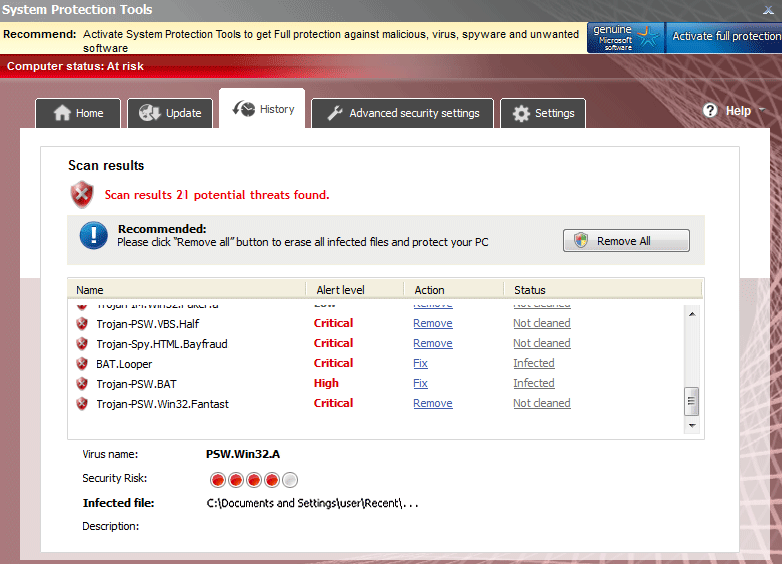 System Protection is a rogue anti-malware application that shows fake warnings about PC threats that System Protection supposedly protects your PC from being harmed by. Many infections associated with System Protection can be considered variants of System Protection 2012, an equally fraudulent anti-malware scanner from the FakeScanti (or FakeScanti) family. While System Protection's main purpose is to gain access to your finances and related information during a much-advertised online purchase process, SpywareRemove.com malware experts caution that System Protection may also attack your PC with browser redirects, arbitrary program crashes and even entire operating system crashes. The significant peril that System Protection represents to your PC should be responded to with real anti-malware software that can remove System Protection and all associated PC threats in a complete system scan.
Keeping System Protection's Fake Alerts from Ever Appearing in the First Place
Like many types of fake security programs, System Protection's initial symptoms include a variety of warning messages that try to deceive you about your computer's health. Although these errors may appear to be similar to those of real security software, you should ignore any pop-ups or warnings from System Protection, since SpywareRemove.com malware analysts have confirmed System Protection's inability to detect or deal with any kind of system problem or PC threat.
System Protection similar types of rogue anti-malware programs and other Trojans that are disguised as fake software media updates include Security Guard, Sysinternals Antivirus, WireShark Antivirus, Milestone Antivirus, BlueFlare Antivirus, Wolfram Antivirus, OpenCloud Antivirus, OpenCloud Security, Data Restore, AV Guard Online, Cloud Protection, AV Protection Online, System Protection 2012, AV Security 2012, Sphere Security 2012, AV Protection 2011, Security Guard 2012, Super AV 2013 and OpenCloud AV. Codecs and movie player updates are common guises for such Trojans, which can install System Protection without your permission, and they may reinstall their payload if they're not removed by the same system scans that detect and remove System Protection.
Secondary Symptoms of a System Protection Scam
Infections that are associated with the System Protection's family of rogue anti-malware applications are also noted for other characteristics that will actively harm your PC while System Protection is trying to persuade you to spend money on its fake software. Some of the most common attacks that SpywareRemove.com malware research team has noted to appear alongside FakeScanti scamware like System Protection are listed below:
- Malfunctions in unrelated programs, particularly software that's related to anti-malware scans, system diagnostics or security.
- Browser redirects that cause your web browser to load System Protection's website or censor your ability to access PC security websites.
- Random system crashes (the well-known 'Blue Screen of Death' phenomenon of Windows).
Most reports of System Protection attacks are indicative of System Protection being specific to the Windows operating system, and SpywareRemove.com malware researchers note that System Protection should be unable to attack Mac, Linux or similar alternatives in OS platforms.
no entiendo porque comprar para evitar un malware
Non voglio tenere un prodotto che mi porta malware