VirusProtect Pro
Posted: July 1, 2007
Threat Metric
The following fields listed on the Threat Meter containing a specific value, are explained in detail below:
Threat Level: The threat level scale goes from 1 to 10 where 10 is the highest level of severity and 1 is the lowest level of severity. Each specific level is relative to the threat's consistent assessed behaviors collected from SpyHunter's risk assessment model.
Detection Count: The collective number of confirmed and suspected cases of a particular malware threat. The detection count is calculated from infected PCs retrieved from diagnostic and scan log reports generated by SpyHunter.
Volume Count: Similar to the detection count, the Volume Count is specifically based on the number of confirmed and suspected threats infecting systems on a daily basis. High volume counts usually represent a popular threat but may or may not have infected a large number of systems. High detection count threats could lay dormant and have a low volume count. Criteria for Volume Count is relative to a daily detection count.
Trend Path: The Trend Path, utilizing an up arrow, down arrow or equal symbol, represents the level of recent movement of a particular threat. Up arrows represent an increase, down arrows represent a decline and the equal symbol represent no change to a threat's recent movement.
% Impact (Last 7 Days): This demonstrates a 7-day period change in the frequency of a malware threat infecting PCs. The percentage impact correlates directly to the current Trend Path to determine a rise or decline in the percentage.
| Threat Level: | 10/10 |
|---|---|
| Infected PCs: | 133 |
| First Seen: | July 24, 2009 |
|---|---|
| Last Seen: | March 19, 2022 |
| OS(es) Affected: | Windows |
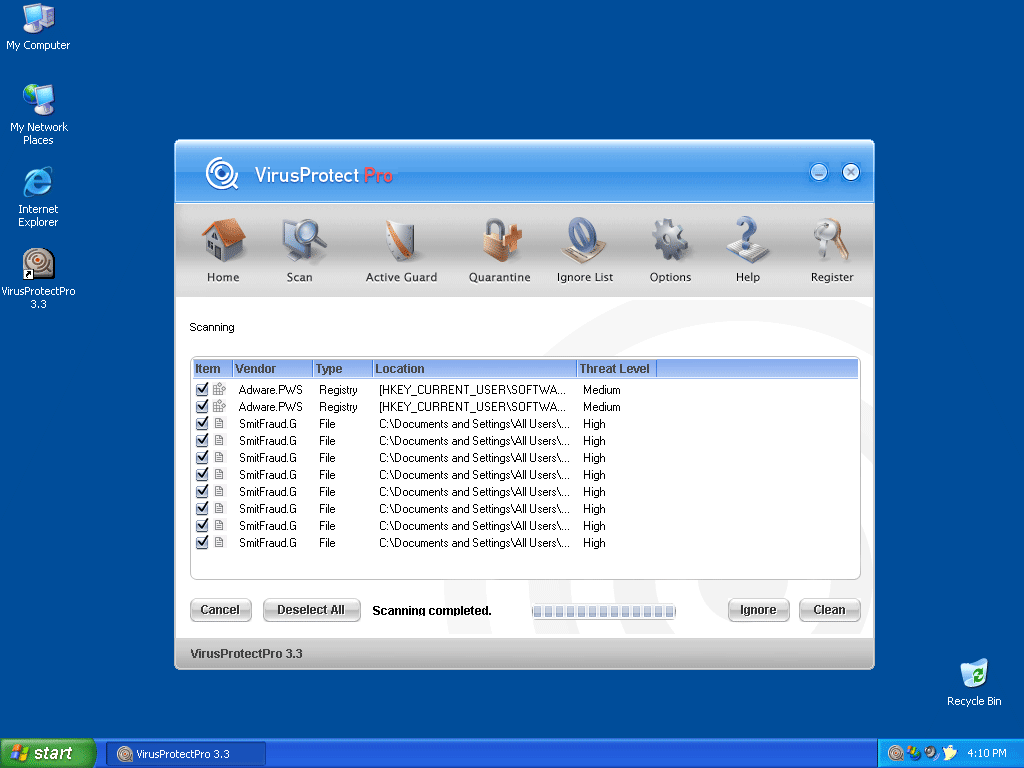 VirusProtect Pro, also known as VirusProtectPro, is the latest rogue anti-spyware program to come out from the makers of SpyDawn and VirusBurst.
Do not confuse VirusProtect Pro with VirusProtect, which is the newest addition to the rogue anti-spyware program family.
VirusProtect Pro is installed by a trojan called Zlob, which attempts to trick you into buying the alleged anti-spyware program. Once you're infected with VirusProtect Pro, a fake security message similar to a Windows notification pops up saying your PC is infected with malware. This VirusProtect Pro message is used to lure you into purchasing, downloading and installing their program to remove the imaginary spyware.
Aliases
More aliases (73)
Technical Details
File System Modifications
Tutorials: If you wish to learn how to remove malware components manually, you can read the tutorials on how to find malware, kill unwanted processes, remove malicious DLLs and delete other harmful files. Always be sure to back up your PC before making any changes.
The following files were created in the system:VirusProtectPro 3.3.exe
File name: VirusProtectPro 3.3.exeSize: 1.74 MB (1740800 bytes)
MD5: d16afc7ab39c219024b71e00124398df
Detection count: 91
File type: Executable File
Mime Type: unknown/exe
Group: Malware file
Last Updated: December 11, 2009
%WINDIR%\system32\xmlprw32.dll
File name: xmlprw32.dllSize: 157.18 KB (157184 bytes)
MD5: e1d72164ed193065cdac05e5d07101d5
Detection count: 80
File type: Dynamic link library
Mime Type: unknown/dll
Path: %WINDIR%\system32
Group: Malware file
Last Updated: December 22, 2011
__c00CC9C1.dat
File name: __c00CC9C1.datSize: 86.01 KB (86016 bytes)
MD5: a555ea3f4d692b09a248b4f9e92f9ce3
Detection count: 52
File type: Data file
Mime Type: unknown/dat
Group: Malware file
Last Updated: December 11, 2009
VirusProtectPro 3.5.exe
File name: VirusProtectPro 3.5.exeSize: 1.76 MB (1765376 bytes)
MD5: 3fbfaf98e47dca363b1c676c98cf139f
Detection count: 52
File type: Executable File
Mime Type: unknown/exe
Group: Malware file
Last Updated: December 11, 2009
VirusProtectPro 3.4.exe
File name: VirusProtectPro 3.4.exeSize: 1.76 MB (1765376 bytes)
MD5: 087e449f7c1cabb4cff5598238d92189
Detection count: 45
File type: Executable File
Mime Type: unknown/exe
Group: Malware file
Last Updated: December 11, 2009
__c007A850.dat
File name: __c007A850.datSize: 73.72 KB (73728 bytes)
MD5: f8f238a69734f508b740ed243a3a016d
Detection count: 42
File type: Data file
Mime Type: unknown/dat
Group: Malware file
Last Updated: December 11, 2009
vpp_install[1].exe
File name: vpp_install[1].exeSize: 3.17 MB (3175837 bytes)
MD5: dbc9d1c475e3a41ffcb8e7ac7802af21
Detection count: 41
File type: Executable File
Mime Type: unknown/exe
Group: Malware file
Last Updated: December 11, 2009
VirusProtectPro 3.6.exe
File name: VirusProtectPro 3.6.exeSize: 1.8 MB (1802240 bytes)
MD5: db06ec940b1009b77b1946e8215f10dc
Detection count: 26
File type: Executable File
Mime Type: unknown/exe
Group: Malware file
Last Updated: December 11, 2009
VirusProtect 3.8.exe
File name: VirusProtect 3.8.exeSize: 1.76 MB (1761280 bytes)
MD5: a2bbdfa6c1ad0570ced87247bd33c3de
Detection count: 14
File type: Executable File
Mime Type: unknown/exe
Group: Malware file
Last Updated: December 11, 2009
VirusProtectPro 3.7.exe
File name: VirusProtectPro 3.7.exeSize: 1.8 MB (1802240 bytes)
MD5: f6444d47246fe39144a9d0de3ad10cc2
Detection count: 10
File type: Executable File
Mime Type: unknown/exe
Group: Malware file
Last Updated: December 11, 2009
More files
Registry Modifications
File name without pathVirusProtectPro 3.7.lnk
Virusprotect Pro new version 3.4:
Virusprotect Pro v.3.4
VirusProtectPro 3.4.exe
VirusProtectPro 3.4.url
Virusprotect Pro new file:
C:\Windows\System32\surzzh.dll
Virusprotect Pro new files:
C:\Windows\System32\onljweo.dll
C:\Windows\System32\yhjbbzf.dll
C:\Windows\System32\dyrwls.dll
C:\Windows\System32\ugofuq.dll
C:\Windows\System32\bgwttyl.dll
C:\Windows\System32\afzdbl.dll
C:\Windows\System32\lrnjnzf.dll
C:\Windows\System32\zpuwriz.dll
C:\Windows\System32\tkrsw.dll
Virusprotect Pro new files:
C:\Windows\System32\vjxwnn.dll
C:\Windows\System32\gtawclv.dll
VirusProtect Pro new version 3.6:
VirusProtectPro 3.6.exe
VirusProtectPro 3.6.lnk
Uninstall VirusProtectPro 3.6.lnk
VirusProtectPro 3.6 Website.lnk
VirusProtectPro 3.6.url
I downloaded SpyHunter and now I cannot run. Please help
plsssssssssss, help me my computer is also infected wth "viruspro tecpro"..bt it is nt opening a dialogbox..rather it continuing poping up in the taskbar n asking for downloading its anto-spyware software..... n when i click it,,,it opens a website of it....
David,
If you purchased SpyHunter you are a legal user. So contact to support team if you have any problems and they will solve them as soon as possible.
khancool8286,
If you are not experienced user the manual VirusProtect Pro removal can be too difficult for you, so better get anti-spyware program which will help you to get rid of this spyware. If you don't want to pay money for anti-spyware programs you can try to remove VirusProtect Pro manually. You can follow the removal instructions which are above. But first of all you'll have to find bad file and it's not so easy. I suggest you to scan your computer with our free VirusProtect Pro scanner which will show you that bad file. And then try the manual removal instructions.