Vista Antispyware 2013
Posted: October 6, 2012
Threat Metric
The following fields listed on the Threat Meter containing a specific value, are explained in detail below:
Threat Level: The threat level scale goes from 1 to 10 where 10 is the highest level of severity and 1 is the lowest level of severity. Each specific level is relative to the threat's consistent assessed behaviors collected from SpyHunter's risk assessment model.
Detection Count: The collective number of confirmed and suspected cases of a particular malware threat. The detection count is calculated from infected PCs retrieved from diagnostic and scan log reports generated by SpyHunter.
Volume Count: Similar to the detection count, the Volume Count is specifically based on the number of confirmed and suspected threats infecting systems on a daily basis. High volume counts usually represent a popular threat but may or may not have infected a large number of systems. High detection count threats could lay dormant and have a low volume count. Criteria for Volume Count is relative to a daily detection count.
Trend Path: The Trend Path, utilizing an up arrow, down arrow or equal symbol, represents the level of recent movement of a particular threat. Up arrows represent an increase, down arrows represent a decline and the equal symbol represent no change to a threat's recent movement.
% Impact (Last 7 Days): This demonstrates a 7-day period change in the frequency of a malware threat infecting PCs. The percentage impact correlates directly to the current Trend Path to determine a rise or decline in the percentage.
| Threat Level: | 2/10 |
|---|---|
| Infected PCs: | 66 |
| First Seen: | October 6, 2012 |
|---|---|
| Last Seen: | June 11, 2022 |
| OS(es) Affected: | Windows |
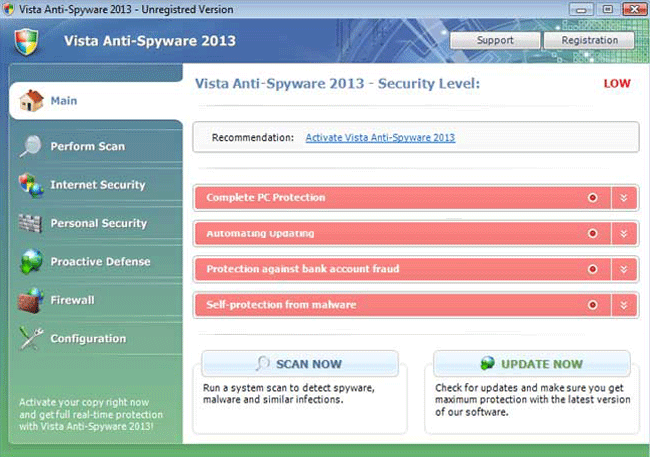 Although Vista Antispyware 2013 is a new example member of its family, the FakeRean family of fake anti-malware scanners is, itself, far from brand-new, with over a year's accumulated history of scamming online victims out of their money. Vista Antispyware 2013 may present itself as an anti-malware program for Windows Vista, but all-but-identical types of scamware from Vista Antispyware 2013's family have been seen assaulting most versions of Windows, always by displaying fraudulent security information to display capabilities of their fake security features. SpywareRemove.com malware researchers encourage Vista Antispyware 2013's prompt deletion with actual anti-malware software, since Vista Antispyware 2013 can cause security problems, including issues accessing software that's central to keeping Windows safe, such as Windows Update.
The Spies and Everything Else That Vista Antispyware 2013 Pretends to Find
Vista Antispyware 2013 starts automatically with Windows and, unlike legitimate commercial software, doesn't offer any options whatsoever to disable this function. The reasons for this become apparently almost immediately, as Vista Antispyware 2013 uses its position to display inaccurate pop-up messages regularly, along with fake scans of your PC that always include wide ranges of infections. Threats 'detected' by Vista Antispyware 2013 aren't limited to spyware and can include rootkits, Trojans and other high-level threats that will fail to be detected by any reputable anti-malware program.
SpywareRemove.com malware researchers have also found that Vista Antispyware 2013 may display fake infection alerts while Vista Antispyware 2013 blocks other applications. This can, theoretically, be applied to any EXE file, although Vista Antispyware 2013 includes a small white list of 'allowable' programs, such as web browsers and some crucial Windows components. These messages and any other security information from Vista Antispyware 2013 always should be considered erroneous, and attempts to act on the information that Vista Antispyware 2013 presents to you will, at best, result in the deletion of harmless files.
Once Vista Antispyware 2013 has its con well in hand, Vista Antispyware 2013 will request that you spend money on a full version of its software to delete all of these fake infections. Of course, SpywareRemove.com malware experts not only don't recommend buying Vista Antispyware 2013, but advise that you have Vista Antispyware 2013 deleted as soon as possible.
Why Vista Antispyware 2013 Hides the Source of Your Computer Problems Oh So Carefully
While Vista Antispyware 2013's ability to block programs and display erroneous system information can be troublesome enough, Vista Antispyware 2013, as a member of the FakeRean family of rogue anti-malware software, may also attack your computer in secondary ways. Your web browser may be blocked from visiting safe sites (often by being redirected to a fake warning page) and the following programs may be disabled or deleted:
- Windows Update
- Windows Firewall
- Windows Defender
- Windows Security Center
To rid yourself of Vista Antispyware 2013 and get back to a safe Windows environment, SpywareRemove.com malware researchers suggest using either Safe Mode or a system boot from a USB device, whichever is required to disable Vista Antispyware 2013's startup exploit. After Vista Antispyware 2013 is disabled, anti-malware software of your choice can remove Vista Antispyware 2013 and, with Vista Antispyware 2013, the many problems that Vista Antispyware 2013 causes.
Some of FakeRean's other members include Antivirus 2008 Pro, Windows Antivirus 2008, Vista Antivirus 2008, Antivirus XP 2008, PC Clean Pro, Antivirus Pro 2009, AntiSpy Safeguard, ThinkPoint, Spyware Protection 2010, Internet Antivirus 2011, Palladium Pro, XP Anti-Virus 2011, CleanThis, Rogue.Vista Antivirus 2008, XP Home Security 2012, XP Security 2012 and AntiVirus PRO 2015.
Technical Details
File System Modifications
Tutorials: If you wish to learn how to remove malware components manually, you can read the tutorials on how to find malware, kill unwanted processes, remove malicious DLLs and delete other harmful files. Always be sure to back up your PC before making any changes.
The following files were created in the system:%AppData%\Roaming\Microsoft\Windows\Templates\[RANDOM CHARACTERS]
File name: %AppData%\Roaming\Microsoft\Windows\Templates\[RANDOM CHARACTERS]Group: Malware file
%CommonAppData%\[RANDOM CHARACTERS]
File name: %CommonAppData%\[RANDOM CHARACTERS]Group: Malware file
%LocalAppData%\[RANDOM CHARACTERS]
File name: %LocalAppData%\[RANDOM CHARACTERS]Group: Malware file
%LocalAppData%\[RANDOM CHARACTERS].exe
File name: %LocalAppData%\[RANDOM CHARACTERS].exeFile type: Executable File
Mime Type: unknown/exe
Group: Malware file
%Temp%\[RANDOM CHARACTERS]
File name: %Temp%\[RANDOM CHARACTERS]Group: Malware file
Registry Modifications
HKEY..\..\{Value}HKEY_CURRENT_USER\Software\Classes\.exe\shell\open\command "(Default)" = "%LocalAppData%\.exe" -a "%1" %*HKEY_CURRENT_USER\Software\Classes\.exe "(Default)" = ''HKEY_CURRENT_USER\Software\Classes\ "(Default)" = 'Application'HKEY_CURRENT_USER\Software\Classes\\shell\open\command "(Default)" = "%LocalAppData%\.exe" -a "%1" %*HKEY_CURRENT_USER\Software\Classes\\DefaultIcon "(Default)" = '%1'HKEY_CLASSES_ROOT\ah\shell\open\command "(Default)" = "%LocalAppData%\.exe" -a "%1" %*HKEY_CLASSES_ROOT\.exe\shell\open\command "(Default)" = "%LocalAppData%\.exe" -a "%1" %*HKEY_LOCAL_MACHINE\SOFTWARE\Clients\StartMenuInternet\IEXPLORE.EXE\shell\open\command "(Default)" = ""%LocalAppData%\.exe" -a "C:\Program Files\Internet Explorer\iexplore.exe""HKEY_LOCAL_MACHINE\SOFTWARE\Clients\StartMenuInternet\FIREFOX.EXE\shell\safemode\command "(Default)" = ""%LocalAppData%\.exe" -a "C:\Program Files\Mozilla Firefox\firefox.exe" -safe-mode"HKEY_LOCAL_MACHINE\SOFTWARE\Clients\StartMenuInternet\FIREFOX.EXE\shell\open\command "(Default)" = ""%LocalAppData%\.exe -a "C:\Program Files\Mozilla Firefox\firefox.exe""HKEY..\..\..\..{Subkeys}HKEY_CLASSES_ROOT\ah\shell\open\command "IsolatedCommand"
Additional Information
| # | Message |
|---|---|
| 1 | Critical System Alert! Unknown software is try to take control over your system! |
| 2 | Privacy alert! Rogue malware detected in your system. Data leaks and system damage are possible. Click here for a free security scan and spyware deletion. |
| 3 | System danger! Your system security is in danger. Privacy threats detected. Spyware, keyloggers or Trojans may be working in the background right now. Perform an in-depth scan and removal now, click here. |
| 4 | System hacked! Unknown program is scanning your system registry right now! Identity theft detected! |
| 5 | System hijack! System security threat was detected. Viruses and/or spyware may be damaging your system now. Prevent infection and data loss or stealing by running a free security scan. |
Leave a Reply
Please note that we are not able to assist with billing and support issues regarding SpyHunter or other products. If you're having issues with SpyHunter, please get in touch with SpyHunter customer support through your SpyHunter . If you have SpyHunter billing questions, we recommend you check the Billing FAQ. For general suggestions or feedback, contact us.