Fake Windows Security Center
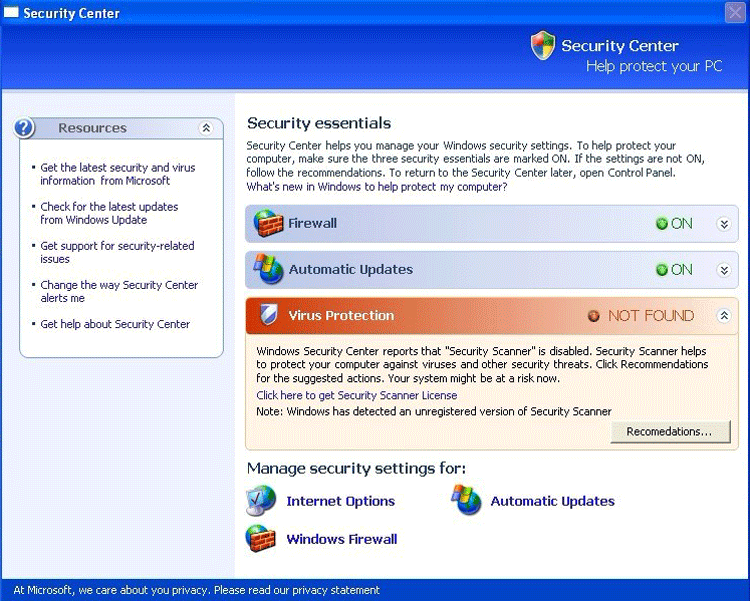 Fake Windows Security Center masquerades as the legitimate Windows Security Center, using such fake spyware removers as SystemCop, BlockDefense, QuickHealCleaner, SaveDefense, TrustNinja and SaveKeep in order to scare you into believing your computer is under attack. Fake Windows Security Center may also prompt you to purchase one of these rogue spyware removers in order to protect yourself. Do not be fooled, and remove Fake Windows Security Center as soon as possible.
File System Modifications
- The following files were created in the system:
# File Name 1 C:\Documents and Settings\malwarehelp.org\Local Settings\Temp\8ymnibx6.exe 2 C:\Documents and Settings\malwarehelp.org\Local Settings\Temporary Internet Files\Content.IE5\4SOEDFRR\setup.exe 3 C:\WINDOWS\system32\8ymnibx6.exe
Registry Modifications
- The following newly produced Registry Values are:
HKEY..\..\..\..{Subkeys}HKEY_CURRENT_USER\SOFTWARE\Microsoft\Windows\CurrentVersion\Run\8ymnibx6.exe
Leave a Reply
Please note that we are not able to assist with billing and support issues regarding SpyHunter or other products. If you're having issues with SpyHunter, please get in touch with SpyHunter customer support through your SpyHunter . If you have SpyHunter billing questions, we recommend you check the Billing FAQ. For general suggestions or feedback, contact us.