The Qvo6 hijacker is a browser hijacker that's promoted by Qvo6.com as a useful search-enhancing utility, even though Qvo6's real search-related features appear to be limited to redirecting PC users to popular search engines like Google. Installation methods for the Qvo6 hijacker appear to include many non-consensual methods, and although Qvo6.com does provide uninstallation instructions, these instructions may not remove all of the components of any particular Qvo6 hijacker. As a standard precaution against Qvo6 hijacker infections, malware researchers recommend using anti-malware...

One of quite a few variants of a very well-distributed form of scamware, System Care Antivirus poses as an anti-malware scanner, but actually is a rogue anti-malware product that detects PC threats with deliberate inaccuracy. By detecting large amounts of fake infections and causing various system problems (such as blocking specific applications), System Care Antivirus hopes to convince victims to pay for registering its software, supposedly to 'fix' the above issues. SpywareRemove.com malware researchers recommend that you ignore any alerts or system information from System Care...

The Microsoft Security Essentials Alert Virus is a ransomware Trojan that imitates the pop-up alerts of Microsoft Security Essentials to encourage you to pay an illegal fine through one of several methods. Because Microsoft Security Essentials Alert Virus may block other programs to prevent you from removing Microsoft Security Essentials Alert Virus and its pop-up, SpywareRemove.com malware analysts recommend disabling Microsoft Security Essentials Alert Virus's startup exploits prior to any anti-malware scans that could delete Microsoft Security Essentials Alert Virus safely. Contrary...

The Ukash Virus is a colloquial nickname for a family of ransomware Trojans that display fraudulent police alerts, block you from using other applications and threaten you with legal action if you don't pay a fee within a short time period. Preferred payment methods for this fine include Paysafecard and Ukash – hence the Ukash Virus's name. The Ukash Virus family is especially notable for tailoring its warning messages to local regions and having many different variants for different countries. SpywareRemove.com malware researchers have noted that the Ukash Virus is particularly...
Ad.yieldmanager.com, adyieldmanager.com or yieldmanager.com, is a tracking cookie designed to keep track of how many times you visit a website and how long you stay, your browser type, your IP address, and other web surfing activities which are sent back to the cookie's host site.
Generally, cookies are not dangerous in nature. Cookies are even helpful since they allow websites to store user preferences (login credentials, personalize web pages, etc.). Yet there are cookies that are used for malicious purposes.
In the wrong hands, a cookie can be harmful and turn into a security...

MyStart by Incredibar is an adware program that displays advertisements. While similar adware plugins have been known to be bundled with freely-distributed programs, malware experts have also caught websites using browser exploits to install MyStart sans any other software. If you notice symptoms of the presence of Incredibar's MyStart while you browse the web, you should remove MyStart with anti-malware software that can delete all of MyStart without difficulties, including its Registry-based components. Normal software removal methods have been confirmed to fail on MyStart, although,...

Copied from previously-existing types of rogue diagnostic programs, Windows Fix follows typical scamware strategies by creating fake system scans, fake pop-up alerts and other types of misleading data that identify nonexistent infections on your PC. SpywareRemove.com malware researchers have noted that most Windows Fix infections are the result of drive-by-download attacks from malicious websites or payloads from previously-installed rootkits. Protecting your PC from Windows Fix should, accordingly, take the form of using a secure web browser, avoiding risky websites and keeping...

Internet Security is a member of the family of fake anti-malware programs. According to its pop-up alerts and scanner simulations, Internet Security pretends to offer protection from spyware and other types of PC threats, but SpywareRemove.com malware researchers emphasize Internet Security's complete inability to find or remove any sort of actual and malicious software. Like other members of its family, Internet Security will launch itself without permission and may do so repeatedly whenever you try to open an executable file to prevent you from disabling Internet Security and...

Home Malware Cleaner should be considered to be anything but hygienic, since SpywareRemove.com malware researchers have traced Home Malware Cleaner's past through disreputable scamware like Malware Protection Center and all the way back to evidence of browser hijacks, attacks against PC security software and fraudulent security features. Even though Home Malware Cleaner has the appearance of a polished and reputable anti-malware scanner, there isn't a single virus or Trojan in the world that Home Malware Cleaner could detect or remove, and system analysis information from Home Malware...

Mixi DJ Search and Toolbar is an adware program that promotes an application by making some changes to the hijacked Internet browser. Mixi DJ Search and Toolbar usually comes as an inserted code to a software program that computer users may download from numerous online providers. Sometimes, Mixi DJ Search and Toolbar is advertised through online software programs and free applications. Once the program is installed, PC users are also installing Mixi DJ Search and Toolbar. In actuality, the program urges PC users if they want to exclude Mixi DJ Search and Toolbar. However, most...

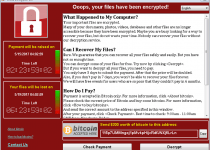
Reveton is a ransomware Trojan that hijacks your browser to display a fake legal alert while Reveton also locks down your computer. Because Reveton's pop-up alerts often use country-specific references to various legal agencies, Reveton may appear legitimate at first glance, but Reveton simply is a way for criminals to milk money out of PC users by accusing them of random crimes. Standard pop-up alerts from Reveton are recognizable members of the widespread ' Ukash Virus ' family, which SpywareRemove.com malware experts have noted are especially common in Europe, although other countries...

'You Have 48 Hours to Pay the Fine' Ransomware is ransomware that locks your computer and recommends that you transfer money to a third-party to restore your PC. Instead of rewarding criminals for their malware-coding crimes, SpywareRemove.com malware experts suggest deleting 'You Have 48 Hours to Pay the Fine' Ransomware with a traditional anti-malware product from a trustworthy brand. Most ransomware-based PC threats like 'You Have 48 Hours to Pay the Fine' Ransomware are incapable of penalizing you for failing to pay their fines – even if, just like 'You Have 48 Hours To Pay The...
Internet Security Protection is one of various members of FakeRean, a large group of fake anti-malware programs that can display inaccurate security information while also blocking you from using most other applications. Through fake firewall warnings, system scans and similar credentials, Internet Security Protection tries to convince victims that their PC has been infected by dozens of PC threats that must be removed by a premium-registered version of Internet Security Protection. For their part, SpywareRemove.com malware experts haven't seen any real PC security features in Internet...

Rather than being an addition to your computer's security, Internet Security Plus is nothing more than a negative, as a fictitious anti-malware program that pretends to detect malicious software so that Internet Security Plus can encourage you to pay for its fraudulent registration. SpywareRemove.com malware experts are very familiar with Internet Security Plus's family of multi-named scamware products, which, in addition to their fake security information, also may block other programs and create pop-ups that imitate the interfaces of legitimate Windows utilities (like your...
Internet Security Premium is one of the latest fake anti-malware programs from the FakeRean family. Internet Security Premium's attacks involve combinations of intentionally inaccurate warning messages, many of which imitate other Windows programs, along with fake scans that detect various threats on your PC. Because Internet Security Premium's family habitually blocks most other applications, SpywareRemove.com malware experts rate Internet Security Premium as a mid-level threat to your PC and a security risk that should be exterminated quickly. However, deleting Internet Security...
Internet Security Pro 2013 is one of the newer variants of FakeRean, a family of fake anti-malware scanners that are noted for displaying inaccurate system warnings and terminating other programs on the infected PC. SpywareRemove.com malware experts rate drive-by-download attacks through your browser as the most probable infection vector for Internet Security Pro 2013, but other distribution techniques, such as installation via Trojans like Bredolab, also are viable threats. Even though Internet Security Pro 2013's appearance is designed to imitate that of a legitimate anti-malware...
PC Health Kit is a rogue Registry cleaner that creates fake alerts and deliberately-inaccurate scans as a means of defrauding the PC's user – by first detecting a series of fake infections and numerous related computer problems, and then asking for a premium registration fee before PC Health Kit can repair your computer. Like any similar form of scamware, PC Health Kit doesn't have any functions focused on actually helping PC Health Kit delete malware or repair your system, and SpywareRemove.com malware researchers always discourage spending money on PC Health Kit. Any problems related...
A rogue anti-malware scanner with little to separate Internet Security Pro from dozens of its kin, Internet Security Pro is incapable of protecting your computer, even though Internet Security Pro displays a sizable barrage of system warnings and will pretend to scan your computer for PC threats of various degrees of danger. Attacks by Internet Security Pro also may include attempts to block you from being able to access other programs, especially those that are related to maintaining the safety of your computer, and SpywareRemove.com malware experts caution that purchasing Internet...
Seemingly unrelated to older scamware like SystemDoctor 2006 , System Doctor 2014 is a new rogue anti-malware product that claims to protect your computer while displaying pop-up alerts with deliberately inaccurate contents, in addition to imitative system scans that actually don't scan your computer. System Doctor 2014 has a high chance of interfering with your accessibility to any applications related to your PC's security and also will block any file downloads managed through your browser, and, as a result, should be treated as a threat to your PC and removed promptly....

The United States Courts Ransomware is an illegal program that creates a fake anti-piracy warning while blocking your ability to access your desktop or other software. While the United States Courts Ransomware isn't affiliated with the US government and will display its alert no matter whether or not you happen to have used your PC to download files illegally, the United States Courts Ransomware's system-locking attack is perfectly real, and will prevent you from using your PC until you find a means of disabling the United States Courts Ransomware. Although the United States Courts...
Internet Security 2014 is a rogue anti-malware product that creates intentionally inaccurate system alerts and requests that you purchase the software before Internet Security 2014 will remove any detected threats on your computer. As a member of the vast and varied family of scamware, Internet Security 2014 is a well-identified PC threat that has a high probability of interfering with your usage of other applications without any legitimate justification and never should be bought. As an alternative to giving criminals your money and credit card information, SpywareRemove.com malware...

The 'Your Computer Blocked, Data Encrypted' Virus is a variant of the FBI Cybercrime Division Virus , and actually is a criminal program, instead of a software-based representative of the US Federal Bureau of Investigation. While the 'Your Computer Blocked, Data Encrypted' Virus creates a warning message that accuses your computer of being used for violating copyright laws, the 'Your Computer Blocked, Data Encrypted' Virus will create this pop-up automatically and without any effort to ascertain the innocence or guilt of the compromised computer. SpywareRemove.com malware experts...
Driver Performer is a rogue system optimization application that attempts to trick attacked PC users into purchasing a full version of a software product to repair supposed registry errors and hard drive issues. Driver Performer states to enhance the computer's speed by removing unnecessary entries on the hardware. Once installed on a corrupted PC, Driver Performer will be configured to run automatically every time a computer user starts Windows. Driver Performer will then press the victimized PC user to scan the computer to check it for potential security threats and system errors....

The POLIZEI Cyber Crime Investigation Department Virus is a Police Trojan specialized for attacking residents of Austria, but with a strong resemblance to previous PC threats that have been known to target other countries (particularly other European ones). With pop-up warnings that accuse you of using your computer to commit various crimes of a common and potentially embarrassing nature, the POLIZEI Cyber Crime Investigation Department Virus tries to block your computer and entice you into paying a fictitious legal fine. Any money transferred through the means POLIZEI Cyber Crime...

The Politie Office Central Ransomware is a Police Trojan that displays inaccurate criminal warnings towards residents of Belgium (as detected through the IP addresses of their computers). Like all Police Trojans, the Politie Office Central Ransomware claims to be installed to prevent you from using your computer for crimes such as downloading illegal media content, but actually only exists to extort money to transfer to criminals. Since the Politie Office Central Ransomware's fake warning also coincides with an effort to block most other Windows programs, SpywareRemove.com malware...
Europol Interpol Ransomware, also known as Europol Interpol Virus, is a malware threat detected as ransomware, which attempts to steal money from trusting computer users in Germany. Europol Interpol Ransomware is spread by a 'Police' Trojan, which blocks the targeted computer and asks the affected PC user to make a payment as a ransom to receive an unlock code. Europol Interpol Ransomware Virus blocks the desktop of the targeted PC and makes the victimized computer completely unusable. Europol Interpol Ransomware displays a pop-up warning message 'Ihr Internet Service Provider...

PC Speed Maximizer is a rogue system optimizer and registry cleaner that claims to improve the performance of your computer by removing junk files and unneeded data, but actually detects fake system problems. Trying to use PC Speed Maximizer to remove any of these imaginary issues only will redirect you to a purchase form for PC Speed Maximizer's registration. PC Speed Maximizer also has been promoted through multiple malicious websites and through the fake online scanner XP Micro Antivirus Online Scan . Scamware products like PC Speed Maximizer never should be bought, and although...