HalfLemon
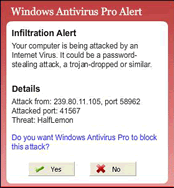 HalfLemon may send this monitored information to a remote attacker when it can be used against you or worst, lead to identity theft. HalfLemon is a self updating program that pulls information from the internet to update itself. HalfLemon will boot at windows startup and may be very difficult to manually remove.
Moreover, HalfLemon is listed as an infection in a "Windows Antivirus Pro Alert" pop-up window from the rogue anti-spyware program called Windows Antivirus Pro.
File System Modifications
- The following files were created in the system:
# File Name 1 %ProgramFiles%\Halflemon\halflemon.dll 2 halflemon.exe 3 halflemon.inf
Registry Modifications
- The following newly produced Registry Values are:
HKEY..\..\..\..{Subkeys}HKEY_CURRENT_USER\Software\HalflemonHKEY_LOCAL_MACHINE\SOFTWARE\Classes\CLSID\{D94AAA2A-C415-42E3-82B6-49FAB4EBFFE9}HKEY_LOCAL_MACHINE\SOFTWARE\Classes\Halflemon.SearchHookHKEY_LOCAL_MACHINE\SOFTWARE\Classes\Halflemon.SearchHook.1HKEY_LOCAL_MACHINE\SOFTWARE\Classes\Interface\{270514AB-6A3E-4DF8-9173-F240A0948251}HKEY_LOCAL_MACHINE\SOFTWARE\Classes\TypeLib\{0A4B13C3-CAF8-4DE1-BC09-48727433DD3A}
Leave a Reply
Please note that we are not able to assist with billing and support issues regarding SpyHunter or other products. If you're having issues with SpyHunter, please get in touch with SpyHunter customer support through your SpyHunter . If you have SpyHunter billing questions, we recommend you check the Billing FAQ. For general suggestions or feedback, contact us.