Search.fantastigames.com
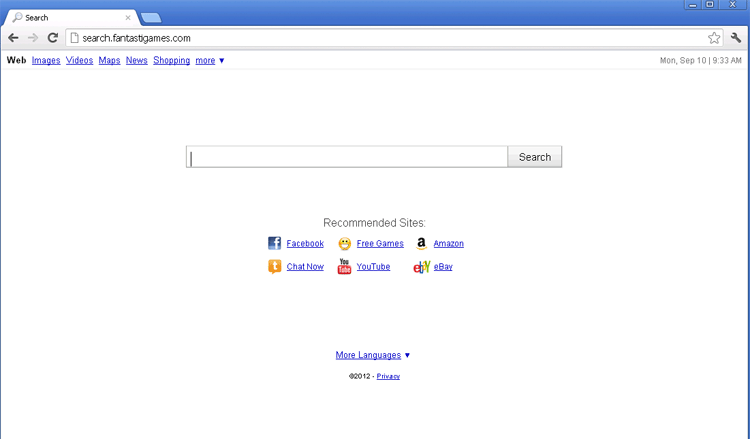 Search.fantastigames.com is a MetaCrawler-based search engine that's also known for an associated browser hijacker that redirects you to Search.fantastigames.com without your permission. Even though SpywareRemove.com malware researchers haven't confirmed cases of Search.fantastigames.com linking to deliberately malicious content, unwanted redirects to Search.fantastigames.com and other Search.fantastigames.com-related settings changes should be considered low-level security risks to your browser. As usual, anti-malware scans are the best means of ridding yourself of Search.fantastigames.com-promoting adware, since Search.fantastigames.com's browser hijacker isn't associated with a readily-apparent program or browser add-on.
Search.fantastigames.com – a Fantastic Example of a Needless Middle Man in Online Searches
Search.fantastigames.com has the basic look of Google, but Search.fantastigames.com's results are all acquired through MetaCrawler (a meta-search engine that gathers results from Google, Bing and other popular search sites). Since there are no features that Search.fantastigames.com provides that aren't available straight from the websites that Search.fantastigames.com is 'borrowing' content from, there's no real reason to use Search.fantastigames.com, although SpywareRemove.com malware analysts have yet to find any danger in doing so.
Search.fantastigames.com's poor showing of content is backed up by poor ratings for trustworthiness and other traits in website-ranking databases, with substantially negative scores that appear to be primarily the result of browser hijack attacks associated with Search.fantastigames.com.
These hijacks are caused by browser hijacker-based PC threats that are installed through deceptive or concealed means, and their most common symptoms, insofar as SpywareRemove.com malware analysts have been able to determine, include:
- New tabs for Search.fantastigames.com that appear whenever you launch your browser.
- Having your default search engine locked to Search.fantastigames.com – no matter what changes you make to your browser's settings.
- Being redirected to Search.fantastigames.com after making searches through unrelated search sites.
The home domain from which Search.fantastigames.com is derived, fantasigames.com, should also be considered equivalent to Search.fantastigames.com with respect to the browser-based attacks associated with Search.fantastigames.com and the potential dangers involved.
Getting Your Browser the Way You Want it Without Search.fantastigames.com Muddying the Works
Browser hijackers that utilize Search.fantastigames.com redirects are still active as of this month of 2012, and SpywareRemove.com malware researchers have also confirmed their compatibility with Firefox, Internet Explorer and Chrome browsers. Since, unlike many browser hijackers, Search.fantastigames.com's adware doesn't display obvious browser plugins or programs to be uninstalled, it's encouraged for you to use anti-malware software to delete any Search.fantastigames.com-related PC threats.
Browser hijacks for Search.fantastigames.com and other sites are often used by malware with other abilities to harm your computer. Rootkits that compromise system files, spyware programs that steal confidential information and backdoor Trojans that disable your PC's security can all be included with browser hijackers for Search.fantastigames.com. Given these risks, SpywareRemove.com malware experts always encourage you to react to a Search.fantastigames.com-related infection swiftly, even if Search.fantastigames.com, by itself, isn't much of a threat to your computer.
Leave a Reply
Please note that we are not able to assist with billing and support issues regarding SpyHunter or other products. If you're having issues with SpyHunter, please get in touch with SpyHunter customer support through your SpyHunter . If you have SpyHunter billing questions, we recommend you check the Billing FAQ. For general suggestions or feedback, contact us.