SOPA Ransomware
Posted: October 8, 2012
Threat Metric
The following fields listed on the Threat Meter containing a specific value, are explained in detail below:
Threat Level: The threat level scale goes from 1 to 10 where 10 is the highest level of severity and 1 is the lowest level of severity. Each specific level is relative to the threat's consistent assessed behaviors collected from SpyHunter's risk assessment model.
Detection Count: The collective number of confirmed and suspected cases of a particular malware threat. The detection count is calculated from infected PCs retrieved from diagnostic and scan log reports generated by SpyHunter.
Volume Count: Similar to the detection count, the Volume Count is specifically based on the number of confirmed and suspected threats infecting systems on a daily basis. High volume counts usually represent a popular threat but may or may not have infected a large number of systems. High detection count threats could lay dormant and have a low volume count. Criteria for Volume Count is relative to a daily detection count.
Trend Path: The Trend Path, utilizing an up arrow, down arrow or equal symbol, represents the level of recent movement of a particular threat. Up arrows represent an increase, down arrows represent a decline and the equal symbol represent no change to a threat's recent movement.
% Impact (Last 7 Days): This demonstrates a 7-day period change in the frequency of a malware threat infecting PCs. The percentage impact correlates directly to the current Trend Path to determine a rise or decline in the percentage.
| Threat Level: | 10/10 |
|---|---|
| Infected PCs: | 32 |
| First Seen: | October 8, 2012 |
|---|---|
| OS(es) Affected: | Windows |
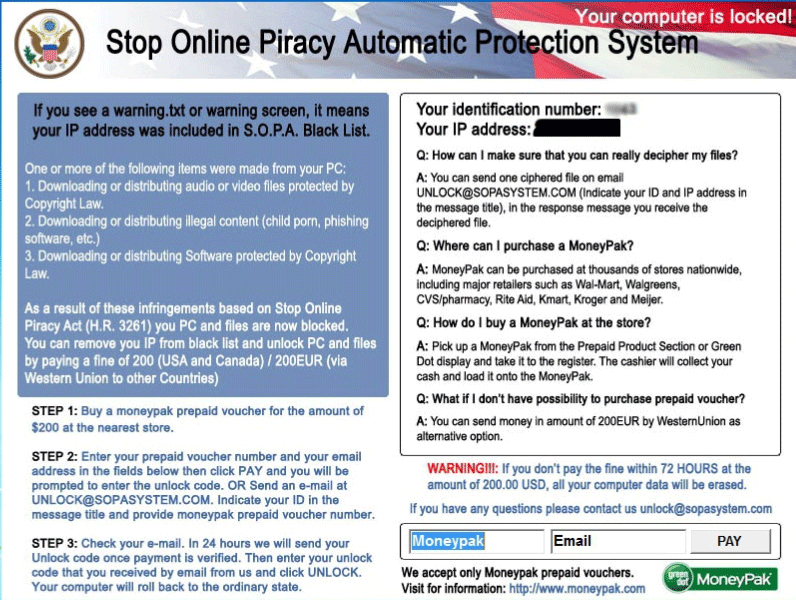 SOPA Ransomware is a ransomware Trojan that pretends to be a software representative from the never-implemented Stop Online Piracy Act by blocking your PC with a warning message, encrypting various files and then instructing you to pay a ransom if you want your files back. Due to the legal references used, along with the preferred payment method (MoneyPak), SpywareRemove.com malware experts consider SOPA Ransomware to be targeting the United States explicitly, although other countries – including Canada and even some parts of Europe – are also in danger from SOPA Ransomware attacks. Given that SOPA Ransomware is a criminal program that lacks any legal backing, it's recommended that you use anti-malware software to delete SOPA Ransomware and restore your encrypted files from a backup, especially since SOPA Ransomware's criminal partners don't have any reason to restore your files even after you pay their fee.
When Aborted Legislation Meets Malware in SOPA Ransomware
SOPA Ransomware is a unique example of a ransomware Trojan due to its usage of failed legislation to upgrade its appearance of legal legitimacy from 'questionable' to 'semi-believable.' The much-decried SOPA legislation, an anti-piracy act, failed to pass final legislative muster once significant outcry from technology companies and voters caused congressmen to lose confidence in it. However, SOPA Ransomware hopes that its victims haven't heard about SOPA's final outcome – its pop-up alert claims to be part of an 'automatic protection system' that SOPA supposedly implemented to attack illegal downloaders and other copyright violators.
Besides its pop-up (which, true to form for ransomware Trojans, mixes in accusations of pornography-viewing along with illegal download-related threats), SOPA Ransomware also detects your IP address and displays it to make it look as though your computer has been identified by legal agencies. However, SpywareRemove.com malware experts note that other ransomware Trojans have used similar functions for displaying region-specific pop-up alerts, which is most likely also the case for SOPA Ransomware, since SOPA Ransomware has been found to vary the currency of its fine from USD to Euros as appropriate.
What SOPA Ransomware's Fake Threats Mean for Your Real Files
SOPA Ransomware insists that you pay a MoneyPak fine to make up for your crimes, although this is both needless and discouraged by SpywareRemove.com malware experts as a waste of your finances. Unfortunately, to back up this warning, SOPA Ransomware will encrypt files on your computer (such as text documents, Word files, media files, etc), which makes them unusable unless they're decrypted by an appropriate key. Unusually, SOPA Ransomware even offers a 'test' decryption service that lets you decrypt a single file through e-mail, although SpywareRemove.com malware researchers stress that this isn't an indication that SOPA Ransomware's criminals will be happy to decrypt all of your files once they receive their payment.
In some cases, file encryption can be reversed by solutions that are made accessible by several PC security companies. In other instances, you should restore your files from a backup after you've removed SOPA Ransomware. SpywareRemove.com malware analysts recommend using anti-malware applications for this purpose due to the high likelihood of Registry changes and the presence of other PC threats besides SOPA Ransomware.
Leave a Reply
Please note that we are not able to assist with billing and support issues regarding SpyHunter or other products. If you're having issues with SpyHunter, please get in touch with SpyHunter customer support through your SpyHunter . If you have SpyHunter billing questions, we recommend you check the Billing FAQ. For general suggestions or feedback, contact us.