Searchqu
Posted: May 26, 2011
Threat Metric
The following fields listed on the Threat Meter containing a specific value, are explained in detail below:
Threat Level: The threat level scale goes from 1 to 10 where 10 is the highest level of severity and 1 is the lowest level of severity. Each specific level is relative to the threat's consistent assessed behaviors collected from SpyHunter's risk assessment model.
Detection Count: The collective number of confirmed and suspected cases of a particular malware threat. The detection count is calculated from infected PCs retrieved from diagnostic and scan log reports generated by SpyHunter.
Volume Count: Similar to the detection count, the Volume Count is specifically based on the number of confirmed and suspected threats infecting systems on a daily basis. High volume counts usually represent a popular threat but may or may not have infected a large number of systems. High detection count threats could lay dormant and have a low volume count. Criteria for Volume Count is relative to a daily detection count.
Trend Path: The Trend Path, utilizing an up arrow, down arrow or equal symbol, represents the level of recent movement of a particular threat. Up arrows represent an increase, down arrows represent a decline and the equal symbol represent no change to a threat's recent movement.
% Impact (Last 7 Days): This demonstrates a 7-day period change in the frequency of a malware threat infecting PCs. The percentage impact correlates directly to the current Trend Path to determine a rise or decline in the percentage.
| Ranking: | 1,955 |
|---|---|
| Threat Level: | 5/10 |
| Infected PCs: | 320,779 |
| First Seen: | July 31, 2012 |
|---|---|
| Last Seen: | March 10, 2025 |
| OS(es) Affected: | Windows |
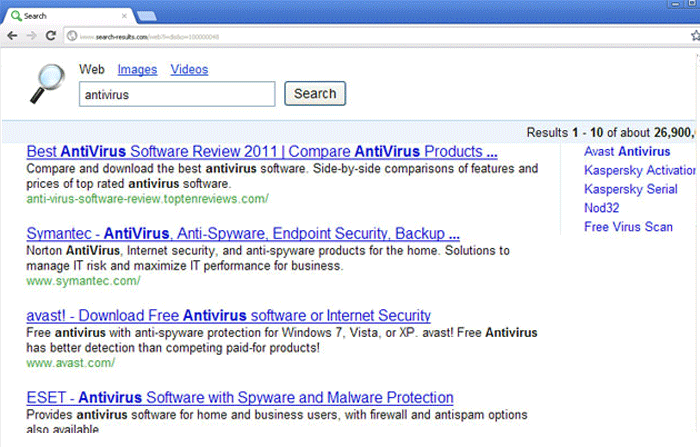
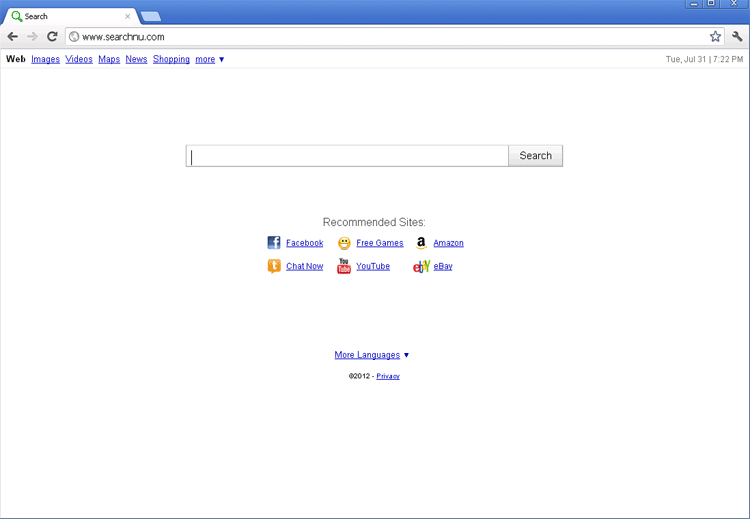 Searchqu is an unwanted installation, which is added to a content the users actually intended to download. Searchqu does not spread via a computer trojan or worm application. Searchqu is not also a software program that adds its components onto a targeted computer system. Searchqu resets browser's homepage to searchqu.com and adds a toolbar to a web browser. Searchqu tries to replace popular search engines hindering access to them and offering its own search tool. Since Searchqu is not specified in the Add/Remove Programs menu, it cannot be merely uninstalled this way. To remove Searchqu, if it's really annoying, delete its entries. You may also uninstall Searchqu in your web browser's menu, but using ultimate technique of the Searchqu removal is preferable to guarantee it is eliminated completely.
File System Modifications
- The following files were created in the system:
# File Name 1 %AppData%\searchqutoolbar\ 2 %AppData%\searchqutoolbar\coupons\categories.xml 3 %AppData%\searchqutoolbar\coupons\merchants.xml 4 %AppData%\searchqutoolbar\coupons\merchants2.xml 5 %AppData%\searchqutoolbar\dtx.ini 6 %AppData%\searchqutoolbar\guid.dat 7 %AppData%\searchqutoolbar\log.txt 8 %AppData%\searchqutoolbar\preferences.dat 9 %AppData%\searchqutoolbar\stat.log 10 %AppData%\searchqutoolbar\stats.dat 11 %AppData%\searchqutoolbar\uninstallIE.dat 12 %AppData%\searchqutoolbar\uninstallStatIE.dat 13 %AppData%\searchqutoolbar\version.xml 14 %Temp%\searchqutoolbar-manifest.xml
Registry Modifications
- The following newly produced Registry Values are:
HKEY..\..\..\..{Subkeys}HKEY_LOCAL_MACHINE\SOFTWARE\ClassesHKEY_LOCAL_MACHINE\SOFTWARE\Classes\CLSID\{99079a25-328f-4bd4-be04-00955acaa0a7} "Searchqu Toolbar"HKEY_LOCAL_MACHINE\SOFTWARE\Classes\CLSID\{99079a25-328f-4bd4-be04-00955acaa0a7}\InprocServer32 "C:\PROGRA~1\WINDOW~4\ToolBar\searchqudtx.dll"HKEY_LOCAL_MACHINE\SOFTWARE\Classes\CLSID\{A40DC6C5-79D0-4ca8-A185-8FF989AF1115} "UrlHelper Class"HKEY_LOCAL_MACHINE\SOFTWARE\Classes\CLSID\{A40DC6C5-79D0-4ca8-A185-8FF989AF1115}\ProgID "SearchQUIEHelper.UrlHelper.1"HKEY_LOCAL_MACHINE\SOFTWARE\Classes\CLSID\{A40DC6C5-79D0-4ca8-A185-8FF989AF1115}\VersionIndependentProgID "SearchQUIEHelper.UrlHelper"HKEY_LOCAL_MACHINE\SOFTWARE\Classes\SearchQUIEHelper.DNSGuard.1HKEY_LOCAL_MACHINE\SOFTWARE\Classes\SearchQUIEHelper.DNSGuard\CLSIDHKEY_LOCAL_MACHINE\SOFTWARE\Classes\SearchQUIEHelper.DNSGuard\CurVerHKEY_LOCAL_MACHINE\SOFTWARE\Microsoft\Internet Explorer\Toolbar "Searchqu Toolbar"HKEY_LOCAL_MACHINE\SOFTWARE\Microsoft\Windows\CurrentVersion\Explorer\Browser Helper Objects\{99079a25-328f-4bd4-be04-00955acaa0a7} "Searchqu Toolbar"HKEY..\..\..\..{RegistryKeys}\SearchQUIEHelper.DNSGuard
Technical Details
File System Modifications
Tutorials: If you wish to learn how to remove malware components manually, you can read the tutorials on how to find malware, kill unwanted processes, remove malicious DLLs and delete other harmful files. Always be sure to back up your PC before making any changes.
The following files were created in the system:%ALLUSERSPROFILE%\Wincert\win32cert.dll
File name: win32cert.dllSize: 7.16 KB (7168 bytes)
MD5: 1ac563ef1ff9e5daf6570d5e413f0a0c
Detection count: 35,785
File type: Dynamic link library
Mime Type: unknown/dll
Path: %ALLUSERSPROFILE%\Wincert\win32cert.dll
Group: Malware file
Last Updated: February 2, 2025
C:\Documents and Settings\<username>\Bureau\Temp de JAPON\datamngrUI.exe.3118734
File name: datamngrUI.exe.3118734Size: 796.6 KB (796608 bytes)
MD5: 1600fccbe1f8b062fafa82bdba2bba63
Detection count: 347
Mime Type: unknown/3118734
Path: C:\Documents and Settings\<username>\Bureau\Temp de JAPON\datamngrUI.exe.3118734
Group: Malware file
Last Updated: April 13, 2023
%PROGRAMFILES(x86)%\Search Results Toolbar\Datamngr\DatamngrCoordinator.exe
File name: DatamngrCoordinator.exeSize: 4.45 MB (4454912 bytes)
MD5: 0b77a81da0124a1f9ff415d15f110548
Detection count: 295
File type: Executable File
Mime Type: unknown/exe
Path: %PROGRAMFILES(x86)%\Search Results Toolbar\Datamngr
Group: Malware file
Last Updated: May 26, 2017
C:\Program Files (x86)\Music Toolbar\Datamngr\SRTOOL~1\IE\__searchresultsDx.dll
File name: __searchresultsDx.dllSize: 92.59 KB (92592 bytes)
MD5: 85daab2fb836f70e9200967dd270d3b6
Detection count: 283
File type: Dynamic link library
Mime Type: unknown/dll
Path: C:\Program Files (x86)\Music Toolbar\Datamngr\SRTOOL~1\IE\__searchresultsDx.dll
Group: Malware file
Last Updated: April 5, 2022
%PROGRAMFILES%\Windows Searchqu Toolbar\Datamngr\datamngrUI.exe
File name: datamngrUI.exeSize: 1.61 MB (1616784 bytes)
MD5: 6d22910188808d0fcb90ff7e3da6c2a5
Detection count: 47
File type: Executable File
Mime Type: unknown/exe
Path: %PROGRAMFILES%\Windows Searchqu Toolbar\Datamngr
Group: Malware file
Last Updated: December 4, 2012
%PROGRAMFILES%\Music App\Datamngr\SRTOOL~1\IE\searchresultsDx.dll
File name: searchresultsDx.dllSize: 115.58 KB (115584 bytes)
MD5: 306c370c7770a19e53dd1e9c34a5ebef
Detection count: 16
File type: Dynamic link library
Mime Type: unknown/dll
Path: %PROGRAMFILES%\Music App\Datamngr\SRTOOL~1\IE
Group: Malware file
Last Updated: May 25, 2017
More files
Registry Modifications
CLSID{9BB47C17-9C68-4BB3-B188-DD9AF0FD2406}{f34c9277-6577-4dff-b2d7-7d58092f272f}Regexp file mask%PROGRAMFILES%\Mozilla Firefox\searchplugins\Search_Results.xml%PROGRAMFILES(x86)%\Mozilla Firefox\searchplugins\Search_Results.xmlHKEY..\..\..\..{RegistryKeys}Software\Microsoft\Internet Explorer\SearchScopes\{9BB47C17-9C68-4BB3-B188-DD9AF0FD2101}SOFTWARE\Microsoft\Internet Explorer\SearchScopes\{9BB47C17-9C68-4BB3-B188-DD9AF0FD2102}SOFTWARE\Microsoft\Internet Explorer\SearchScopes\{9BB47C17-9C68-4BB3-B188-DD9AF0FD21}Software\Microsoft\Internet Explorer\SearchScopes\{9BB47C17-9C68-4BB3-B188-DD9AF0FD2406}Software\Microsoft\Windows\CurrentVersion\Explorer\Browser Helper Objects\{C1ED9DA0-AFD0-4b90-AC6A-D3874F591014}SOFTWARE\Wow6432Node\Microsoft\Internet Explorer\SearchScopes\{9BB47C17-9C68-4BB3-B188-DD9AF0FD2102}SOFTWARE\Wow6432Node\Microsoft\Internet Explorer\SearchScopes\{9BB47C17-9C68-4BB3-B188-DD9AF0FD21}Software\Wow6432Node\Microsoft\Windows\CurrentVersion\Explorer\Browser Helper Objects\{C1ED9DA0-AFD0-4b90-AC6A-D3874F591014}HKEY_LOCAL_MACHINE\Software\[APPLICATION]\Microsoft\Windows\CurrentVersion\Uninstall..{Uninstaller}Searchqu Toolbar
Leave a Reply
Please note that we are not able to assist with billing and support issues regarding SpyHunter or other products. If you're having issues with SpyHunter, please get in touch with SpyHunter customer support through your SpyHunter . If you have SpyHunter billing questions, we recommend you check the Billing FAQ. For general suggestions or feedback, contact us.