Chit Chat
Posted: September 6, 2011
Threat Metric
The following fields listed on the Threat Meter containing a specific value, are explained in detail below:
Threat Level: The threat level scale goes from 1 to 10 where 10 is the highest level of severity and 1 is the lowest level of severity. Each specific level is relative to the threat's consistent assessed behaviors collected from SpyHunter's risk assessment model.
Detection Count: The collective number of confirmed and suspected cases of a particular malware threat. The detection count is calculated from infected PCs retrieved from diagnostic and scan log reports generated by SpyHunter.
Volume Count: Similar to the detection count, the Volume Count is specifically based on the number of confirmed and suspected threats infecting systems on a daily basis. High volume counts usually represent a popular threat but may or may not have infected a large number of systems. High detection count threats could lay dormant and have a low volume count. Criteria for Volume Count is relative to a daily detection count.
Trend Path: The Trend Path, utilizing an up arrow, down arrow or equal symbol, represents the level of recent movement of a particular threat. Up arrows represent an increase, down arrows represent a decline and the equal symbol represent no change to a threat's recent movement.
% Impact (Last 7 Days): This demonstrates a 7-day period change in the frequency of a malware threat infecting PCs. The percentage impact correlates directly to the current Trend Path to determine a rise or decline in the percentage.
| Threat Level: | 8/10 |
|---|---|
| Infected PCs: | 5 |
| First Seen: | September 6, 2011 |
|---|---|
| Last Seen: | September 30, 2020 |
| OS(es) Affected: | Windows |
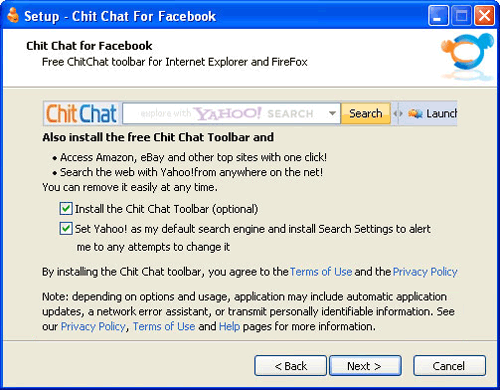 Chit Chat is a spyware program that offers useful instant messaging and social networking features to cover up the fact that Chit Chat is collecting private information from your PC. Because Chit Chat may install several other forms of malicious software and distribute itself along with Relevant Knowledge (a program that SpywareRemove.com malware experts have confirmed to be both spyware and adware), you should remove Chit Chat with a security program that's capable of detecting and deleting multiple types of PC threats. Deleting Chit Chat by manual methods has been noted to fail to remove all of Chit Chat's components and, until you get rid of Chit Chat, your PC will be at the mercy of Chit Chat's constantly-running spying functions and automated updates.
The Straight Talk About What Chit Chat Does to Your PC
Although Chit Chat has been recently endorsed by a variety of social networking groups and offers you useful features, the real intentions behind Chit Chat's existence are somewhat more questionable than Chit Chat's marketing veneer. Chit Chat is distributed along with Relevant Knowledge, Spig search settings, Application Updater and other spyware components that will refuse to be uninstalled by normal methods, even if they pretend to offer you uninstallation utilities.
Like most forms of seemingly benevolent spyware, Chit Chat really does offer you the ability to post messages to Facebook as Chit Chat so claims. Regrettably, this isn't all that Chit Chat does – like the other adware programs that are included with it, Chit Chat will update Chit Chat's features without your permission and will gather personal information from your computer according to Chit Chat's own whims. Primary symptoms of these activities include the presence of unusual memory processes and overall degradation of your computer's performance, especially as it pertains to web-browsing. SpywareRemove.com malware researchers have noted that Chit Chat will attach itself to all major browsers, including Internet Explorer and Firefox.
Bringing This Prying Chit Chat to a Halt
Because Chit Chat pretends to be a beneficial program, Chit Chat does forewarn you about Chit Chat's activities with the following (and grossly understated) line, which is slipped in at the bottom of an installation window:
Depending on options and usage, application may include automatic applications updates, a network error assistant, or transmit personally identifiable information.
Because SpywareRemove.com malware experts have found that most Chit Chat programs are installed via opt-out installation procedures, you should be careful to avoid clicking through any installation processes without reading them. One of these automatically-checked boxes may very well be Chit Chat, Relevant Knowledge or a similar form of adware.
Although Chit Chat claims that Chit Chat can be removed 'easily' and 'at any time,' this isn't exactly true. Trying to remove Chit Chat without help from a dedicated anti-malware program will result in some components of Chit Chat remaining behind. However, since Chit Chat hasn't been noted to take steps to disable security software, a simple scan of your PC with appropriate security applications should delete Chit Chat as quickly as you could want.
Technical Details
File System Modifications
Tutorials: If you wish to learn how to remove malware components manually, you can read the tutorials on how to find malware, kill unwanted processes, remove malicious DLLs and delete other harmful files. Always be sure to back up your PC before making any changes.
The following files were created in the system:C:\Program Files\Chit Chat Toolbar\WidgiHelper.exe
File name: C:\Program Files\Chit Chat Toolbar\WidgiHelper.exeFile type: Executable File
Mime Type: unknown/exe
Group: Malware file
C:\Program Files\Common Files\Spigot\Search Settings\SearchSettings.exe
File name: C:\Program Files\Common Files\Spigot\Search Settings\SearchSettings.exeFile type: Executable File
Mime Type: unknown/exe
Group: Malware file
C:\Program Files\Common Files\Spigot\wtxpcomr
File name: C:\Program Files\Common Files\Spigot\wtxpcomrGroup: Malware file
C:\Program Files\Application Updater\ApplicationUpdater.exe
File name: C:\Program Files\Application Updater\ApplicationUpdater.exeFile type: Executable File
Mime Type: unknown/exe
Group: Malware file
C:\Program Files\Chit Chat For Facebook\CCFFBPlugin.dll
File name: C:\Program Files\Chit Chat For Facebook\CCFFBPlugin.dllFile type: Dynamic link library
Mime Type: unknown/dll
Group: Malware file
C:\Program Files\Chit Chat For Facebook\emot.bmp
File name: C:\Program Files\Chit Chat For Facebook\emot.bmpMime Type: unknown/bmp
Group: Malware file
C:\Program Files\Chit Chat For Facebook\Facebook-Chat-EULA-1.txt
File name: C:\Program Files\Chit Chat For Facebook\Facebook-Chat-EULA-1.txtMime Type: unknown/txt
Group: Malware file
C:\Program Files\Chit Chat For Facebook\skin.skn
File name: C:\Program Files\Chit Chat For Facebook\skin.sknMime Type: unknown/skn
Group: Malware file
C:\Program Files\Chit Chat For Facebook\unins000.dat
File name: C:\Program Files\Chit Chat For Facebook\unins000.datFile type: Data file
Mime Type: unknown/dat
Group: Malware file
C:\Program Files\Chit Chat For Facebook\unins000.exe
File name: C:\Program Files\Chit Chat For Facebook\unins000.exeFile type: Executable File
Mime Type: unknown/exe
Group: Malware file
C:\Program Files\Chit Chat For Facebook\Updater.exe
File name: C:\Program Files\Chit Chat For Facebook\Updater.exeFile type: Executable File
Mime Type: unknown/exe
Group: Malware file
C:\Program Files\Chit Chat For Facebook
File name: C:\Program Files\Chit Chat For FacebookGroup: Malware file
C:\Program Files\Chit Chat For Facebook\Emoticons
File name: C:\Program Files\Chit Chat For Facebook\EmoticonsGroup: Malware file
C:\Program Files\Chit Chat For Facebook\Langs
File name: C:\Program Files\Chit Chat For Facebook\LangsGroup: Malware file
C:\Program Files\Chit Chat For Facebook\Sounds
File name: C:\Program Files\Chit Chat For Facebook\SoundsGroup: Malware file
C:\Program Files\Chit Chat For Facebook\CCFFacebook.exe
File name: C:\Program Files\Chit Chat For Facebook\CCFFacebook.exeFile type: Executable File
Mime Type: unknown/exe
Group: Malware file
C:\Program Files\Chit Chat Toolbar
File name: C:\Program Files\Chit Chat ToolbarGroup: Malware file
C:\Program Files\Chit Chat Toolbar\FF
File name: C:\Program Files\Chit Chat Toolbar\FFGroup: Malware file
C:\Program Files\Chit Chat Toolbar\IE
File name: C:\Program Files\Chit Chat Toolbar\IEGroup: Malware file
C:\Program Files\Chit Chat Toolbar\Res
File name: C:\Program Files\Chit Chat Toolbar\ResGroup: Malware file
Registry Modifications
HKEY..\..\..\..{Subkeys}HKEY_LOCAL_MACHINE\SOFTWARE\Chit ChatHKEY_LOCAL_MACHINE\SOFTWARE\Microsoft\Internet Explorer\Toolbar "Chit Chat Toolbar"HKEY_CURRENT_USER\Software\AppDataLow\Software\Chit ChatHKEY_CURRENT_USER\Software\Facebook Chat ClientHKEY_CURRENT_USER\Software\Microsoft\Windows\CurrentVersion\Run "Chit Chat for Facebook"
Additional Information
| # | Message |
|---|---|
| 1 | Depending on options and usage, application may include automatic applications updates, a network error assistant, or transmit personally identifiable information. |
Leave a Reply
Please note that we are not able to assist with billing and support issues regarding SpyHunter or other products. If you're having issues with SpyHunter, please get in touch with SpyHunter customer support through your SpyHunter . If you have SpyHunter billing questions, we recommend you check the Billing FAQ. For general suggestions or feedback, contact us.