Facemoods Toolbar
Posted: August 27, 2010
Threat Metric
The following fields listed on the Threat Meter containing a specific value, are explained in detail below:
Threat Level: The threat level scale goes from 1 to 10 where 10 is the highest level of severity and 1 is the lowest level of severity. Each specific level is relative to the threat's consistent assessed behaviors collected from SpyHunter's risk assessment model.
Detection Count: The collective number of confirmed and suspected cases of a particular malware threat. The detection count is calculated from infected PCs retrieved from diagnostic and scan log reports generated by SpyHunter.
Volume Count: Similar to the detection count, the Volume Count is specifically based on the number of confirmed and suspected threats infecting systems on a daily basis. High volume counts usually represent a popular threat but may or may not have infected a large number of systems. High detection count threats could lay dormant and have a low volume count. Criteria for Volume Count is relative to a daily detection count.
Trend Path: The Trend Path, utilizing an up arrow, down arrow or equal symbol, represents the level of recent movement of a particular threat. Up arrows represent an increase, down arrows represent a decline and the equal symbol represent no change to a threat's recent movement.
% Impact (Last 7 Days): This demonstrates a 7-day period change in the frequency of a malware threat infecting PCs. The percentage impact correlates directly to the current Trend Path to determine a rise or decline in the percentage.
| Ranking: | 8,871 |
|---|---|
| Threat Level: | 1/10 |
| Infected PCs: | 81,582 |
| First Seen: | August 27, 2010 |
|---|---|
| Last Seen: | March 4, 2025 |
| OS(es) Affected: | Windows |
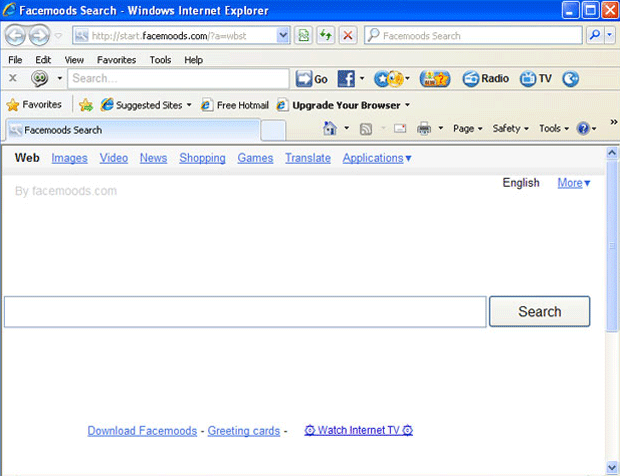 Facemoods is a toolbar that provides Facebook emoticons and other text enhancements. Although Facemoods hasn't been classified as a form of malware by the majority of PC security brands, SpywareRemove.com malware research team has found that Facemoods contains many characteristics of malicious software, such as installing features and the entire toolbar without your consent, changing your browser settings, avoiding easy deletion, hijacking your web browser and harvesting confidential information. Facemoods may not be as dangerous as a Banker Trojan or a rootkit, but overall, its attributes are primarily negative, and removing Facemoods is encouraged to insure the safety and privacy of your PC.
Why the Look on Your Face Should Be a Frown After Facemoods Attacks
Facemoods is promoted at the facemoods.com website in the form of a useful emoticon-enabling tool for Facebook and other forms of text-based communication. Even though facemoods.com makes Facemoods sound both harmless and handy, Facemoods has a number of traits that make Facemoods mildly to moderately malicious. Perhaps the most dangerous aspect of Facemoods that SpywareRemove.com malware researchers have noted is its tendency to install itself without your consent. If you've had any contact with facemoods.com or other websites with poor reputations, you may be the victim of drive-by-download script attacks that install Facemoods.
Other issues that SpywareRemove.com malware analysts have found with Facemoods include:
- Facemoods will change your browser settings, such as your homepage, without your permission. Furthermore, Facemoods will refuse to allow you to change these settings back to their original values (at least, not until you've removed Facemoods itself).
- Trying to delete Facemoods is far more difficult than it would be for any legitimate toolbar, and may require anti-malware software to remove all Facemoods components.
- Even though Facemoods offers opt-out selections for many of its features during the installation process, Facemoods will still install all of its questionable features even if you try to don't check them.
- Facemoods will engage in browser hijacker-like behavior by changing your search engine without your permission.
- Most dangerously, SpywareRemove.com malware experts have found that Facemoods will harvest private information from Facebook profiles that Facemoods can access. This can include email addresses, street addresses, phone numbers and account passwords.
Wiping the Smirk Off of the Face of Facemoods
Because Facemoods is a recently-classified threat as of August 2011, many forms of security software haven't identified Facemoods as a definitive threat. However, some software may classify Facemoods, rather mildly, as a variant of Win32/SweetIM.B or as a 'potentially unwanted application.' Regardless of what type of anti-malware program you're using, keeping your software up-to-date for threat definitions will help you delete Facemoods and its various components. Until this is accomplished, it's strongly suggested that you avoid using links that are related to Facemoods browser hijacks, since these links may contain malware of their own or be hostile to your PC in other ways.
Aliases
Technical Details
File System Modifications
Tutorials: If you wish to learn how to remove malware components manually, you can read the tutorials on how to find malware, kill unwanted processes, remove malicious DLLs and delete other harmful files. Always be sure to back up your PC before making any changes.
The following files were created in the system:%PROGRAMFILES%\facemoods.com\facemoods\1.4.15.13\bh\facemoods.dll
File name: facemoods.dllSize: 262.14 KB (262144 bytes)
MD5: 2348e190716b38329163c2882e1169c0
Detection count: 7,073
File type: Dynamic link library
Mime Type: unknown/dll
Path: %PROGRAMFILES%\facemoods.com\facemoods\1.4.15.13\bh
Group: Malware file
Last Updated: November 8, 2022
C:\Disks\Frompassport\OviriBaks\Users\<username>\AppData\Local\facemoods.exe
File name: facemoods.exeSize: 1.22 MB (1229360 bytes)
MD5: 5f856a489cc99dff30713f9fdab715df
Detection count: 4,354
File type: Executable File
Mime Type: unknown/exe
Path: C:\Disks\Frompassport\OviriBaks\Users\<username>\AppData\Local\facemoods.exe
Group: Malware file
Last Updated: September 13, 2024
%SYSTEMDRIVE%\GSBackup\T-VALAUSC\Program Files (x86)\facemoods.com\facemoods\1.4.17.8\facemoodssrv.exe
File name: facemoodssrv.exeSize: 329.43 KB (329432 bytes)
MD5: 080a028f48fe7a732e268df388f26c43
Detection count: 3,188
File type: Executable File
Mime Type: unknown/exe
Path: %SYSTEMDRIVE%\GSBackup\T-VALAUSC\Program Files (x86)\facemoods.com\facemoods\1.4.17.8\facemoodssrv.exe
Group: Malware file
Last Updated: June 21, 2024
D:\Archivos\Programas\Protección PC\Hijackthis\backups\backup-20110617-201200-930.dll
File name: backup-20110617-201200-930.dllSize: 262.14 KB (262144 bytes)
MD5: 2ebb4879e920a1453d5941cf4d226113
Detection count: 1,958
File type: Dynamic link library
Mime Type: unknown/dll
Path: D:\Archivos\Programas\Protección PC\Hijackthis\backups\backup-20110617-201200-930.dll
Group: Malware file
Last Updated: August 14, 2024
%PROGRAMFILES%\facemoods.com\facemoods\1.4.17.4\bhfacemoods.dll
File name: %PROGRAMFILES%\facemoods.com\facemoods\1.4.17.4\bhfacemoods.dllFile type: Dynamic link library
Mime Type: unknown/dll
Group: Malware file
%PROGRAMFILES%\facemoods.com\facemoods\1.4.17.4\facemoods.crx
File name: %PROGRAMFILES%\facemoods.com\facemoods\1.4.17.4\facemoods.crxMime Type: unknown/crx
Group: Malware file
%PROGRAMFILES%\facemoods.com\facemoods\1.4.17.4\facemoods.png
File name: %PROGRAMFILES%\facemoods.com\facemoods\1.4.17.4\facemoods.pngMime Type: unknown/png
Group: Malware file
%PROGRAMFILES%\facemoods.com\facemoods\1.4.17.4\facemoodsApp.dll
File name: %PROGRAMFILES%\facemoods.com\facemoods\1.4.17.4\facemoodsApp.dllFile type: Dynamic link library
Mime Type: unknown/dll
Group: Malware file
%PROGRAMFILES%\facemoods.com\facemoods\1.4.17.4\facemoodsEng.dll
File name: %PROGRAMFILES%\facemoods.com\facemoods\1.4.17.4\facemoodsEng.dllFile type: Dynamic link library
Mime Type: unknown/dll
Group: Malware file
%PROGRAMFILES%\facemoods.com\facemoods\1.4.17.4\facemoodssrv.exe
File name: %PROGRAMFILES%\facemoods.com\facemoods\1.4.17.4\facemoodssrv.exeFile type: Executable File
Mime Type: unknown/exe
Group: Malware file
%PROGRAMFILES%\facemoods.com\facemoods\1.4.17.4\facemoodsTlbr.dll
File name: %PROGRAMFILES%\facemoods.com\facemoods\1.4.17.4\facemoodsTlbr.dllFile type: Dynamic link library
Mime Type: unknown/dll
Group: Malware file
%PROGRAMFILES%\facemoods.com\facemoods\1.4.17.4\uninstall.exe
File name: %PROGRAMFILES%\facemoods.com\facemoods\1.4.17.4\uninstall.exeFile type: Executable File
Mime Type: unknown/exe
Group: Malware file
More files
Registry Modifications
CLSID{12A5F606-B1EC-474C-83ED-95E99FD8058E}{542FA950-C57A-4E17-B3E1-D935DFE15DEE}{5B035F86-41B5-40F1-AAAD-3D219F30244E}{6365AC7B-9920-4D8B-AF5D-3BDFEAC340A8}{6A934270-717F-4BC3-BA59-BC9BED47A8D2}{74C012C4-00FB-4F04-9AFB-4AD5449D2018}{79B13431-CCAC-4097-8889-D0289E5E924F}{8B8558F6-DC26-4F39-8417-34B8934AA459}{8C8D5C57-3CAD-4CF9-BCAD-F873678DA883}{981334CB-7B8B-431F-B86D-67B7426B125B}{A3A2A5C0-1306-4D1A-A093-9CECA4230002}{A5B99E41-E157-4209-8AAC-DB003A816079}{AD20D01C-C939-4dd2-8C55-56935A48987E}{AD25754E-D76C-42B3-A335-2F81478B722F}{C1C2FC43-F042-4F17-AEDB-C5ABF3B42E4B}{C8D424EF-CB21-49A0-8659-476FBAB0F8E8}{DDE2C74F-58CC-4d71-8CE1-09DEBB8CFB78}{E95EAD3F-18C6-4304-9DC6-BD6FD8E11D37}{F7EC6286-297C-4981-9DCC-FD7F57BC24C9}HKEY..\..\{CLSID Path}HKEY_CURRENT_USER\Software\Microsoft\Internet Explorer\SearchScopes\{0D7562AE-8EF6-416d-A838-AB665251703A} "Facemoods Search"HKEY..\..\..\..{Subkeys}HKEY_CURRENT_USER\Software\facemoods.comHKEY_CURRENT_USER\Software\facemoods.com\facemoodsinstlHKEY_CURRENT_USER\Software\Microsoft\Internet Explorer\Main "http://start.facemoods.com/?a=w7th"HKEY_CURRENT_USER\Software\Microsoft\Windows\ShellNoRoam\MUICache "facemoodssrv"HKEY_LOCAL_MACHINE\SOFTWARE\Microsoft\Internet Explorer\Search "SearchAssistant"HKEY_LOCAL_MACHINE\SOFTWARE\Microsoft\Internet Explorer\Toolbar "facemoods Toolbar"HKEY_LOCAL_MACHINE\SOFTWARE\Microsoft\Windows\CurrentVersion\Run "facemoods"HKEY_LOCAL_MACHINE\SOFTWARE\Microsoft\Windows\CurrentVersion\Uninstall\facemoodHKEY..\..\..\..{RegistryKeys}SOFTWARE\Classes\facemoods.dskBndSOFTWARE\Classes\facemoods.dskBnd.1SOFTWARE\Classes\facemoods.facemoodsHlprSOFTWARE\Classes\facemoods.facemoodsHlpr.1SOFTWARE\Classes\facemoods.xtrnlSOFTWARE\Classes\facemoods.xtrnl.1SOFTWARE\Classes\facemoodsApp.appCoreSOFTWARE\Classes\facemoodsApp.appCore.1Software\Microsoft\Internet Explorer\Approved Extensions\{64182481-4F71-486B-A045-B233BD0DA8FC}Software\Microsoft\Internet Explorer\Approved Extensions\{DB4E9724-F518-4DFD-9C7C-78B52103CAB9}SOFTWARE\Microsoft\Internet Explorer\Low Rights\ElevationPolicy\{FFDF9EF3-3C3A-4f05-9A6E-5D3B778EC567}SOFTWARE\Microsoft\Internet Explorer\Toolbar\{DB4E9724-F518-4dfd-9C7C-78B52103CAB9}SOFTWARE\Microsoft\Windows\CurrentVersion\explorer\Browser Helper Objects\{64182481-4F71-486b-A045-B233BD0DA8FC}Software\Microsoft\Windows\CurrentVersion\Ext\Settings\{64182481-4F71-486B-A045-B233BD0DA8FC}Software\Microsoft\Windows\CurrentVersion\Ext\Settings\{DB4E9724-F518-4DFD-9C7C-78B52103CAB9}Software\Microsoft\Windows\CurrentVersion\Ext\Stats\{64182481-4F71-486B-A045-B233BD0DA8FC}Software\Microsoft\Windows\CurrentVersion\Ext\Stats\{DB4E9724-F518-4DFD-9C7C-78B52103CAB9}SOFTWARE\Wow6432Node\Microsoft\Internet Explorer\Low Rights\ElevationPolicy\{FFDF9EF3-3C3A-4f05-9A6E-5D3B778EC567}SOFTWARE\Wow6432Node\Microsoft\Internet Explorer\Toolbar\{DB4E9724-F518-4dfd-9C7C-78B52103CAB9}SOFTWARE\Wow6432Node\Microsoft\Windows\CurrentVersion\explorer\Browser Helper Objects\{64182481-4F71-486b-A045-B233BD0DA8FC}HKEY_LOCAL_MACHINE\Software\[APPLICATION]\Microsoft\Windows\CurrentVersion\Uninstall..{Uninstaller}facemoods
Leave a Reply
Please note that we are not able to assist with billing and support issues regarding SpyHunter or other products. If you're having issues with SpyHunter, please get in touch with SpyHunter customer support through your SpyHunter . If you have SpyHunter billing questions, we recommend you check the Billing FAQ. For general suggestions or feedback, contact us.