FreeKeylogger
Posted: June 7, 2007
Threat Metric
The Threat Meter is a malware assessment that SpywareRemove.com's research team is able to
give every identifiable malware threat. Our Threat Meter includes several criteria based off of
specific malware threats to value their severity, reach and volume. The Threat Meter is able to give
you a numerical breakdown of each threat's initial Threat Level, Detection Count, Volume Count,
Trend Path and Percentage Impact. The overall ranking of each threat in the Threat Meter is a basic
breakdown of how all threats are ranked within our own extensive malware database. The scoring for
each specific malware threat can be easily compared to other emerging threats to draw a contrast in
its particular severity. The Threat Meter is a useful tool in the endeavor of seeking a solution to
remove a threat or pursue additional analytical research for all types of computer users.
The following fields listed on the Threat Meter containing a specific value, are explained in detail below:
Threat Level: The threat level scale goes from 1 to 10 where 10 is the highest level of severity and 1 is the lowest level of severity. Each specific level is relative to the threat's consistent assessed behaviors collected from SpyHunter's risk assessment model.
Detection Count: The collective number of confirmed and suspected cases of a particular malware threat. The detection count is calculated from infected PCs retrieved from diagnostic and scan log reports generated by SpyHunter.
Volume Count: Similar to the detection count, the Volume Count is specifically based on the number of confirmed and suspected threats infecting systems on a daily basis. High volume counts usually represent a popular threat but may or may not have infected a large number of systems. High detection count threats could lay dormant and have a low volume count. Criteria for Volume Count is relative to a daily detection count.
Trend Path: The Trend Path, utilizing an up arrow, down arrow or equal symbol, represents the level of recent movement of a particular threat. Up arrows represent an increase, down arrows represent a decline and the equal symbol represent no change to a threat's recent movement.
% Impact (Last 7 Days): This demonstrates a 7-day period change in the frequency of a malware threat infecting PCs. The percentage impact correlates directly to the current Trend Path to determine a rise or decline in the percentage.
The following fields listed on the Threat Meter containing a specific value, are explained in detail below:
Threat Level: The threat level scale goes from 1 to 10 where 10 is the highest level of severity and 1 is the lowest level of severity. Each specific level is relative to the threat's consistent assessed behaviors collected from SpyHunter's risk assessment model.
Detection Count: The collective number of confirmed and suspected cases of a particular malware threat. The detection count is calculated from infected PCs retrieved from diagnostic and scan log reports generated by SpyHunter.
Volume Count: Similar to the detection count, the Volume Count is specifically based on the number of confirmed and suspected threats infecting systems on a daily basis. High volume counts usually represent a popular threat but may or may not have infected a large number of systems. High detection count threats could lay dormant and have a low volume count. Criteria for Volume Count is relative to a daily detection count.
Trend Path: The Trend Path, utilizing an up arrow, down arrow or equal symbol, represents the level of recent movement of a particular threat. Up arrows represent an increase, down arrows represent a decline and the equal symbol represent no change to a threat's recent movement.
% Impact (Last 7 Days): This demonstrates a 7-day period change in the frequency of a malware threat infecting PCs. The percentage impact correlates directly to the current Trend Path to determine a rise or decline in the percentage.
| Ranking: | 19,044 |
|---|---|
| Threat Level: | 8/10 |
| Infected PCs: | 27,407 |
| First Seen: | July 24, 2009 |
|---|---|
| Last Seen: | December 12, 2024 |
| OS(es) Affected: | Windows |
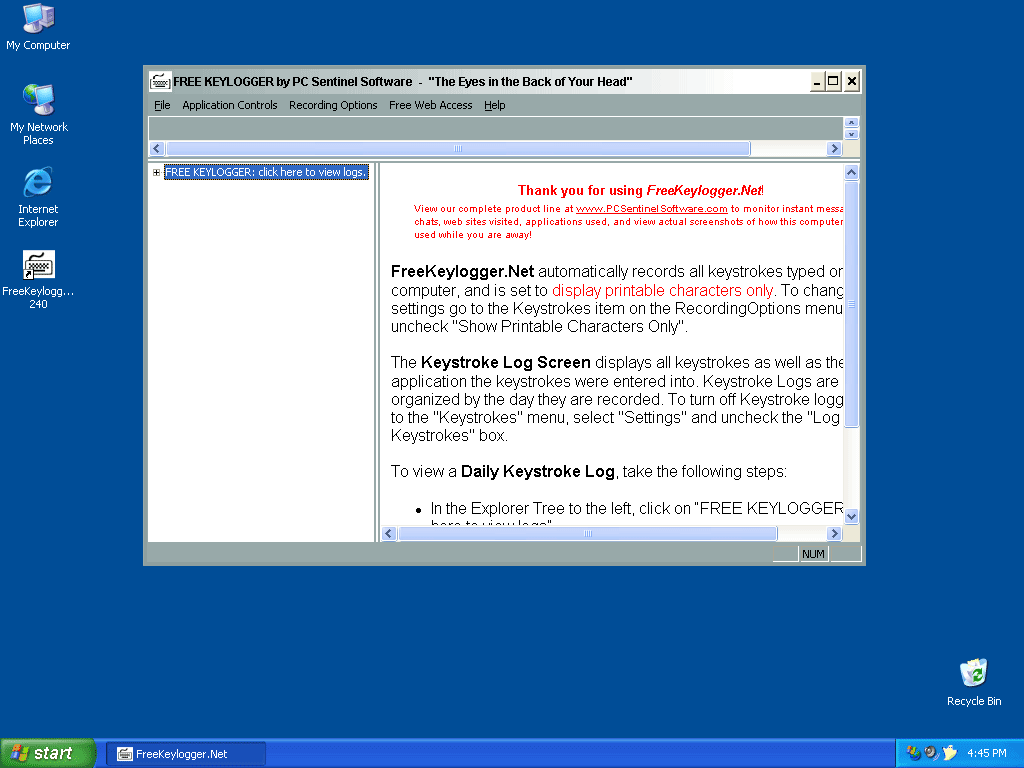 FreeKeylogger is another malicious keylogger program that is created to record your keystrokes, IM and email conversations. FreeKeylogger may also log every web page that you browse and send all the gathered information to the third parties. FreeKeylogger opens up a huge security hole on your computer and is a very dangerous threat to the security of your personal and financial data.
Aliases
Logger.OEQ [AVG]FreeKeyLogger [Sophos]Trojan.KeyLogger.9239 [DrWeb]Heur.Suspicious [Comodo]Application.Keylogger.QFC [BitDefender]not-a-virus:Monitor.Win32.FreeKeylogger.at [Kaspersky]Win32.Spyware.TotalS [eSafe]Win32:PUP-gen [PUP] [Avast]Spyware.AIOLogger [Symantec]Riskware [K7AntiVirus]Spyware-TotalSpy [McAfee]
Technical Details
File System Modifications
Tutorials: If you wish to learn how to remove malware components manually, you can read the tutorials on how to find malware, kill unwanted processes, remove malicious DLLs and delete other harmful files. Always be sure to back up your PC before making any changes.
The following files were created in the system:C:\Program Files (x86)\KG Monitor\service.exe
File name: service.exeSize: 1.2 MB (1204736 bytes)
MD5: fa066525765c6fb6f0ad117a83e87518
Detection count: 279
File type: Executable File
Mime Type: unknown/exe
Path: C:\Program Files (x86)\KG Monitor\service.exe
Group: Malware file
Last Updated: March 10, 2022
%PROGRAMFILES%\KG Monitor\klgratis.exe
File name: klgratis.exeSize: 1.18 MB (1183232 bytes)
MD5: 392bcb35f27d57f28ed801872dc49efa
Detection count: 169
File type: Executable File
Mime Type: unknown/exe
Path: %PROGRAMFILES%\KG Monitor
Group: Malware file
Last Updated: June 4, 2016
C:\Windows\SysWOW64\ntqsi32.dll
File name: ntqsi32.dllSize: 10.75 KB (10752 bytes)
MD5: 7aff4c17d95fd9326af93b9c1a1f32dc
Detection count: 26
File type: Dynamic link library
Mime Type: unknown/dll
Path: C:\Windows\SysWOW64\ntqsi32.dll
Group: Malware file
Last Updated: June 16, 2023
C:\Program Files\Free Key Logger\FreeKeyLogger.exe
File name: FreeKeyLogger.exeSize: 2.5 MB (2503168 bytes)
MD5: bafeb5124a3bba627e13137b1ef73542
Detection count: 14
File type: Executable File
Mime Type: unknown/exe
Path: C:\Program Files\Free Key Logger\FreeKeyLogger.exe
Group: Malware file
Last Updated: June 16, 2023
pcmn651.exe
File name: pcmn651.exeSize: 573.44 KB (573440 bytes)
MD5: cc8aa541804ae1afff7a3ddef969b371
Detection count: 12
File type: Executable File
Mime Type: unknown/exe
Group: Malware file
Last Updated: December 11, 2009
PCFreeKey651.exe
File name: PCFreeKey651.exeSize: 1.16 MB (1167360 bytes)
MD5: bf4e5bfb3ac46973258fedd9d9bf3023
Detection count: 2
File type: Executable File
Mime Type: unknown/exe
Group: Malware file
Last Updated: December 11, 2009
kh651.dll
File name: kh651.dllSize: 77.82 KB (77824 bytes)
MD5: c31bfcd33ab57041cbea9db5d7c77ecd
Detection count: 1
File type: Dynamic link library
Mime Type: unknown/dll
Group: Malware file
Last Updated: December 11, 2009
freekey_setup[1].exe
File name: freekey_setup[1].exeSize: 760.57 KB (760576 bytes)
MD5: 204cd2932dfca870516dc71bcf16a815
Detection count: 0
File type: Executable File
Mime Type: unknown/exe
Group: Malware file
Last Updated: December 11, 2009
More files
Additional Information
The following directories were created:
%APPDATA%\KYLOG Viewer%PROGRAMFILES%\FK View%PROGRAMFILES%\FKLGR Manager%PROGRAMFILES%\FRERKEN Manager%PROGRAMFILES%\KG Monitor%PROGRAMFILES%\KYLOG Viewer%PROGRAMFILES%\KeyViewer%PROGRAMFILES(x86)%\FK View%PROGRAMFILES(x86)%\FKLGR Manager%PROGRAMFILES(x86)%\FRERKEN Manager%PROGRAMFILES(x86)%\KG Monitor%PROGRAMFILES(x86)%\KYLOG Viewer%PROGRAMFILES(x86)%\KeyViewer%ProgramFiles%\Free Key Logger
Leave a Reply
Please note that we are not able to assist with billing and support issues regarding SpyHunter or other products. If you're having issues with SpyHunter, please get in touch with SpyHunter customer support through your SpyHunter . If you have SpyHunter billing questions, we recommend you check the Billing FAQ. For general suggestions or feedback, contact us.