Lemurleap
Posted: September 11, 2013
Threat Metric
The following fields listed on the Threat Meter containing a specific value, are explained in detail below:
Threat Level: The threat level scale goes from 1 to 10 where 10 is the highest level of severity and 1 is the lowest level of severity. Each specific level is relative to the threat's consistent assessed behaviors collected from SpyHunter's risk assessment model.
Detection Count: The collective number of confirmed and suspected cases of a particular malware threat. The detection count is calculated from infected PCs retrieved from diagnostic and scan log reports generated by SpyHunter.
Volume Count: Similar to the detection count, the Volume Count is specifically based on the number of confirmed and suspected threats infecting systems on a daily basis. High volume counts usually represent a popular threat but may or may not have infected a large number of systems. High detection count threats could lay dormant and have a low volume count. Criteria for Volume Count is relative to a daily detection count.
Trend Path: The Trend Path, utilizing an up arrow, down arrow or equal symbol, represents the level of recent movement of a particular threat. Up arrows represent an increase, down arrows represent a decline and the equal symbol represent no change to a threat's recent movement.
% Impact (Last 7 Days): This demonstrates a 7-day period change in the frequency of a malware threat infecting PCs. The percentage impact correlates directly to the current Trend Path to determine a rise or decline in the percentage.
| Ranking: | 19,471 |
|---|---|
| Threat Level: | 2/10 |
| Infected PCs: | 22,604 |
| First Seen: | September 11, 2013 |
|---|---|
| Last Seen: | March 3, 2025 |
| OS(es) Affected: | Windows |
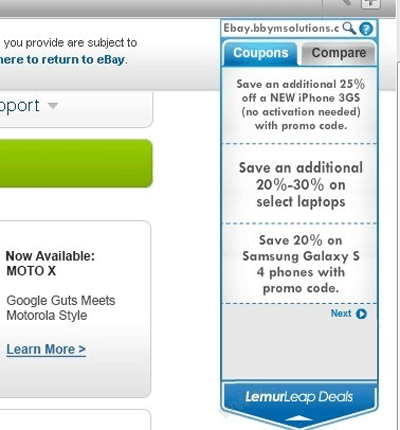 Lemurleap is an adware program that displays advertisements through your browser while providing little to no means of altering the display of these advertisements. In line with the typical strategies of similar adware programs like SaveNShare or Coupon Pigeon, Lemurleap often 'leaps' onto your computer without warning and usually is noticed after Lemurleap begins modifying your browser to display new advertisements and other unwanted changes. While malware researchers would be hesitant to categorize Lemurleap as a threat to your computer to the same degree that a Trojan would be, you should consider removing Lemurleap with anti-malware software as a basic security measure for keeping your Web-browsing settings under your full and unimpeded control.
Lemurleap: When Adware Springs into Action
Lemurleap is a new form of adware brought to you by the same company responsible for Adware.Somoto and related PC threats. Besides the advertisements that are quite possibly its most prominent symptoms, Lemurleap infections also may include some components traditionally associated with browser hijackers, such as functions for changing your browser's homepage to a new site or redirecting your Web searches to other search engines. However, SpywareRemove.com malware experts have not yet identified any cases of Lemurleap using its functions to promote high-level PC threats or other highly toxic types of Web content that would endanger your computer. Therefore, for the most part, Lemurleap should be considered simple adware that only is a small security issue for your PC.
Because of Lemurleap's ties with Somoto, Lemurleap also may be distributed by PUP.BundleInstaller.BI, a software bundle utility that allows multiple types of software to be installed through a single package. If you scan an installer file before opening it and it is detected as a variant of this bundler, SpywareRemove.com malware researchers recommend deleting the file, rather than taking the risk of dealing with Lemurleap or other adware as the price paid for any new programs with questionable benefits.
Turning Lemurleap into a Lemur Stopped in Its Tracks
Adware and PUPs just like Lemurleap may include a variety of fail-safes that prevent them from being deleted from your computer very easily, and SpywareRemove.com malware researchers additionally stress that a single Lemurleap infection also may include several other types of PC threats – whether they're installed through PUP.BundleInstaller.BI or some other method. General anti-malware scans from suitable programs should be able to detect and delete both Lemurleap and any other threat associated with its presence on your computer, and doing so at the first opportunity can only improve your Web-browsing experience.
Installers for Lemurleap and other adware programs may take various formats but may conceal the presence of the adware. Watch for potential Lemurleap installers in such applications as free FTP clients, DVD burners, media players and PDF creation tools, all of which have been favored infection vectors for spreading Lemurleap and other adware to fresh victims.
Technical Details
File System Modifications
Tutorials: If you wish to learn how to remove malware components manually, you can read the tutorials on how to find malware, kill unwanted processes, remove malicious DLLs and delete other harmful files. Always be sure to back up your PC before making any changes.
The following files were created in the system:C:\Program Files\LemurLeap\updateLemurLeap.exe
File name: updateLemurLeap.exeSize: 65.31 KB (65312 bytes)
MD5: f422bb58e93a0451a5ade8bc34e1faea
Detection count: 11,533
File type: Executable File
Mime Type: unknown/exe
Path: C:\Program Files\LemurLeap\updateLemurLeap.exe
Group: Malware file
Last Updated: November 10, 2021
%TEMP%\LemurLeap\LemurLeap_Setup.exe
File name: LemurLeap_Setup.exeSize: 869.24 KB (869248 bytes)
MD5: 09b6be96ed3fae5376f5741d1c576f94
Detection count: 81
File type: Executable File
Mime Type: unknown/exe
Path: %TEMP%\LemurLeap
Group: Malware file
Last Updated: December 18, 2013
%PROGRAMFILES%\LemurLeap\LemurLeapuninstall.exe
File name: LemurLeapuninstall.exeSize: 211.42 KB (211423 bytes)
MD5: c7c992f5482833f30e852fa7078f1e9f
Detection count: 63
File type: Executable File
Mime Type: unknown/exe
Path: %PROGRAMFILES%\LemurLeap
Group: Malware file
Last Updated: December 18, 2013
%PROGRAMFILES%\LemurLeap\LemurLeapbho.dll
File name: LemurLeapbho.dllSize: 149.28 KB (149280 bytes)
MD5: 13c68472bc69471858c8dad73ce27b72
Detection count: 61
File type: Dynamic link library
Mime Type: unknown/dll
Path: %PROGRAMFILES%\LemurLeap
Group: Malware file
Last Updated: December 18, 2013
C:\#GDATA.Trash.Store#\{A69A39E4-653E-4C74-99A1-949749553711}
File name: {A69A39E4-653E-4C74-99A1-949749553711}Size: 175.2 KB (175208 bytes)
MD5: c78539208554bdf5b49d6a17c7965853
Detection count: 19
Path: C:\#GDATA.Trash.Store#\{A69A39E4-653E-4C74-99A1-949749553711}
Group: Malware file
Last Updated: March 27, 2022
C:\Users\<username>\AppData\Local\Microsoft\Windows\Temporary Internet Files\Content.IE5\08ZKOM4J\Setup[1].exe
File name: Setup[1].exeSize: 783.68 KB (783688 bytes)
MD5: fb87c703b9138dbd6596b25a4ce62131
Detection count: 14
File type: Executable File
Mime Type: unknown/exe
Path: C:\Users\<username>\AppData\Local\Microsoft\Windows\Temporary Internet Files\Content.IE5\08ZKOM4J\Setup[1].exe
Group: Malware file
Last Updated: March 27, 2022
More files
Registry Modifications
HKEY..\..\..\..{RegistryKeys}Software\LemurLeapSoftware\Microsoft\Internet Explorer\Approved Extensions\{415419C3-DAD0-4DF1-AC37-22C72AD81878}SOFTWARE\Microsoft\Windows\CurrentVersion\explorer\Browser Helper Objects\{415419c3-dad0-4df1-ac37-22c72ad81878}SOFTWARE\Wow6432Node\LemurLeapSYSTEM\ControlSet001\services\eventlog\Application\Update LemurLeapSYSTEM\ControlSet001\services\Update LemurLeapSYSTEM\CurrentControlSet\services\eventlog\Application\Update LemurLeapHKEY_LOCAL_MACHINE\Software\[APPLICATION]\Microsoft\Windows\CurrentVersion\Uninstall..{Uninstaller}LemurLeap
Leave a Reply
Please note that we are not able to assist with billing and support issues regarding SpyHunter or other products. If you're having issues with SpyHunter, please get in touch with SpyHunter customer support through your SpyHunter . If you have SpyHunter billing questions, we recommend you check the Billing FAQ. For general suggestions or feedback, contact us.