RocketTab
Posted: December 19, 2013
Threat Metric
The following fields listed on the Threat Meter containing a specific value, are explained in detail below:
Threat Level: The threat level scale goes from 1 to 10 where 10 is the highest level of severity and 1 is the lowest level of severity. Each specific level is relative to the threat's consistent assessed behaviors collected from SpyHunter's risk assessment model.
Detection Count: The collective number of confirmed and suspected cases of a particular malware threat. The detection count is calculated from infected PCs retrieved from diagnostic and scan log reports generated by SpyHunter.
Volume Count: Similar to the detection count, the Volume Count is specifically based on the number of confirmed and suspected threats infecting systems on a daily basis. High volume counts usually represent a popular threat but may or may not have infected a large number of systems. High detection count threats could lay dormant and have a low volume count. Criteria for Volume Count is relative to a daily detection count.
Trend Path: The Trend Path, utilizing an up arrow, down arrow or equal symbol, represents the level of recent movement of a particular threat. Up arrows represent an increase, down arrows represent a decline and the equal symbol represent no change to a threat's recent movement.
% Impact (Last 7 Days): This demonstrates a 7-day period change in the frequency of a malware threat infecting PCs. The percentage impact correlates directly to the current Trend Path to determine a rise or decline in the percentage.
| Ranking: | 19,520 |
|---|---|
| Threat Level: | 2/10 |
| Infected PCs: | 61,504 |
| First Seen: | December 20, 2013 |
|---|---|
| Last Seen: | December 27, 2024 |
| OS(es) Affected: | Windows |
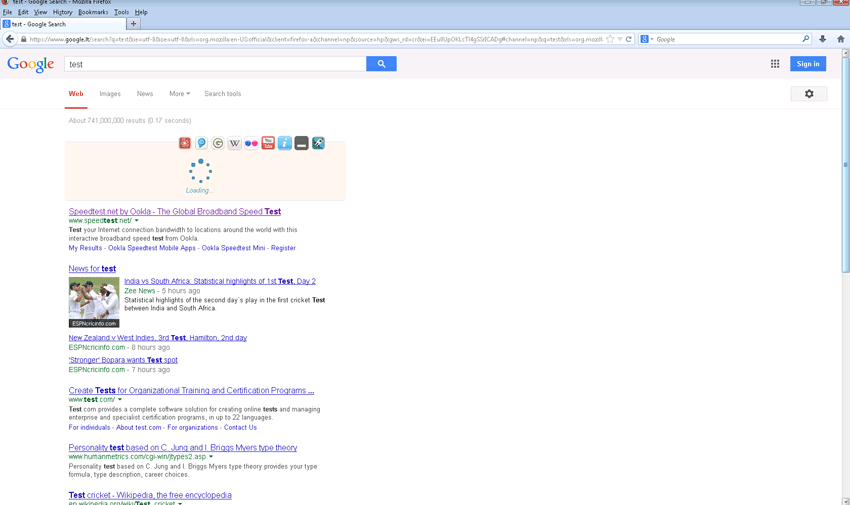 RocketTab is a 'search enhancer' add-on that provides accessible search fields to prevent you from needing to visit popular search engine sites individually. Its functions also include additional advertisements that are injected into a search engine page, which makes it necessary to classify RocketTab as an adware program. RocketTab doesn't need to be considered a high-level threat to your PC's safety, but malware researchers usually do recommend uninstalling adware as a basic part of maintaining an optimized PC. Reliable security products should be trusted to delete RocketTab with no mischances that could leave your browser open to any extra advertisements leftover from RocketTab's stay.
RocketTab: an Add-On that's Keeping Tabs on Your Searches
RocketTab is a Web search-themed add-on, but unlike many similar PUPs, doesn't try to hijack your Web browser or force it to use one particular search engine. Instead of redirecting your traffic, RocketTab simply offers basic links to search engines embedded in its interface, but also uses your searches as an opportunity to launch advertisements. Based on malware researchers' latest reports, RocketTab's advertisements appear to be limited to injected 'sponsored' search results above the natural results of any search engine you may be using. RocketTab's advertisements are labeled and are confined to text, but don't have any guarantees of perfect accuracy to your queries.
Although RocketTab certainly is a classier style of adware product than the majority of those examined by malware experts and doesn't have an apparent cause to be classified as a clone of previously existing software, RocketTab still has few advantages for your Web browser. RocketTab advertisements may not appear to be a major issue, and are unlikely to cause any noticeable performance problems, but still may be sources of attacks against your PC. Fraudulent software updates concealing PC threats often are distributed through the same advertisement networks that are used by adware products.
Lastly, RocketTab also uses cookies and permits its third party advertising partners to use them, as well. Although cookies can't collect sensitive confidential data, they may monitor your basic browsing habits. Some PC users feel that cookies are invasions of their personal privacy, and you usually will not want to keep RocketTab or other adware on your computer if you're interested in keeping your personal habits strictly personal.
Sending RocketTab Blasting Off of Your Browser
Due to all of the issues with even the most user-friendly of adware products, removing RocketTab generally should be considered for a default reaction to RocketTab, unless, of course, you have a reasoned motive for keeping RocketTab on your browser. Although RocketTab may be somewhat responsible to normal uninstallation methods, malware researchers consider it best to use anti-malware tools to remove any Potentially Unwanted Program that modifies your Web browser. Other ways of removing RocketTab may be more or less workable, but often will not delete the browser changes that are causing your browser to load advertisements.
RocketTab is marketed by itself but may use other installation methods, from time to time. The most common of these alternative methods usually are free software bundles that install RocketTab when you're trying to install an unrelated program. Since malware experts find most of these bundles have been distributed through sites with a historical tendency to promote adware, avoiding these obviously
Technical Details
File System Modifications
Tutorials: If you wish to learn how to remove malware components manually, you can read the tutorials on how to find malware, kill unwanted processes, remove malicious DLLs and delete other harmful files. Always be sure to back up your PC before making any changes.
The following files were created in the system:C:\System Volume Information\_restore{8EACE45B-C48E-4A37-A55C-C32F4F7B3227}\RP16\A0010334.exe
File name: A0010334.exeSize: 4.45 MB (4458496 bytes)
MD5: 118700722c5921a62a4610521efbb0f2
Detection count: 710
File type: Executable File
Mime Type: unknown/exe
Path: C:\System Volume Information\_restore{8EACE45B-C48E-4A37-A55C-C32F4F7B3227}\RP16\A0010334.exe
Group: Malware file
Last Updated: November 27, 2020
%PROGRAMFILES%\Search Extensions\uninstall.exe
File name: uninstall.exeSize: 5.95 MB (5958144 bytes)
MD5: 1be4534311a6701babbed12fabab1865
Detection count: 422
File type: Executable File
Mime Type: unknown/exe
Path: %PROGRAMFILES%\Search Extensions
Group: Malware file
Last Updated: April 15, 2023
C:\Users\<username>\AppData\Local\Temp\rtVCVkI7bC.exe
File name: rtVCVkI7bC.exeSize: 6.57 MB (6579712 bytes)
MD5: 02b66add0cc97fff39260bb8f850b471
Detection count: 386
File type: Executable File
Mime Type: unknown/exe
Path: C:\Users\<username>\AppData\Local\Temp\rtVCVkI7bC.exe
Group: Malware file
Last Updated: September 8, 2022
RocketTab.dll
File name: RocketTab.dllSize: 24.84 KB (24848 bytes)
MD5: 721390ac23733f9dad33891344812989
Detection count: 73
File type: Dynamic link library
Mime Type: unknown/dll
Group: Malware file
Last Updated: December 20, 2013
More files
Registry Modifications
HKEY..\..\..\..{RegistryKeys}Software\Microsoft\Internet Explorer\Approved Extensions\{B3791C53-EE85-4A60-8134-3FEE81687D5C}SOFTWARE\Microsoft\Shared Tools\MSConfig\startupreg\RocketTabSOFTWARE\Microsoft\Tracing\gb-installer-core_RASAPI32SOFTWARE\Microsoft\Tracing\gb-installer-core_RASMANCSSOFTWARE\Microsoft\Tracing\rt-installer-gg_RASAPI32SOFTWARE\Microsoft\Tracing\rt-installer-gg_RASMANCSSOFTWARE\Microsoft\Tracing\rt-installer_RASAPI32SOFTWARE\Microsoft\Tracing\rt-installer_RASMANCSSOFTWARE\Microsoft\Windows NT\CurrentVersion\Schedule\TaskCache\Tree\RocketTabSOFTWARE\Microsoft\Windows NT\CurrentVersion\Schedule\TaskCache\Tree\RocketTab Update TaskSoftware\RocketTabSoftware\RocketTabInstalledSoftware\Search Extensions\RocketTabSOFTWARE\Wow6432Node\Microsoft\Tracing\gb-installer-core_RASAPI32SOFTWARE\Wow6432Node\Microsoft\Tracing\gb-installer-core_RASMANCSSOFTWARE\Wow6432Node\Microsoft\Tracing\rt-installer-core_RASAPI32SOFTWARE\Wow6432Node\Microsoft\Tracing\rt-installer-core_RASMANCSSOFTWARE\Wow6432Node\Microsoft\Tracing\rt-installer-gg_RASAPI32SOFTWARE\Wow6432Node\Microsoft\Tracing\rt-installer-gg_RASMANCSSOFTWARE\Wow6432Node\Microsoft\Tracing\rt-installer_RASAPI32SOFTWARE\Wow6432Node\Microsoft\Tracing\rt-installer_RASMANCSSOFTWARE\Wow6432Node\RocketTabHKEY_LOCAL_MACHINE\Software\[APPLICATION]\Microsoft\Windows\CurrentVersion\Uninstall..{Uninstaller}RocketTab
Leave a Reply
Please note that we are not able to assist with billing and support issues regarding SpyHunter or other products. If you're having issues with SpyHunter, please get in touch with SpyHunter customer support through your SpyHunter . If you have SpyHunter billing questions, we recommend you check the Billing FAQ. For general suggestions or feedback, contact us.