Searchcompanion.com
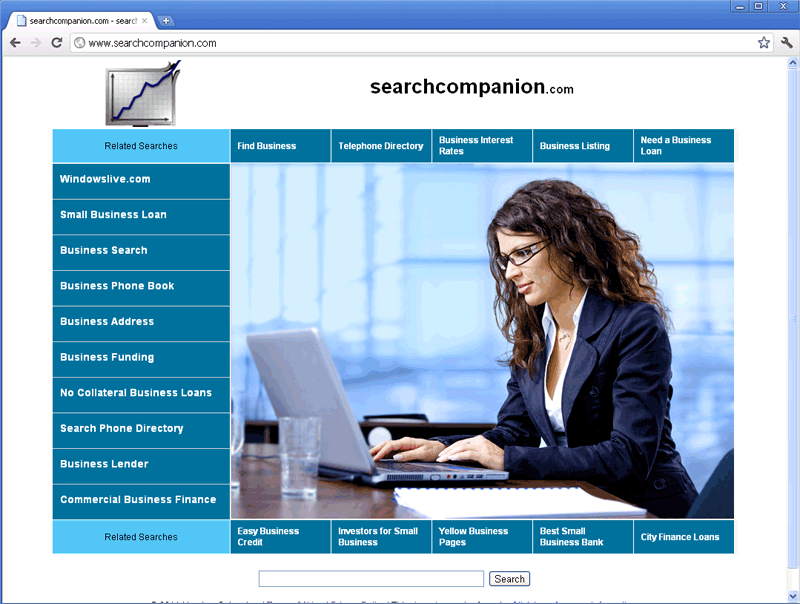 From its title, one would expect Searchcompanion.com to be a useful search engine site, but SpywareRemove.com malware analysts have determined Searchcompanion.com to be a link farm that doesn't provide links to anything, except sites that pay Searchcompanion.com back for the traffic. In addition to this irrelevant and potentially harmful content, Searchcompanion.com has also been noted to use rootkits with browser-redirecting functions to force browsers to load Searchcompanion.com in lieu of unrelated sites. Rootkits can also be responsible for serious lapses in security and privacy, including disabled anti-malware programs, altered firewall settings and corruption of normal system processes. Since rootkits are sophisticated and high-level threats to your PC, it's recommended that you delete them by utilizing a competent anti-malware program to scan your entire computer.
Why You Don't Want to Trust This Backstabbing 'Companion'
Searchcompanion.com uses a relatively standardized format that includes stock photos and lists of general-interest topics (such as 'Getting Business Credit,' a 'Phone Directory' and a 'Business Search' section) to make it look like there's useful business-related info to find at Searchcompanion.com. However, Searchcompanion.com doesn't provide links to legitimate or useful websites, preferring to redirect you to sites that will pay Searchcompanion.com back a few cents, in exchange for the traffic. SpywareRemove.com malware researchers strongly discourage any contact with Searchcompanion.com or related sites, since Searchcompanion.com may expose you to drive-by-download attacks that install malicious software, phishing sites that steal private information or scamware sites that sell fake software products.
Searchcompanion.com is also strongly-affiliated with rootkits like TDSS rootkit, TDL3 rootkit and ZeroAccess rootkit that include browser-redirecting attacks in their arsenals. These rootkits may be installed without your permission and can redirect your browser to Searchcompanion.com, when you perform specific actions (like visiting Google) or at random. You should avoid changing your browser to stop these attacks, since this will fail to do anything about removing the original rootkit that's responsible for the attacks, even if you don't see them.
How to Ditch Searchcompanion.com for Clean Searches and a Healthy PC
SpywareRemove.com malware analysts advise that you take any potential Searchcompanion.com infection seriously, since rootkits that are affiliated with Searchcompanion.com also have the possibility to cause:
- Program-blocking attacks that prevent you from using anti-malware and security software.
- Fake alerts and misleading pop-ups that appear to be from Google Analytics, Microsoft and other types of legitimate sources.
- Changes to your system settings that allow remote criminals to control your PC or install other forms of malicious software on it.
Although rootkits that cause these attacks may lie low and show minimal signs of being present, you should assume that a rootkit is active, if you see any of the aforementioned symptoms and have started Windows in a normal fashion. SpywareRemove.com malware researchers encourage the use of both the advanced boot options menu and an appropriate anti-malware scanner, if you want to block a Searchcompanion.com and remove rootkits without risking harm to Windows.
Leave a Reply
Please note that we are not able to assist with billing and support issues regarding SpyHunter or other products. If you're having issues with SpyHunter, please get in touch with SpyHunter customer support through your SpyHunter . If you have SpyHunter billing questions, we recommend you check the Billing FAQ. For general suggestions or feedback, contact us.