Searchcore.net
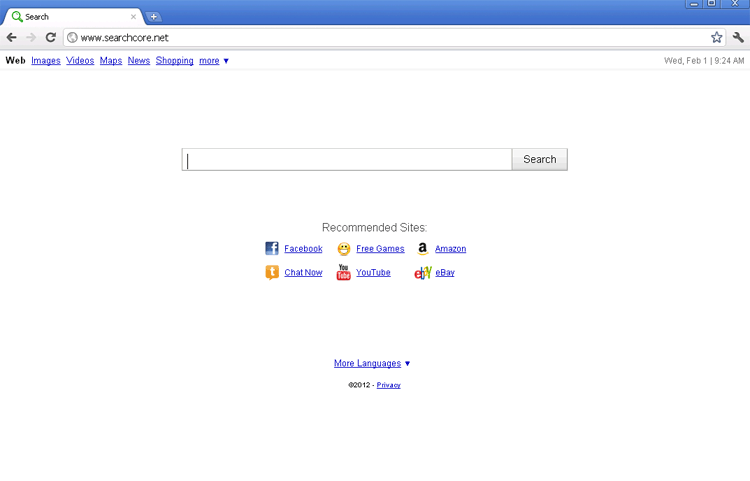 Searchcore.net resembles a normal search engine such as Google, but with at least one crucial difference – Searchcore.net is promoted by browser hijackers that force your web browser to load Searchcore.net regardless of whether or not that's where you wanted to go. Although, at the time of this writing, Searchcore.net hasn't been reported to promote PC threats itself or otherwise attack your computer, browser redirect attacks that promote Searchcore.net should be considered a symptom of infection by a potentially major hazard to your computer's security. Browser hijackers that promote have been linked to the presence of rogue system optimizers and SpywareRemove.com malware experts recommend that you remove both PC threats simultaneously by using a trustworthy anti-malware scanner.
Getting to the Center of Searchcore.net's Liabilities
As far as its appearance goes, Searchcore.net does little to differentiate itself from other types of search engines, but doesn't appear to be directly harmful to your PC. Searchcore.net does include sponsored links in its search results, but as of yet, hasn't been reported for promoting malicious software or using direct attacks against visiting computers. While SpywareRemove.com malware experts aren't able to endorse Searchcore.net's content as such, accidental visits to Searchcore.net or associated sites are, by themselves, unlikely to harm your computer.
Unfortunately, Searchcore.net's reputation has been tainted by association, whether deliberate or inadvertent, with browser hijackers. Most victims of such PC threats have reported that their browser's homepages were changed to Searchcore.net and that any attempts to reverse these setting changes were resisted. However, SpywareRemove.com malware experts warn that browser hijackers that promote Searchcore.net may also be capable of redirecting your browser to Searchcore.net, creating pop-ups or even stealing personal information that's related to your web-browsing activities.
Technical Details
File System Modifications
Tutorials: If you wish to learn how to remove malware components manually, you can read the tutorials on how to find malware, kill unwanted processes, remove malicious DLLs and delete other harmful files. Always be sure to back up your PC before making any changes.
The following files were created in the system:%Documents and Settings%\Application Data\[RANDOM CHARACTERS].dll
File name: %Documents and Settings%\Application Data\[RANDOM CHARACTERS].dllFile type: Dynamic link library
Mime Type: unknown/dll
%Documents and Settings%\Application Data\[RANDOM CHARACTERS].exe
File name: %Documents and Settings%\Application Data\[RANDOM CHARACTERS].exeFile type: Executable File
Mime Type: unknown/exe
%Documents and Settings%\All Users\Application Data\~
File name: %Documents and Settings%\All Users\Application Data\~%Documents and Settings%\Application Data\~r
File name: %Documents and Settings%\Application Data\~rRegistry Modifications
HKEY..\..\..\..{Subkeys}HKEY_CURRENT_USER\Software\Microsoft\Windows\CurrentVersion\Internet Settings "CertificateRevocation" = '0'HKEY_CURRENT_USER\Software\Microsoft\Windows\CurrentVersion\Internet Settings "WarnonBadCertRecving" = '0'HKEY_CURRENT_USER\Software\Microsoft\Windows\CurrentVersion\Run ".exe"HKEY_CURRENT_USER\Software\Microsoft\Windows\CurrentVersion\Run ""HKEY_CURRENT_USER\Software\Microsoft\Windows\CurrentVersion\Policies\ActiveDesktop "NoChangingWallPaper" = '1'HKEY_CURRENT_USER\Software\Microsoft\Windows\CurrentVersion\Policies\Associations "LowRiskFileTypes" = '/{hq:/s`s:/ogn:/uyu:/dyd:/c`u:/bnl:/ble:/sdf:/lrh:/iul:/iulm:/fhg:/clq:/kqf:/`wh:/lqf:/lqdf:/lnw:/lq2:/l2t:/v`w:/rbs:'HKEY_LOCAL_MACHINE\SOFTWARE\Microsoft\Windows\CurrentVersion\policies\system "DisableTaskMgr" = '1'HKEY_CURRENT_USER\Software\Microsoft\Internet Explorer\Download "CheckExeSignatures" = 'no'HKEY_CURRENT_USER\Software\Microsoft\Windows\CurrentVersion\Policies\Attachments "SaveZoneInformation" = '1'HKEY_CURRENT_USER\Software\Microsoft\Windows\CurrentVersion\Policies\System "DisableTaskMgr" = '1'HKEY_CURRENT_USER\Software\Microsoft\Windows\CurrentVersion\Explorer\Advanced "ShowSuperHidden" = '0'HKEY_CURRENT_USER\Software\Microsoft\Internet Explorer\Main "Use FormSuggest" = 'yes'HKEY_CURRENT_USER\Software\Microsoft\Windows\CurrentVersion\Explorer\Advanced "Hidden" = '0'
Leave a Reply
Please note that we are not able to assist with billing and support issues regarding SpyHunter or other products. If you're having issues with SpyHunter, please get in touch with SpyHunter customer support through your SpyHunter . If you have SpyHunter billing questions, we recommend you check the Billing FAQ. For general suggestions or feedback, contact us.