Searchya.com
Posted: March 16, 2012
Threat Metric
The following fields listed on the Threat Meter containing a specific value, are explained in detail below:
Threat Level: The threat level scale goes from 1 to 10 where 10 is the highest level of severity and 1 is the lowest level of severity. Each specific level is relative to the threat's consistent assessed behaviors collected from SpyHunter's risk assessment model.
Detection Count: The collective number of confirmed and suspected cases of a particular malware threat. The detection count is calculated from infected PCs retrieved from diagnostic and scan log reports generated by SpyHunter.
Volume Count: Similar to the detection count, the Volume Count is specifically based on the number of confirmed and suspected threats infecting systems on a daily basis. High volume counts usually represent a popular threat but may or may not have infected a large number of systems. High detection count threats could lay dormant and have a low volume count. Criteria for Volume Count is relative to a daily detection count.
Trend Path: The Trend Path, utilizing an up arrow, down arrow or equal symbol, represents the level of recent movement of a particular threat. Up arrows represent an increase, down arrows represent a decline and the equal symbol represent no change to a threat's recent movement.
% Impact (Last 7 Days): This demonstrates a 7-day period change in the frequency of a malware threat infecting PCs. The percentage impact correlates directly to the current Trend Path to determine a rise or decline in the percentage.
| Ranking: | 15,449 |
|---|---|
| Threat Level: | 5/10 |
| Infected PCs: | 21 |
| First Seen: | October 17, 2023 |
|---|---|
| Last Seen: | February 5, 2025 |
| OS(es) Affected: | Windows |
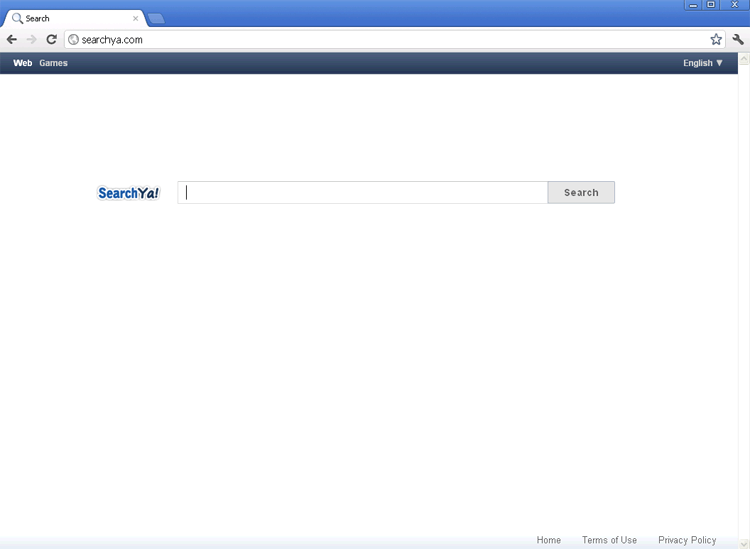 Searchya.com is an obscure search engine site that's benefited from exceptionally high traffic of late. Unfortunately, this traffic boost isn't due to a stellar marketing campaign, but is one of the results of a series of redirect attacks that are caused by browser hijackers. Browser-hijacking PC threats may also include rootkit or Trojan components, and SpywareRemove.com malware researchers recommend that you treat any redirect to Searchya.com as a security risk. While Searchya.com, by itself, hasn't been found to be a danger to your PC, it's suggested that you maintain a high level of caution around Searchya.com, which may not use the safety or relevance guidelines that more reputable search engines than itself are known to have. You can remove Searchya.com-related PC threats, including Searchya.com-affiliated browser hijackers, by using suitable anti-malware programs to scan your computer, although additional steps (such as booting into Safe Mode or booting from a USB device) may also be necessary in some cases.
When Searchya.com is Your Only Choice in Search Engines
While obscure in terms of recorded footprints or online history, Searchya.com has managed to make waves in 2012 due to its traffic surge from browser-hijacked victims. While Searchya.com hasn't been confirmed as complicit in these attacks, the presence of a browser hijacker is always a danger to your PC that should be remedied by dedicated anti-malware software. Hijacks may also promote other sites besides Searchya.com, such as 9z8j5a0y4z51.com or Believesearch.info, a habit that's particularly common for PC threats that are linked to rings of disreputable search engine sites.
A typical browser hijack to Searchya.com will occur after you click a search engine link, which will redirect your search to Searchya.com, and from there to another destination (which may or may not be what you had in mind). SpywareRemove.com malware analysts also warn to watch for the following symptoms that are closely associated with browser hijackers for Searchya.com and similar sites:
- Being redirected to Searchya.com when you first attempt to load to an unrelated site or open your web browser.
- Having your homepage settings to Searchya.com, even if you change these settings back repeatedly.
- Pop-ups for Searchya.com that appear without your consent or a visible trigger.
Putting an End to the Search for Killing Off Searchya.com's Browser Hijackers
Since browser hijackers that are linked to Searchya.com may make undesirable system changes, contain multiple components or be used alongside other PC threats, SpywareRemove.com malware research team discourages any attempt to detect a Searchya.com-promoting PC threat manually. A thorough scan of your hard drive with your choice of anti-malware scanner will insure that all related PC threats, in addition to Searchya.com's browser hijacker, are completely detected and removed. If you still experience redirects afterwards, you can try alternative methods (such as a Safe Mode boot) to allow your software to detect all malicious components and settings changes.
While some browser hijackers have been known to limit their attacks to redirects, Searchya.com browser redirects may also be accompanied by other attacks against your PC. Common attacks that SpywareRemove.com malware experts have linked to browser hijackers include backdoor exploits, theft of personal information and the installation of Trojans.
Leave a Reply
Please note that we are not able to assist with billing and support issues regarding SpyHunter or other products. If you're having issues with SpyHunter, please get in touch with SpyHunter customer support through your SpyHunter . If you have SpyHunter billing questions, we recommend you check the Billing FAQ. For general suggestions or feedback, contact us.