SpyAgent
Posted: March 28, 2006
Threat Metric
The Threat Meter is a malware assessment that SpywareRemove.com's research team is able to
give every identifiable malware threat. Our Threat Meter includes several criteria based off of
specific malware threats to value their severity, reach and volume. The Threat Meter is able to give
you a numerical breakdown of each threat's initial Threat Level, Detection Count, Volume Count,
Trend Path and Percentage Impact. The overall ranking of each threat in the Threat Meter is a basic
breakdown of how all threats are ranked within our own extensive malware database. The scoring for
each specific malware threat can be easily compared to other emerging threats to draw a contrast in
its particular severity. The Threat Meter is a useful tool in the endeavor of seeking a solution to
remove a threat or pursue additional analytical research for all types of computer users.
The following fields listed on the Threat Meter containing a specific value, are explained in detail below:
Threat Level: The threat level scale goes from 1 to 10 where 10 is the highest level of severity and 1 is the lowest level of severity. Each specific level is relative to the threat's consistent assessed behaviors collected from SpyHunter's risk assessment model.
Detection Count: The collective number of confirmed and suspected cases of a particular malware threat. The detection count is calculated from infected PCs retrieved from diagnostic and scan log reports generated by SpyHunter.
Volume Count: Similar to the detection count, the Volume Count is specifically based on the number of confirmed and suspected threats infecting systems on a daily basis. High volume counts usually represent a popular threat but may or may not have infected a large number of systems. High detection count threats could lay dormant and have a low volume count. Criteria for Volume Count is relative to a daily detection count.
Trend Path: The Trend Path, utilizing an up arrow, down arrow or equal symbol, represents the level of recent movement of a particular threat. Up arrows represent an increase, down arrows represent a decline and the equal symbol represent no change to a threat's recent movement.
% Impact (Last 7 Days): This demonstrates a 7-day period change in the frequency of a malware threat infecting PCs. The percentage impact correlates directly to the current Trend Path to determine a rise or decline in the percentage.
The following fields listed on the Threat Meter containing a specific value, are explained in detail below:
Threat Level: The threat level scale goes from 1 to 10 where 10 is the highest level of severity and 1 is the lowest level of severity. Each specific level is relative to the threat's consistent assessed behaviors collected from SpyHunter's risk assessment model.
Detection Count: The collective number of confirmed and suspected cases of a particular malware threat. The detection count is calculated from infected PCs retrieved from diagnostic and scan log reports generated by SpyHunter.
Volume Count: Similar to the detection count, the Volume Count is specifically based on the number of confirmed and suspected threats infecting systems on a daily basis. High volume counts usually represent a popular threat but may or may not have infected a large number of systems. High detection count threats could lay dormant and have a low volume count. Criteria for Volume Count is relative to a daily detection count.
Trend Path: The Trend Path, utilizing an up arrow, down arrow or equal symbol, represents the level of recent movement of a particular threat. Up arrows represent an increase, down arrows represent a decline and the equal symbol represent no change to a threat's recent movement.
% Impact (Last 7 Days): This demonstrates a 7-day period change in the frequency of a malware threat infecting PCs. The percentage impact correlates directly to the current Trend Path to determine a rise or decline in the percentage.
| Ranking: | 1,694 |
|---|---|
| Threat Level: | 8/10 |
| Infected PCs: | 1,342,152 |
| First Seen: | July 24, 2009 |
|---|---|
| Last Seen: | March 9, 2025 |
| OS(es) Affected: | Windows |
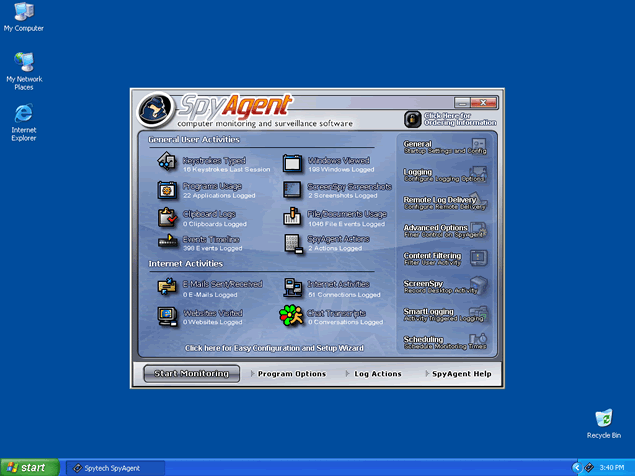 SpyAgent is a keylogger program that has the ability to record keystrokes. SpyAgent runs in the background and is usually installed without your permission. SpyAgent sends your personal information to remote users where they have the ability to steal banking or account data from you. SpyAgent should be removed as soon as possible. SpyAgent may be very difficult to remove manually.
Aliases
Gen.Trojan.Heur [Ikarus]DLOADER.Trojan [DrWeb]Win32:Malware-gen [Avast]Artemis!D951CF99EEC5 [McAfee]Lion.II [Panda]BAT/Rootkit [AhnLab-V3]Trojan/Shell.Agent [Antiy-AVL]TR/Rootkit.Linux.Agent.SK [AntiVir]Unix.ShellSpy [DrWeb]Trojan-Spy.Shell.Agent.a [Kaspersky]VBS:Malware-gen [Avast]Infostealer [Symantec]Unix/Agent.SK [F-Prot]Linux/Shell.Agent.A [NOD32]Trojan [K7AntiVirus]
More aliases (212)
More aliases (212)
Technical Details
File System Modifications
Tutorials: If you wish to learn how to remove malware components manually, you can read the tutorials on how to find malware, kill unwanted processes, remove malicious DLLs and delete other harmful files. Always be sure to back up your PC before making any changes.
The following files were created in the system:%PROGRAMFILES%\WEB Framework\wbfrmwrk.exe
File name: wbfrmwrk.exeSize: 354.3 KB (354304 bytes)
MD5: d951cf99eec581aafa5bc97eca083cb4
Detection count: 4,492
File type: Executable File
Mime Type: unknown/exe
Path: %PROGRAMFILES%\WEB Framework
Group: Malware file
Last Updated: January 13, 2012
%WINDIR%\system32\drivers\winmon.sys
File name: winmon.sysSize: 7.24 KB (7248 bytes)
MD5: 0abf2951ad6d55b34be49004261c4a41
Detection count: 2,679
File type: System file
Mime Type: unknown/sys
Path: %WINDIR%\system32\drivers\winmon.sys
Group: Malware file
Last Updated: October 7, 2024
C:\Windows\System32\drivers\WinmonProcessMonitor.sys.dvs
File name: WinmonProcessMonitor.sys.dvsSize: 35.07 KB (35072 bytes)
MD5: cc32dc3e78ddc9c36e0cb286f255a999
Detection count: 691
Mime Type: unknown/dvs
Path: C:\Windows\System32\drivers\WinmonProcessMonitor.sys.dvs
Group: Malware file
Last Updated: March 4, 2025
E:\5914079931432960\688606ed20b933123345a197a174110fdd92940ae3b67484b2a6f7ef001470ca
File name: 688606ed20b933123345a197a174110fdd92940ae3b67484b2a6f7ef001470caSize: 27.83 KB (27832 bytes)
MD5: c74978bf8dbff9da9d3104fc3fe03cec
Detection count: 639
Path: E:\5914079931432960\688606ed20b933123345a197a174110fdd92940ae3b67484b2a6f7ef001470ca
Group: Malware file
Last Updated: December 6, 2022
%WINDIR%\system32\drivers\winmonprocessmonitor.sys
File name: winmonprocessmonitor.sysSize: 28.36 KB (28368 bytes)
MD5: d64b955e7e24dea146a70fbc671c5eb9
Detection count: 426
File type: System file
Mime Type: unknown/sys
Path: %WINDIR%\system32\drivers\winmonprocessmonitor.sys
Group: Malware file
Last Updated: September 7, 2022
C:\Program Files (x86)\Hrvw0r2e\uhhxnxyzzxwx.exe
File name: uhhxnxyzzxwx.exeSize: 663.74 KB (663743 bytes)
MD5: 763408f6eacbb3770dc425f52d375481
Detection count: 94
File type: Executable File
Mime Type: unknown/exe
Path: C:\Program Files (x86)\Hrvw0r2e
Group: Malware file
Last Updated: November 26, 2018
eb753b.exe
File name: eb753b.exeSize: 70.65 KB (70656 bytes)
MD5: 8c6bc425e26fae9fc53f86e6f476a902
Detection count: 74
File type: Executable File
Mime Type: unknown/exe
Group: Malware file
Last Updated: December 11, 2009
%APPDATA%\asz$audio.exe
File name: asz$audio.exeSize: 320 KB (320008 bytes)
MD5: fff6fe8e5091420d284da376b5641781
Detection count: 56
File type: Executable File
Mime Type: unknown/exe
Path: %APPDATA%
Group: Malware file
Last Updated: February 8, 2017
loader_5849_fHx8fDE0fHx8_.exe
File name: loader_5849_fHx8fDE0fHx8_.exeSize: 129.02 KB (129024 bytes)
MD5: fce949062bac2f218c150085c11db277
Detection count: 51
File type: Executable File
Mime Type: unknown/exe
Group: Malware file
Last Updated: December 11, 2009
hxgame-update.exe
File name: hxgame-update.exeSize: 225.28 KB (225280 bytes)
MD5: 449be139ef6d747a064ac290a5bee02c
Detection count: 44
File type: Executable File
Mime Type: unknown/exe
Group: Malware file
Last Updated: December 11, 2009
C:\ProgramData\dhvev\hbmwqlq.exe
File name: hbmwqlq.exeSize: 434.17 KB (434176 bytes)
MD5: 90a74c3fa4357f9c4ebb2cb665cdd86a
Detection count: 35
File type: Executable File
Mime Type: unknown/exe
Path: C:\ProgramData\dhvev
Group: Malware file
Last Updated: December 7, 2018
brelib.dll
File name: brelib.dllSize: 279.55 KB (279552 bytes)
MD5: fe5da48e7903258d73c55510c3a92504
Detection count: 15
File type: Dynamic link library
Mime Type: unknown/dll
Group: Malware file
Last Updated: January 8, 2010
SysUp23.exe
File name: SysUp23.exeSize: 218.11 KB (218112 bytes)
MD5: 3a387a83bf03ee75cdcd99d71df02051
Detection count: 14
File type: Executable File
Mime Type: unknown/exe
Group: Malware file
Last Updated: April 15, 2010
autochk.dll
File name: autochk.dllSize: 24.06 KB (24064 bytes)
MD5: d886bf93a7014262c9f2f7755e6a6697
Detection count: 12
File type: Dynamic link library
Mime Type: unknown/dll
Group: Malware file
Last Updated: January 21, 2010
C:\Users\<username>\AppData\Roaming\MARRIO~1\MARRIO~1.EXE
File name: MARRIO~1.EXESize: 241.66 KB (241664 bytes)
MD5: 3dba917e0b2610600ac5d99d63c6211f
Detection count: 12
File type: Executable File
Mime Type: unknown/EXE
Path: C:\Users\<username>\AppData\Roaming\MARRIO~1
Group: Malware file
Last Updated: November 5, 2018
C:\Users\<username>\AppData\Roaming\NYQBIDP\NYQBIDP.exe
File name: NYQBIDP.exeSize: 1.52 MB (1527808 bytes)
MD5: a6e351d7be60c0b518738badc8b1f5b3
Detection count: 12
File type: Executable File
Mime Type: unknown/exe
Path: C:\Users\<username>\AppData\Roaming\NYQBIDP
Group: Malware file
Last Updated: November 7, 2018
%LOCALAPPDATA%\Microsoft\Windows\Explorer\svhosts.exe
File name: svhosts.exeSize: 31.74 KB (31744 bytes)
MD5: 93937438037b43c45ec9c8442831f985
Detection count: 7
File type: Executable File
Mime Type: unknown/exe
Path: %LOCALAPPDATA%\Microsoft\Windows\Explorer
Group: Malware file
Last Updated: March 3, 2017
More files
Registry Modifications
The following newly produced Registry Values are:
File name without pathRE[B]Ell.batRegexp file mask%ALLUSERSPROFILE%\ccleaner.exe%ALLUSERSPROFILE%\Windows Server\wserver.exe%APPDATA%\datZZ~.dat%APPDATA%\dvdcss\dvdcss.exe%APPDATA%\Kaspersky Internet Security 2017\explorers.exe%APPDATA%\Kaspersky Internet Security 2017\spoolsvc.exe%APPDATA%\Kaspersky Internet Security 2017\svhost.exe%APPDATA%\Kaspersky Internet Security 2017\Taskhosts.exe%APPDATA%\WebCounter\WebCounter.exe%COMMONPROGRAMFILES%\finder.exe%COMMONPROGRAMFILES(x86)%\finder.exe%LOCALAPPDATA%\Jaxx\jaxxsrv.exe%LOCALAPPDATA%\Microsoft Windows\svchost.exe%LOCALAPPDATA%\Packages\SandboxieRpcSc.exe%LOCALAPPDATA%\Packages\svchost.exe%USERPROFILE%\gupd.exe%WINDIR%\Media\Long\certsvc.exe%WINDIR%\system32\drivers\ibinldr.sys%WINDIR%\System32\drivers\WinmonProcessMonitor.sys%WINDIR%\SysWOW64\Windows Server\wserver.exe
File name without pathRE[B]Ell.batRegexp file mask%ALLUSERSPROFILE%\ccleaner.exe%ALLUSERSPROFILE%\Windows Server\wserver.exe%APPDATA%\datZZ~.dat%APPDATA%\dvdcss\dvdcss.exe%APPDATA%\Kaspersky Internet Security 2017\explorers.exe%APPDATA%\Kaspersky Internet Security 2017\spoolsvc.exe%APPDATA%\Kaspersky Internet Security 2017\svhost.exe%APPDATA%\Kaspersky Internet Security 2017\Taskhosts.exe%APPDATA%\WebCounter\WebCounter.exe%COMMONPROGRAMFILES%\finder.exe%COMMONPROGRAMFILES(x86)%\finder.exe%LOCALAPPDATA%\Jaxx\jaxxsrv.exe%LOCALAPPDATA%\Microsoft Windows\svchost.exe%LOCALAPPDATA%\Packages\SandboxieRpcSc.exe%LOCALAPPDATA%\Packages\svchost.exe%USERPROFILE%\gupd.exe%WINDIR%\Media\Long\certsvc.exe%WINDIR%\system32\drivers\ibinldr.sys%WINDIR%\System32\drivers\WinmonProcessMonitor.sys%WINDIR%\SysWOW64\Windows Server\wserver.exe
Additional Information
The following directories were created:
%ALLUSERSPROFILE%\googieupdater%TEMP%\NetPlatform\WorkDir%WINDIR%\cmdacoBin
Leave a Reply
Please note that we are not able to assist with billing and support issues regarding SpyHunter or other products. If you're having issues with SpyHunter, please get in touch with SpyHunter customer support through your SpyHunter . If you have SpyHunter billing questions, we recommend you check the Billing FAQ. For general suggestions or feedback, contact us.