Trojan.Happili
Posted: May 28, 2012
Threat Metric
The following fields listed on the Threat Meter containing a specific value, are explained in detail below:
Threat Level: The threat level scale goes from 1 to 10 where 10 is the highest level of severity and 1 is the lowest level of severity. Each specific level is relative to the threat's consistent assessed behaviors collected from SpyHunter's risk assessment model.
Detection Count: The collective number of confirmed and suspected cases of a particular malware threat. The detection count is calculated from infected PCs retrieved from diagnostic and scan log reports generated by SpyHunter.
Volume Count: Similar to the detection count, the Volume Count is specifically based on the number of confirmed and suspected threats infecting systems on a daily basis. High volume counts usually represent a popular threat but may or may not have infected a large number of systems. High detection count threats could lay dormant and have a low volume count. Criteria for Volume Count is relative to a daily detection count.
Trend Path: The Trend Path, utilizing an up arrow, down arrow or equal symbol, represents the level of recent movement of a particular threat. Up arrows represent an increase, down arrows represent a decline and the equal symbol represent no change to a threat's recent movement.
% Impact (Last 7 Days): This demonstrates a 7-day period change in the frequency of a malware threat infecting PCs. The percentage impact correlates directly to the current Trend Path to determine a rise or decline in the percentage.
| Threat Level: | 8/10 |
|---|---|
| Infected PCs: | 74 |
| First Seen: | May 28, 2012 |
|---|---|
| OS(es) Affected: | Windows |
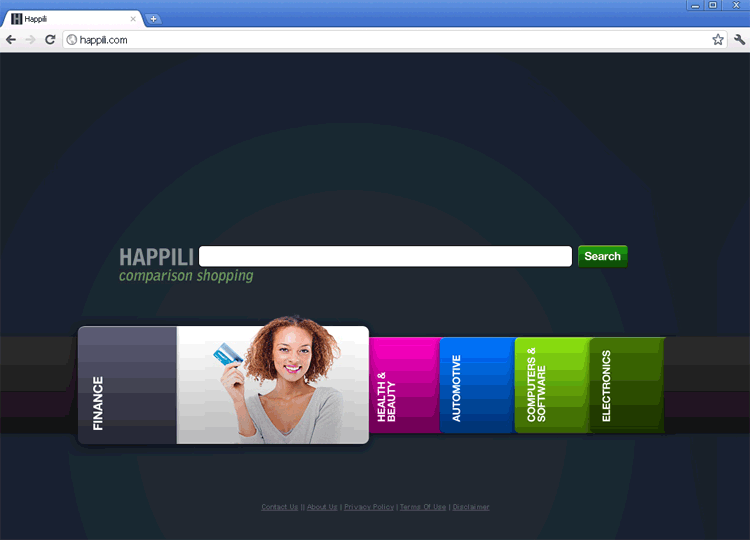 Trojan.Happili is a fake emoticon (or smiley face) add-on for instant messaging programs. As you would expect from its name, Trojan.Happili has close ties to Happili.com, a site SpywareRemove.com malware researchers reported on in January 2012. Beneath its smiling features, what Trojan.Happili really offers your PC is a series of search engine hijacks to promote Happili.com, a supposed shopping comparison website. As a confirmed browser hijacker that may insert its code into normal system processes, Trojan.Happili should always be deleted quickly and via anti-malware software (or with the help of a qualified expert in PC security). Given that Trojan.Happili has acquired its name from the same-named website that has been blacklisted for its misbehavior, SpywareRemove.com malware researchers also encourage you to avoid contact with Happili.com or other sites that Trojan.Happili promotes with its browser redirects.
Trojan.Happili: the Least Sincere Smile That You'll Ever See
Trojan.Happili (also known as Trojan.Happili.XGen or simply the Happili Virus) may infect your PC by itself or with other PC threats such as Exploit.Drop.9, with the latter usually occurring if you didn't install Trojan.Happili willingly. Although Trojan.Happili pretends to be a smiley-enabler for instant messengers, its true purpose is to redirect all of your online searches to Happili.com, which can profit from the increase in traffic. While its moniker is derived from Happili.com, a Trojan.Happili may also redirect you to other types of malicious sites that SpywareRemove.com malware experts always recommend that you avoid – particularly phishing sites that pose as news or 'work at home' career domains.
Although Happili.com-related attacks have been in evidence for quite some time, as of the time of this writing, SpywareRemove.com malware research team has noted a sharp rise in Happili redirect attacks and Trojan.Happili infections. Besides installing Trojan.Happili intentionally in hopes of gaining access to new smiley faces, your PC may also be infected by Trojan.Happili if you visit hostile sites that use drive-by-download exploits. Trojan downloaders have also been known to include Trojan.Happili and other Happili-associated browser hijackers in their payloads.
Salting the Earth Where Happili's Trojan Once Stood
Trojan.Happili infections often include other PC threats that can be responsible for a variety of attacks, as SpywareRemove.com malware researchers have noted in the following list:
- Random shutdowns for your web browser and e-mail client applications.
- The installation of scamware security programs that display fake security alerts and system scans.
- Contact with sites that steal personal information (such as your usernames, e-mail addresses or passwords for various online accounts).
Because SpywareRemove.com malware experts have found Trojan.Happili to infect multiple locations and even insert its code into normal Windows processes, you should never try to remove Trojan.Happili without a little help from a qualified anti-malware scanner.
Technical Details
File System Modifications
Tutorials: If you wish to learn how to remove malware components manually, you can read the tutorials on how to find malware, kill unwanted processes, remove malicious DLLs and delete other harmful files. Always be sure to back up your PC before making any changes.
The following files were created in the system:C:\Documents and Settings\<username>\Local Settings\temp\0.6837268366905471
File name: C:\Documents and Settings\<username>\Local Settings\temp\0.6837268366905471Mime Type: unknown/6837268366905471
Group: Malware file
C:\Users\<username>\AppData\Local\Mozilla\Microsoft Help\gpsqesyf.dll
File name: C:\Users\<username>\AppData\Local\Mozilla\Microsoft Help\gpsqesyf.dllFile type: Dynamic link library
Mime Type: unknown/dll
Group: Malware file
Registry Modifications
HKEY..\..\{Value}HKEY_CURRENT_USER\SOFTWARE\Microsoft\Windows\CurrentVersion\Run, Microsoft Help = rundll32 "C:\Users\[USERNAME]\AppData\Local\Mozilla\Microsoft Help\gpsqesyf.dll",h264OutVideoInitW
Leave a Reply
Please note that we are not able to assist with billing and support issues regarding SpyHunter or other products. If you're having issues with SpyHunter, please get in touch with SpyHunter customer support through your SpyHunter . If you have SpyHunter billing questions, we recommend you check the Billing FAQ. For general suggestions or feedback, contact us.