Trojan.Rannoh
Posted: May 8, 2012
Threat Metric
The following fields listed on the Threat Meter containing a specific value, are explained in detail below:
Threat Level: The threat level scale goes from 1 to 10 where 10 is the highest level of severity and 1 is the lowest level of severity. Each specific level is relative to the threat's consistent assessed behaviors collected from SpyHunter's risk assessment model.
Detection Count: The collective number of confirmed and suspected cases of a particular malware threat. The detection count is calculated from infected PCs retrieved from diagnostic and scan log reports generated by SpyHunter.
Volume Count: Similar to the detection count, the Volume Count is specifically based on the number of confirmed and suspected threats infecting systems on a daily basis. High volume counts usually represent a popular threat but may or may not have infected a large number of systems. High detection count threats could lay dormant and have a low volume count. Criteria for Volume Count is relative to a daily detection count.
Trend Path: The Trend Path, utilizing an up arrow, down arrow or equal symbol, represents the level of recent movement of a particular threat. Up arrows represent an increase, down arrows represent a decline and the equal symbol represent no change to a threat's recent movement.
% Impact (Last 7 Days): This demonstrates a 7-day period change in the frequency of a malware threat infecting PCs. The percentage impact correlates directly to the current Trend Path to determine a rise or decline in the percentage.
| Threat Level: | 9/10 |
|---|---|
| Infected PCs: | 48 |
| First Seen: | May 8, 2012 |
|---|---|
| OS(es) Affected: | Windows |
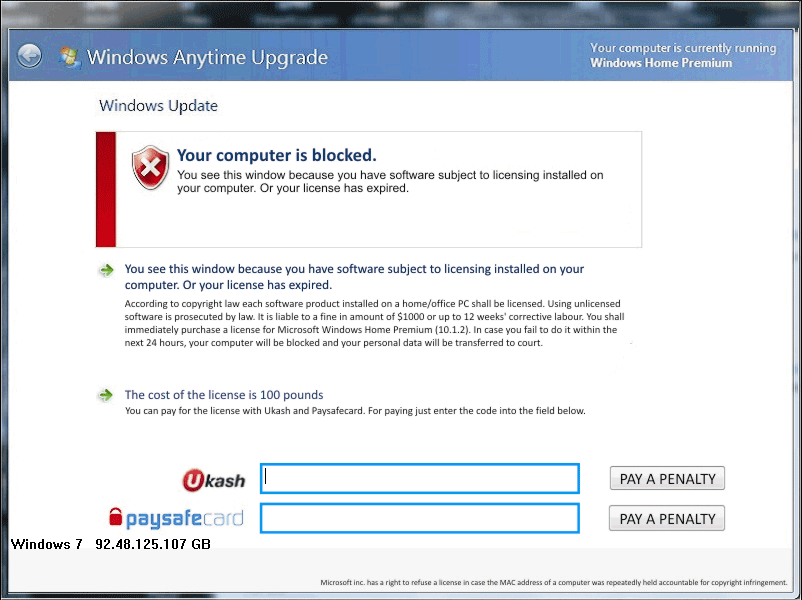 Trojan.Rannoh is a ransomware Trojan that encrypts the files on the infected computer (encoding them to make them unusable) while Trojan.Rannoh blocks you from accessing major PC functions and displays a ransom message to force you to purchase a decryption code. However, throwing money into the hands of Trojan.Rannoh's criminal partnership is unnecessary to save your files, since various PC security companies distribute free decryption tools for ransomware Trojans like Trojan.Rannoh on a regular basis. Before attempting to decrypt your files, you should first try to remove Trojan.Rannoh, which SpywareRemove.com malware analysts suggest doing with competent anti-malware products. If you're unable to launch the relevant program while Trojan.Rannoh is open, there are multiple methods of disabling Trojan.Rannoh and similar PC threats so that you can access your operating system safely.
Trojan.Rannoh – Wrapping Your Files Up in an Expensive Conundrum
Trojan.Rannoh uses attacks that are similar to other encryption-based ransomware Trojans like TrojanEncoder94, Trojan.Ransom.HM or Trojan.Crypt.VB.U. Like its fellow ransomware Trojans, Trojan.Rannoh encrypts several files on your computer, temporarily making them unusable until the encryption is reversed. Trojan.Rannoh will also attempt to block you from using most Windows features in general, including unrelated programs and security features that could assist you with Trojan.Rannoh's removal. These features cause SpywareRemove.com malware analysts to recommend disabling Trojan.Rannoh by one of the following methods before you use anti-malware software to delete Trojan.Rannoh:
- Rebooting in Safe Mode, which can be accessed on any Windows computer by tapping F8 before Windows begins to load (but after the BIOS has loaded).
- Booting your PC from a removable hard drive-based OS.
- Booting your PC from a local network-based OS.
Attempting to delete Trojan.Rannoh without help from suitable anti-malware programs is discouraged, since Trojan.Rannoh's file components use randomized names and are located in multiple sensitive locations, including your system folder.
Finding the Answer to Trojan.Rannoh's File Riddle
Removing Trojan.Rannoh, while an important step in solving your Trojan.Rannoh-related problems, will not reverse the encryption attack against your files – although SpywareRemove.com malware research team also stresses the fact that this encryption does not permanently damage the files in any way. Trojan.Rannoh's encryption method hasn't been fully analyzed by any PC security companies and there currently aren't any free tools available to reverse Trojan.Rannoh's encryption as of yet. Nonetheless, since spending money on Trojan.Rannoh's ransom fee isn't even guaranteed to give you a working decryption code, SpywareRemove.com malware experts don't recommend that you give in to Trojan.Rannoh's ransom attempt.
Trojan.Rannoh was only identified by most PC security companies in early May of 2012. Given that free decryption tools are often distributed as soon as two weeks to a month after the initial appearance of an encryption-based PC threat, SpywareRemove.com malware researchers feel safe in assuring victims of Trojan.Rannoh's attacks that a free encryption-reversal utility should be available shortly.
Technical Details
File System Modifications
Tutorials: If you wish to learn how to remove malware components manually, you can read the tutorials on how to find malware, kill unwanted processes, remove malicious DLLs and delete other harmful files. Always be sure to back up your PC before making any changes.
The following files were created in the system:%WinDir%\System32
File name: %WinDir%\System32Group: Malware file
%UserProfile%\Local Settings\Temp\<10 RANDOM LETTERS>
File name: %UserProfile%\Local Settings\Temp\<10 RANDOM LETTERS>Group: Malware file
Leave a Reply
Please note that we are not able to assist with billing and support issues regarding SpyHunter or other products. If you're having issues with SpyHunter, please get in touch with SpyHunter customer support through your SpyHunter . If you have SpyHunter billing questions, we recommend you check the Billing FAQ. For general suggestions or feedback, contact us.