Trojan.Winlock.7372
Posted: November 29, 2012
Threat Metric
The following fields listed on the Threat Meter containing a specific value, are explained in detail below:
Threat Level: The threat level scale goes from 1 to 10 where 10 is the highest level of severity and 1 is the lowest level of severity. Each specific level is relative to the threat's consistent assessed behaviors collected from SpyHunter's risk assessment model.
Detection Count: The collective number of confirmed and suspected cases of a particular malware threat. The detection count is calculated from infected PCs retrieved from diagnostic and scan log reports generated by SpyHunter.
Volume Count: Similar to the detection count, the Volume Count is specifically based on the number of confirmed and suspected threats infecting systems on a daily basis. High volume counts usually represent a popular threat but may or may not have infected a large number of systems. High detection count threats could lay dormant and have a low volume count. Criteria for Volume Count is relative to a daily detection count.
Trend Path: The Trend Path, utilizing an up arrow, down arrow or equal symbol, represents the level of recent movement of a particular threat. Up arrows represent an increase, down arrows represent a decline and the equal symbol represent no change to a threat's recent movement.
% Impact (Last 7 Days): This demonstrates a 7-day period change in the frequency of a malware threat infecting PCs. The percentage impact correlates directly to the current Trend Path to determine a rise or decline in the percentage.
| Ranking: | 13,247 |
|---|---|
| Threat Level: | 9/10 |
| Infected PCs: | 59 |
| First Seen: | November 29, 2012 |
|---|---|
| Last Seen: | February 3, 2025 |
| OS(es) Affected: | Windows |
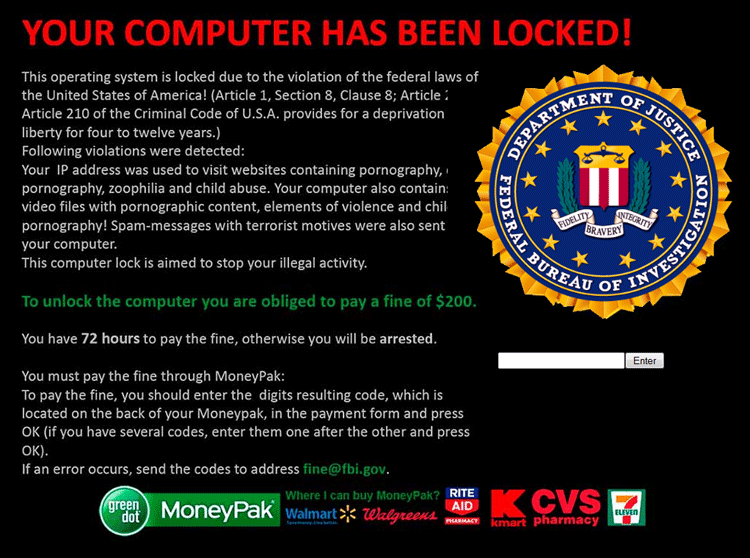 Trojan.Winlock.7372 is a ransomware Trojan that displays a fake legal alert and restricts your ability to use your PC, supposedly until you pay its (illegal) fine. Like similar ransomware that SpywareRemove.com malware experts have analyzed of late, Trojan.Winlock.7372's attacks use a browser pop-up-based methodology, with Trojan.Winlock.7372's attacks launching as soon as Windows starts. However, if you launch Windows by using Safe Mode or other methods to disable Trojan.Winlock.7372, Trojan.Winlock.7372 can be removed for free by any competent anti-malware product, which is the recommended course of action.
Trojan.Winlock.7372: a New Serial Number for an Ancient Scam
Very reminiscent of other ransomware Trojan groups like Reveton, the Ukash Virus or Lockscreen, the Winlock family harbors a number of Trojans that are designed to attack PCs in multiple countries with fake legal alerts. Trojan.Winlock.7372 is just one of many possible examples of such, with pop-ups referencing such agencies as the United States FBI to trick victims into making fraudulent cash transfers.
Trojan.Winlock.7372's faux legal warning is displayed automatically and may cover your entire screen. Because Trojan.Winlock.7372 loads its warning as a browser pop-up, Trojan.Winlock.7372 may attempt to detect your geographical region and load an appropriate warning (as determined by your PC's IP address). Trojan.Winlock.7372 may claim that your PC has been used for illegal activities, but SpywareRemove.com malware researchers emphasize Trojan.Winlock.7372's lack of ties to law enforcement and its inability to detect any type of cybercrime.
The Thoroughness of Trojan.Winlock.7372's Little Lockdown
Along with its fake legal alert, Trojan.Winlock.7372 also blocks other applications on your computer, such as the Registry Editor, Task Manager or Command Prompt. Stopping Trojan.Winlock.7372 from starting and blocking these programs is one of the first things you'll need to do to counteract a Trojan.Winlock.7372 infection. SpywareRemove.com malware researchers recommend that you use similar precautions against other ransomware Trojans such as 'Your computer has been locked!' Ransomware, the FBI Green Dot Moneypak Virus, the FBI Ultimate Game Card virus, the Federal Department of Justice and Police Virus, TROJ_RANSOM.AAF or TROJ_RANSOM.CXB.
Booting your PC in Safe Mode may be adequate for disabling simple PC threats like Trojan.Winlock.7372 and other members of the Winlock family. If you still experience problems with accessing your anti-malware software to expedite Trojan.Winlock.7372's removal, SpywareRemove.com malware experts suggest that you load an OS onto a removable drive and boot your PC from it.
Because Trojan.Winlock.7372 has been confirmed to make undesirable changes to your Registry and will try to avoid being deleted by standard methods, SpywareRemove.com malware research team discourages manual removal of Trojan.Winlock.7372 if dedicated anti-malware products are available. Residents of the US are considered to be at highest risk of a possible Trojan.Winlock.7372, but similar ransomware attacks by nearly identical ransomware Trojans also have been observed in dozens of countries throughout the world.
Technical Details
File System Modifications
Tutorials: If you wish to learn how to remove malware components manually, you can read the tutorials on how to find malware, kill unwanted processes, remove malicious DLLs and delete other harmful files. Always be sure to back up your PC before making any changes.
The following files were created in the system:%HOMEPATH%\Local Settings\Temporary Internet Files\Content.IE5\U98D4X8H\getunlock[1].php
File name: %HOMEPATH%\Local Settings\Temporary Internet Files\Content.IE5\U98D4X8H\getunlock[1].phpMime Type: unknown/php
Group: Malware file
%HOMEPATH%\Local Settings\Temporary Internet Files\Content.IE5\KHMHGZ4F\picture[1].php
File name: %HOMEPATH%\Local Settings\Temporary Internet Files\Content.IE5\KHMHGZ4F\picture[1].phpMime Type: unknown/php
Group: Malware file
Registry Modifications
HKEY..\..\{Value}HKEY_LOCAL_MACHINE\SOFTWARE\Microsoft\Windows\CurrentVersion\Run 'Microsoft Updater' = '"Full path to virus"'HKEY_LOCAL_MACHINE\SYSTEM\ControlSet001\Services\SharedAccess\Parameters\FirewallPolicy\StandardProfile 'EnableFirewall' = '00000000'
Leave a Reply
Please note that we are not able to assist with billing and support issues regarding SpyHunter or other products. If you're having issues with SpyHunter, please get in touch with SpyHunter customer support through your SpyHunter . If you have SpyHunter billing questions, we recommend you check the Billing FAQ. For general suggestions or feedback, contact us.