Trojan Win32.Murlo
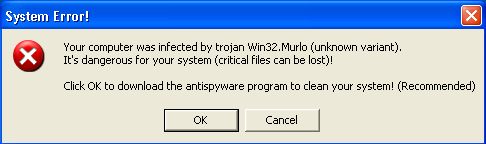 Trojan Win32.Murlo is a Trojan name that is displayed in the fake Warning messages that report a spyware infection only to trick you into purchasing a rogue anti-spyware application, which at the moment is Files Secure .
Trojan Win32.Murlo infects your computer with the help of fake codecs that pretend to be free video codecs, often found on porno websites. If you download free video codecs from questionable websites, it is highly probable that they will be infected with dangerous Trojan programs. Once the Trojan program is installed, you will be bombarded with fake warning messages that may look as this one:
System Error
Your computer was infected by Trojan Win32.Murlo (unknown variant).
It's dangerous for your system (critical files can be lost)
Click OK to download the antispyware program to clean your system! (Recommended)
Once you click on this fake alert message, you will be directed to Files Secure's website where you are persuaded to buy the commercial version of the rogue anti-spyware program, which in reality does not remove any Spyware. We recommend the immediate removal of Trojan Win32.Murlo.
File System Modifications
- The following files were created in the system:
# File Name 1 D3DCompiler_3.dll 2 dbmsrpcnw.dll 3 domnftwqpd.dll 4 duserf.dll 5 efcdcbx.dll 6 mljjh.dll 7 oggview32.dll 8 pmkhi.dll 9 sstqr.dll 10 toprates.dll 11 ttaqdcwmaoxzw.dll 12 turbosearchsite.dll 13 tuvtr.dll 14 wfcynbmx.dll
Registry Modifications
- The following CLSID's were detected:
HKEY..\..\{CLSID Path}E90BBB19-1B2E-42C0-8BFF-AFC6984247DD819EFD78-6FD4-42EF-9030-F6DAB24BB9F09DEC81A1-919F-41F0-A983-7F202E3EBBB3BD8C0E45-7FC1-48A2-8A8A-ABCDFF848D23C3DFA1D4-A6F6-4920-A4E1-AD78DA649AA24EBAA7B0-740D-4CFA-9455-5C233BB354E11E40AD15-4280-428A-9A26-AB96F9DA2ACE3DAF1739-AB9E-493E-8DD7-F65CDF363BCB69B98C68-D2B8-4A4E-9CB7-E85B6F3A701414B65C62-1F53-4B15-9476-5D697608536F9733dacb-e689-4eb1-9928-aa8008944dd54911E55D-9240-49DB-B878-337DE4F53E7000DC0058-A87E-4D19-9C26-F1AAC98AD4D7A74F3FC3-CC9A-4D4C-AFB5-B56F0CAA445D17D2F953-B2D1-4D1B-BCD3-20432E09ECF182C8422E-86A3-41C1-9F2E-094F7BF849E24090F502-6B2D-41B4-8409-B08905A3A0E6BCBC8B3C-397C-4D98-B6BA-FF337B9671E180DFDD57-D8B8-4991-82B9-9E9D426668B047EFD4AD-CB46-4549-B24B-CEE415394C56
System Error
Your computer was infected by Trojan Win32.Murlo (unknown variant).
It's dangerous for your system (critical files can be lost)
Click OK to download the uggs outlet
uggs outlet store antispyware program to clean your system! (Recommended)
Once you click on this fake alert message, you will be directed to Files Secure's website where you are persuaded to buy the commercial version of the rogue anti-spyware program, which in reality does not remove any Spyware. We recommend the immediate removal of Trojan Win32.Murlo.