Unknown Trojan Removal ToolHome Unknown Trojan Removal ToolSpyware Database Unknown Trojan Removal Tool"Remove Unknown Trojan"

Unknown Trojan   AddThis Social Bookmark Button AddThis Feed Button Email This Article

line

Unknown Trojan Description

Spyware Image
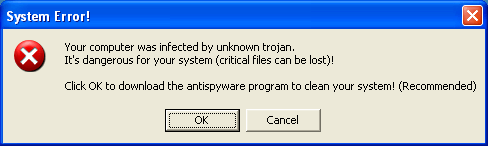
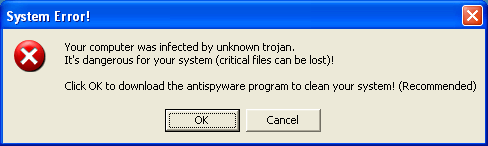
Unknown Trojan is the Trojan name that appears on fake error messages made by trojan makers to threaten and trick you into buying rogue anti-spyware applications like Files Secure.

You're not really infected with an 'Unknown Trojan', but, instead, you're infected with a Trojan that's found on fake video codecs. Most of the fake video codecs that are circulating on the Web are infected with a Trojan called Trojan.Zlob. If your computer displays an 'Unknown Trojan' error message similar to the example below, you may be infected with Trojan.Zlob. Do not click on the 'Unknown Trojan' error message and do not download any product it recommends.

Unknown Trojan error message:

System Error!

"Your computer was infected by an Unknown Trojan.
It’s dangerous for your system (critical files can be lost)!
Click OK to download the antispyware program to clean your computer! (Recommended)"
Unknown Trojan

In the past, 'Unknown Trojan' was mentioned as a keylogger that can not be stopped by firewall, because the firewall sees it as a part of the web browser. Therefore, Unknown Trojan may pose a serious threat to your computer's privacy and security. Unknown Trojan may also change the homepage and monitor user's actions. The prime function is logging keystrokes, including passwords and bank accounts and sending them to hacker.


How can I get rid of Unknown Trojan?

The most common spyware removal tactic is to uninstall Unknown Trojan by using the "Add/Remove Programs" utility. However, as there may still be hidden Unknown Trojan files, it's possible that Unknown Trojan will reappear after reboot. Follow the Unknown Trojan detection and removal methods below.

Unknown Trojan Automatic Detection (Recommended)

Is your PC infected with Unknown Trojan? To safely & quickly detect Unknown Trojan, we highly recommend you...

Download SpyHunter's Free Unknown Trojan Download SpyHunter's FREE Unknown Trojan Scanner.

SpyHunter's free version is only for spyware detection. If SpyHunter's spyware scanner detects Unknown Trojan on your PC, you have the option of purchasing SpyHunter's spyware removal tool to remove Unknown Trojan and other spyware threats.

Unknown Trojan Manual Removal Instructions

Below is a list of Unknown Trojan manual removal instructions and Unknown Trojan components listed to help you remove SpyCrush from your PC. Backup Reminder: Always be sure to back up your PC before making any changes.

Note: This manual removal process may be difficult and you run the risk of destroying your computer. We recommend that you use SpyHunter's spyware detection tool to check for Unknown Trojan.

Step 1 : Use Windows File Search Tool to Find Unknown Trojan Path

  1. Go to Start > Search > All Files or Folders.
  2. In the "All or part of the the file name" section, type in "Unknown Trojan" file name(s).
  3. To get better results, select "Look in: Local Hard Drives" or "Look in: My Computer" and then click "Search" button.
  4. When Windows finishes your search, hover over the "In Folder" of "Unknown Trojan", highlight the file and copy/paste the path into the address bar. Save the file's path on your clipboard because you'll need the file path to delete Unknown Trojan in the following manual removal steps.
  5. Read more about How to Find Unknown Trojan with File Search Tool

Step 2 : Use Windows Task Manager to Remove Unknown Trojan Processes

  1. To open the Windows Task Manager, use the combination of CTRL+ALT+DEL or CTRL+SHIFT+ESC.
  2. Click on the "Image Name" button to search for "Unknown Trojan" process by name.
  3. Select the "Unknown Trojan" process and click on the "End Process" button to kill it.
  4. Remove the "Unknown Trojan" processes files:

  5. Read more about How to kill Unknown Trojan Processes

Step 3 : Use Registry Editor to Remove Unknown Trojan Registry Values

  1. To open the Registry Editor, go to Start > Run > type regedit and then press the "OK" button.
  2. Locate and delete the entry or entries whose data value (in the rightmost column) is the spyware file(s) detected earlier.
  3. To delete "Unknown Trojan" value, right-click on it and select the "Delete" option.
  4. Locate and delete "Unknown Trojan" registry entries:

  5. Read more about How to Remove Unknown Trojan Registry Entries

Step 4 : Use Windows Command Prompt to Unregister Unknown Trojan DLL Files

  1. To open the Windows Command Prompt, go to Start > Run > type cmd and then click the "OK" button.
  2. Type "cd" in order to change the current directory, press the "space" button, enter the full path to where you believe the Unknown Trojan DLL file is located and press the "Enter" button on your keyboard. If you don't know where Unknown Trojan DLL file is located, use the "dir" command to display the directory's contents.
  3. To unregister "Unknown Trojan" DLL file, type in the exact directory path + "regsvr32 /u" + [DLL_NAME] (for example, :C\Spyware-folder\> regsvr32 /u Unknown Trojan.dll) and press the "Enter" button. A message will pop up that says you successfully unregistered the file.
  4. Search and unregister "Unknown Trojan" DLL files:

  5. Read more about How to Remove Unknown Trojan DLL Files

Step 5 : Detect and Delete Other Unknown Trojan Files

  1. To open the Windows Command Prompt, go to Start > Run > type cmd and then press the "OK" button.
  2. Type in "dir /A name_of_the_folder" (for example, C:\Spyware-folder), which will display the folder's content even the hidden files.
  3. To change directory, type in "cd name_of_the_folder".
  4. Once you have the file you're looking for type in "del name_of_the_file".
  5. To delete a file in folder, type in "del name_of_the_file".
  6. To delete the entire folder, type in "rmdir /S name_of_the_folder".
  7. Select the "Unknown Trojan" process and click on the "End Process" button to kill it.
  8. Remove the "Unknown Trojan" processes files:

  9. Read more about How to Delete Harmful Files

Unknown Trojan Recommendation

RECOMMENDED: To avoid the unnecessary risk of damaging your computer, we highly recommend you use a good spyware cleaner/remover to track Unknown Trojan and automatically remove Unknown Trojan as well as other spyware, adware, trojans, and virus threats in your PC.

If you believe you have Unknown Trojan installed on your computer, check for Unknown Trojan with SpyHunter's Free Spyware Scanner.


SpyHunter's free version is only for spyware detection. To remove Unknown Trojan and other spyware threats you can purchase SpyHunter's spyware removal tool. Since new Unknown Trojan files are constantly being released, it is normally advised to run SpyHunter's scanner weekly to get the latest updates on Unknown Trojan and other spyware threats.

To learn more on Unknown Trojan, see our Unknown Trojan resource section below.


More Unknown Trojan Resources

What is Trojans?


Unknown Trojan is a type of Trojans.

Trojans install themselves secretly and quietly onto your computer, most often by the simple downloading of email attachments (usually .avi, .pif, .exe, and even .jpg files.) Most Trojans gain complete control over your system after installation, and with that may delete files, steal passwords, change your system settings, and monitor your computer acitivity.

Think you have Unknown Trojan? Run SpyHunter's FREE Unknown Trojan scan and automatically detect Unknown Trojan on your PC.

Back to Top

Unknown Trojan Prevention Rules


Protect your computer from Unknown Trojan and other spyware by following these four easy prevention rules.

Rule #1: Keep your Windows Security up-to-date

Microsoft provides updates weekly and can always be downloaded manually from the Microsoft website.
Tip: Regularly visit Windows Update and set your computer to receive security & critical updates automatically.

To get Microsoft Update, go to IE > Tools > Windows Update > Product Updates, and select "ALL High-Priority Security Updates" from the list.

Then open IE and go to Internet Options > Security > Internet, then press "Default Level", then OK. Now press "Custom Level."

Rule #2: Download and install a reliable anti-spyware software

A good anti-spyware software that recognizes current Unknown Trojan spyware as well as other forms of spyware can can be the answer to all your security issues. Listed below is an anti-spyware program that can effectively reverse the damage of your computer and detect Unknown Trojan automatically.

Download SpyHunter's Free Unknown Trojan Download SpyHunter's Free Unknown Trojan Scanner

SpyHunter's free version is only for spyware detection. To remove Unknown Trojan and other spyware threats, you can purchase SpyHunter's spyware removal tool.

Rule #3: Install and keep your firewall turned on

A firewall is essential for a complete protection of your PC. Make sure that your firewall is always turned on. A firewall can prevent unwanted software like Unknown Trojan from infecting your computer.

Rule #4: Keep your anti-spyware definitions up-to-date

Since new Unknown Trojan files can be created every day, it is important to keep your anti-spyware program up-to-date. Your anti-spyware scanner should have an update feature where with a click of a button you can get new spyware definitions instantly. Often, an anti-spyware software will open an update window reminding you that there are new updates available.

Back to Top

Unknown Trojan Screenshots


View Unknown Trojan screenshots below and see for yourself how Unknown Trojan looks like. Learn how to recognize Unknown Trojan when it infects your machine.

(click on Unknown Trojan image to enlarge)

Spyware Image  

Back to Top

Publication Date

Tue Mar 28 2006 12:19:23 EDT

User Comments


Username:  Stanley    Date Posted:  2008-02-20 15:25:32   
Comment:
I have the same pop-up as the one in the beginning, the message saying "your computer was infected by unknown trojan," does this trojan log your keystrokes as well as fooling you into buying their software? I want to know, because I dont want to endanger my private information.

Username:  ghostrider01    Date Posted:  2008-02-21 13:45:23   
Comment:

Stanley, 

Most likely, if you don't have any other parasites on your computer like keyloggers, Unknown trojan won't steal your sensitive information. But it will try to pursuade you to purchase rogue software.


Username:  KP    Date Posted:  2008-03-16 09:42:25   
Comment:

i opening internet explorer i see that message " your computer infected unknown trojen, every site i opeining that message is coming. i click cancel site will open what can i do for not see that message future. can i delete that message anyway plz give information , thanks


Username:  D M    Date Posted:  2008-03-30 22:50:45   
Comment:

Greetings. I am a computer tech and I appreciate your posting of this fake error message. I will now add your program to my list of cleaners. One of the computers I am working on for a client has this exact infection message. I have used Spybot Search & Destroy, Ad Aware, Avast Anti Virus, Hijack This, and XoftSpySE to clean the machine and still this @%$#(%% unknown trojan problem remained. The above programs are all excellent cleaners I regularly use, but this problem just happened to be a bit unique. Thanks again and I hope this helps someone else in the same situation.


Leave a Reply


*
To prove you're a person (not a spam script), type the security word shown in the picture.
Security Image

Back to Top

Remove Unknown Trojan