XP Internet Security 2010
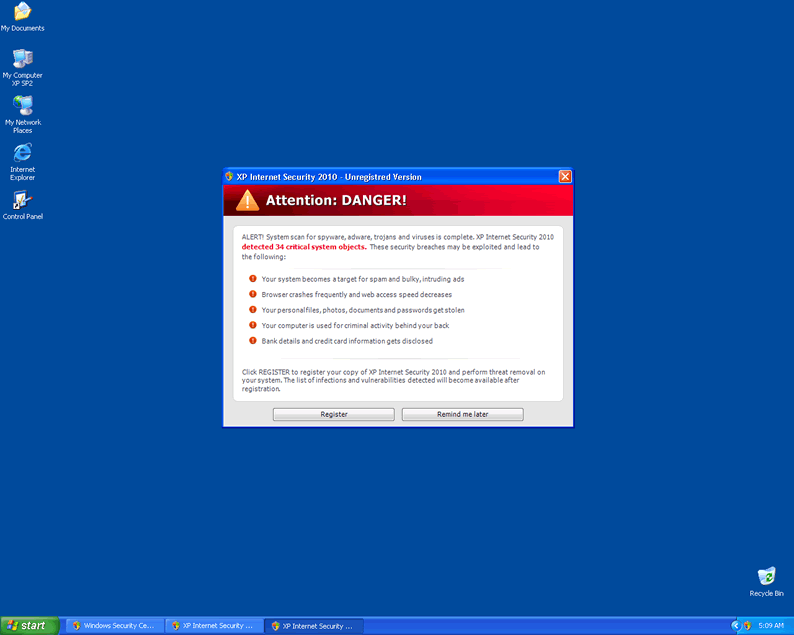 XP Internet Security 2010 is a worthless Rogue Anti-Spyware Program that robs people of their savings. As the name suggests, XP Internet Security 2010 is installed on Windows XP. The counterpart of XP Internet Security 2010 which attacks Windows 7 system is Win 7 Antispyware 2010. XP Internet Security 2010 will produce fake system scan results to try and convince unwary computer users that the system has been infected. Then XP Internet Security 2010 will urge the user to purchase a license to get rid of the alleged malware. Do not fall for this trickery and have XP Internet Security 2010 removed using a genuine anti-spyware program.
File System Modifications
- The following files were created in the system:
# File Name 1 %Documents and Settings%\[UserName]\Application Data\av.exe 2 %Documents and Settings%\[UserName]\Application Data\WRblt8464P
Registry Modifications
- The following newly produced Registry Values are:
HKEY..\..\..\..{Subkeys}HKEY_CURRENT_USER\Software\Classes\secfile\shell\open\commandHKEY_LOCAL_MACHINE\SOFTWARE\Clients\StartMenuInternet\FIREFOX.EXE\shell\open\commandHKEY_LOCAL_MACHINE\SOFTWARE\Clients\StartMenuInternet\FIREFOX.EXE\shell\safemode\commandHKEY_LOCAL_MACHINE\SOFTWARE\Clients\StartMenuInternet\IEXPLORE.EXE\shell\open\commandHKEY_LOCAL_MACHINE\SOFTWARE\Microsoft\Security CenterHKEY..\..\..\..{RegistryKeys}HKEY_CLASSES_ROOT\.exe\shell\open\commandHKEY_CLASSES_ROOT\secfile\shell\open\command
I followed the manual instructions posted on this site and got rid of this malware! I hope this is permanent. Someone told me this worked the first time, but it came back a couple of months later. Crossing my fingers.
Procedure worked perfectly to eradicate the installed reg entries. But for anyone who has a borken exe file extension you will need to follow this kb article to simply execute regedit ...w hh
http://support.microsoft.com/kb/555067
OMFG thankyou sooo much! first virus i\'ve ever had, at first i was calm thinking \"ok...i can look on the internet...\" but NO WAY HOSAY it wasn\'t having ne of that then i thought oooooh sh*t. although sumhow i got firefox up and running and i found this guide with no downloads necessary, THANKYOU!!! just wondering where i got it from.... could you pls e-mail me if you know were the file came from, thanks agen.
Thanks a lot - it helped me to get rid of the virus XP Internet Security 2010, just by following the manual instructions. Great work - it is really appreciated
following these instructions, i have removed the annoying, worthless Rogue Anti-Spyware Program XP Internet Security 2010
So i effed up on deleting the registries (I deleted some of the subfolders titled command and secfiles) and now none of the internet browsers or controll panel files work
is there anyway i can fix this without have to do a system restore or reformating my computer?
Worked beautifully except that the av.exe file and WRblt8464P file were actually located in %Documents and Settings%\[username]\local settings\application data\
In addition, "view hidden files" and "view system files" had to be turned on.
Thank you for this! We use Kaspersky Anti-Virus which couldn't find a virus in a hospital full of sick people, and tried Ad-aware and Malwarebytes before finding this page.
My gratitude.
What can I do if I have already purchased a plan from them?
i need help delete this XP Internet Security becuz it have took over my computer
Find a way for the credit card companies to stop sending money to the crooks and it will slow them down
My son contracted this a few days ago. Unfortunately this version must have changed to defeat the things mentioned here e.g. I couldn't even open a cmd box as it was blocking absolutely any attempt to do so. Trying to run regedit was impossible. Everything whether from an icon or an attempt to open a dos box was met with "invalid path to" then quoting the normal path of the program concerned.
I did manage to delete the initial executable so that stopped it firing up at boot & getting in the way.
How I got around this was to boot into Safe mode with the administrator account then take the option to run a system restore at a date prior to the infection. This got things back almost to normal - no modded registry - & as I write am doing a thorough scan of the disk to pick out any nasties, then will run a specific malware finder & deleting any other unnecessary apps & consider changing the AV s/w.
Regards
I want this program removed from my computer