Blendersearch.com
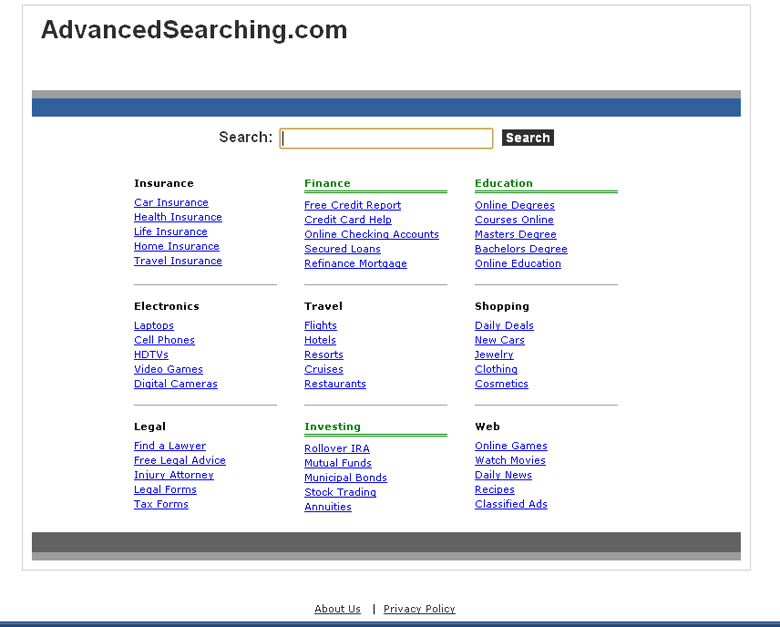 Despite Blendersearch.com's colorful name, the only thing that Blendersearch.com blends into your search results is a glob of irrelevant advertisement-based sites that drive revenue right back to Blendersearch.com in return for the traffic. Although Blendersearch.com looks like a normal search engine with provisions for providing topics like 'Education' and 'Insurance,' SpywareRemove.com malware analysts haven't found Blendersearch.com to show any real search engine functions. In addition, Blendersearch.com's use of browser hijackers to redirect you to Blendersearch.com whenever you try to use an unrelated search engine, while standard for fraudulent search sites like Blendersearch.com, is still both annoying and dangerous, despite Blendersearch.com's lack of creativity. To grind Blendersearch.com's money-making scam to a halt, you only need to delete Blendersearch.com's browser hijacker with an appropriate anti-malware scanner.
A Sample of Blendersearch.com's Harsh Treatment to Your Browser
Although Blendersearch.com isn't directly related to other fraudulent search engines like Seeearch.com, 2dayoftheweek.com, neatsearchsystem.com, Globasearch.com, Search.jzip.com or Goong.info, nonetheless, Blendersearch.com still uses the same types of malicious browser-redirecting tactics that these sites have gained infamy for using. Attempts to use Blendersearch.com's search bar or links will quickly inform you that Blendersearch.com is less interested in giving you relevant sites than Blendersearch.com is interested in giving you worthless advertisements.
Blendersearch.com has also been known to make use of browser-hijacking Trojans. SpywareRemove.com malware experts have found that these hijacks can show themselves in a variety of methods, including:
- Redirects to Blendersearch.com or Blendersearch.com's advertising sites (naturally, by way of Blendersearch.com as a profiting go-between). Blendersearch.com redirects are most likely to occur as a variant of the Google Redirect Virus and will trigger when you try to access a search engine's search result link, but may also occur at other times.
- Pop-ups that occur without a specific trigger and display irrelevant or even malicious content, such as fake surveys, fraudulent contests, inaccurate system scanner simulations or advertisements.
- Links that are added to a content that wouldn't normally have links, such as keywords in various text articles.
- Error screens that block your ability to access PC security and anti-virus websites. These errors may even be crafted to make such sites look dangerous when they could, in reality, help you remove a Blendersearch.com browser hijacker.
Why Blendersearch.com Wants to Throw Your PC Into Its Search Engine Blender
Because Blendersearch.com profits off of any traffic that Blendersearch.com can forcibly redirect to Blendersearch.com's advertisement-based sites, the best way to shut down the Blendersearch.com scam is to avoid using Blendersearch.com's search engine or links and stay away from affiliated sites. If your PC is infected by a Blendersearch.com browser hijacker, SpywareRemove.com malware analysts discourage attempts to change, delete or reinstall your browser, since this only avoids the symptoms of a Blendersearch.com infection and doesn't attack the source of the problem.
The proper way to remove a Blendersearch.com infection is via anti-malware software that's capable of handling Trojan and rootkit-level PC threats. If your anti-malware scanner of choice hasn't been updated recently, you should strongly consider updating its threat database to make sure that it has the correct definition for Blendersearch.com's browser-hijacking Trojan. Safe Mode may also be required to stop Blendersearch.com's malicious software from launching and interfering with the scan without your consent.
Technical Details
File System Modifications
Tutorials: If you wish to learn how to remove malware components manually, you can read the tutorials on how to find malware, kill unwanted processes, remove malicious DLLs and delete other harmful files. Always be sure to back up your PC before making any changes.
The following files were created in the system:%Windows%\system32\DRIVERS\mrxsmb.sys
File name: %Windows%\system32\DRIVERS\mrxsmb.sysFile type: System file
Mime Type: unknown/sys
%Windows%\system32\consrv.dll
File name: %Windows%\system32\consrv.dllFile type: Dynamic link library
Mime Type: unknown/dll
%Windows%\system32\907465\907465.dll
File name: %Windows%\system32\907465\907465.dllFile type: Dynamic link library
Mime Type: unknown/dll
Registry Modifications
HKEY..\..\..\..{Subkeys}SubSystems: Windows = basesrv,1 winsrv:UserServerDllInitialization,3 consrv:ConServerDllInitialization,2 sxssrv,4
Leave a Reply
Please note that we are not able to assist with billing and support issues regarding SpyHunter or other products. If you're having issues with SpyHunter, please get in touch with SpyHunter customer support through your SpyHunter . If you have SpyHunter billing questions, we recommend you check the Billing FAQ. For general suggestions or feedback, contact us.