Bundespolizei Ukash
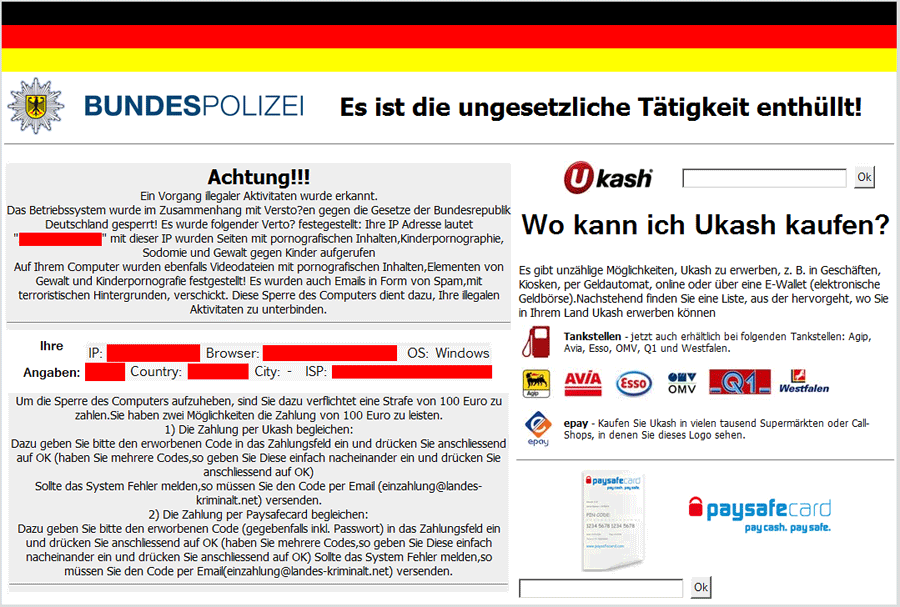 The Bundespolizei Ukash Virus is a variant of the Ukash Virus that, like several other ransomware Trojans of its ilk, targets Germany with a pop-up that invokes that country's national police. Other than a slightly rearranged warning message, the Bundespolizei Ukash Virus keeps to the traditional attacks of its family, and blocks your PC's interface with a pop-up that accuses the system of being involved in media-related crimes (such as trafficking in child pornography). Fortunately, the Bundespolizei Ukash Virus doesn't make any attempt to verify the veracity of its accusations, and the appearance of a Bundespolizei Ukash Virus pop-up doesn't indicate anything other than that your PC has suffered a regrettable security breach. SpywareRemove.com malware experts recommend that you expel a Bundespolizei Ukash Virus just as you should do with any member of the Ukash Virus family, by using anti-malware software to exterminate Bundespolizei Ukash Virus.
Why You Don't Need to Stand at Attention to a Bundespolizei Ukash Virus's 'Achtung!'
Besides the Bundespolizei Ukash Virus, many early members of the Ukash Virus family have also been seen using Germany-localized pop-up alerts, such as GVU Gesellschaft zur Verfolgung Ransomware and Bundespolizei National Cyber Crimes Unit Ransomware. While Bundespolizei Ukash Virus and these relatives present their warning messages in German and use Germany-specific imagery, other variants of the Ukash Virus have extended throughout Europe (Poliisi Tietoverkkorikos Tutkinnan Yksikkö Ransomware, the Cuerpo Nacional de Policia Virus) and even as far as North America ('Computer Crime & Intellectual Property Section' Ransomware).
After their installation (which may be accompanied by an automatic reboot), Bundespolizei Ukash Viruses display fraudulent pop-ups that portray themselves dishonestly as alerts from the Federal Police of Germany. These pop-ups stop you from accessing other aspects of Windows, including your desktop, and will insist that you pay a Ukash or Paysafecard fee to resolve the effective lockdown on your computer. SpywareRemove.com malware experts have found that, like most Ukash Viruses, a Bundespolizei Ukash Virus differs from its kin primarily in aesthetics, but a Bundespolizei Ukash Virus infection can always be considered malicious and should never be given money by any method.
Getting Out of a Bundespolizei Ukash Virus's Trap – Easier Than It Seems at a Glance
Although the total lockdown that a Bundespolizei Ukash Virus enforces may appear to be daunting or even insurmountable, SpywareRemove.com malware researchers are happy to note that it's a less strenuous obstacle than it would seem. Preventing the Bundespolizei Ukash Virus from launching will allow you to access all blocked programs, since Bundespolizei Ukash Virus and its relatives don't make any attempt to block or damage applications outside of their all-encompassing pop-up warnings.
One of the strongest and simplest methods of preventing Bundespolizei Ukash Virus from launching is to boot your PC from a removable USB drive. Removing Bundespolizei Ukash Virus should utilize anti-malware software when available to ensure the complete deletion of Registry entries and other components of a Bundespolizei Ukash Virus infection that may be nonobvious or concealed in a deliberate fashion.
Technical Details
File System Modifications
Tutorials: If you wish to learn how to remove malware components manually, you can read the tutorials on how to find malware, kill unwanted processes, remove malicious DLLs and delete other harmful files. Always be sure to back up your PC before making any changes.
The following files were created in the system:%AppData%\HEX-5823-6893-6818\jusched.exe
File name: %AppData%\HEX-5823-6893-6818\jusched.exeFile type: Executable File
Mime Type: unknown/exe
Registry Modifications
HKEY..\..\{CLSID Path}HKEY_LOCAL_MACHINE\SOFTWARE\Classes\AppID\{7E72E9EC-FCBC-40A7-AA69-2D60ADA7B296} AppID = "{7E72E9EC-FCBC-40A7-AA69-2D60ADA7B296}"HKEY..\..\..\..{Subkeys}HKEY_LOCAL_MACHINE\SOFTWARE\Classes\ASFFile\shell\pipiopenHKEY_LOCAL_MACHINE\SOFTWARE\Classes\ASFFile\shell\pipiopen\command (Default) = "MCCKMPlayerX"HKEY_LOCAL_MACHINE\SOFTWARE\Classes\AppID\MCCKMPlayerX.DLLHKEY_LOCAL_MACHINE\SOFTWARE\Classes\AVIFile\shell\pipiopenHKEY_LOCAL_MACHINE\SOFTWARE\Classes\AVIFile\shell\pipiopen\command (Default) = "Play With PIPIPlayer"HKEY_LOCAL_MACHINE\SOFTWARE\Classes\ASXFile\shell\pipiopen (Default) = ""%ProgramFiles%\pipi\PIPIPlayer.exe" "%L""HKEY_LOCAL_MACHINE\SOFTWARE\Classes\ASXFile\shell\pipiopen\command
Leave a Reply
Please note that we are not able to assist with billing and support issues regarding SpyHunter or other products. If you're having issues with SpyHunter, please get in touch with SpyHunter customer support through your SpyHunter . If you have SpyHunter billing questions, we recommend you check the Billing FAQ. For general suggestions or feedback, contact us.