Buzzdock Ads
Posted: September 6, 2012
Threat Metric
The following fields listed on the Threat Meter containing a specific value, are explained in detail below:
Threat Level: The threat level scale goes from 1 to 10 where 10 is the highest level of severity and 1 is the lowest level of severity. Each specific level is relative to the threat's consistent assessed behaviors collected from SpyHunter's risk assessment model.
Detection Count: The collective number of confirmed and suspected cases of a particular malware threat. The detection count is calculated from infected PCs retrieved from diagnostic and scan log reports generated by SpyHunter.
Volume Count: Similar to the detection count, the Volume Count is specifically based on the number of confirmed and suspected threats infecting systems on a daily basis. High volume counts usually represent a popular threat but may or may not have infected a large number of systems. High detection count threats could lay dormant and have a low volume count. Criteria for Volume Count is relative to a daily detection count.
Trend Path: The Trend Path, utilizing an up arrow, down arrow or equal symbol, represents the level of recent movement of a particular threat. Up arrows represent an increase, down arrows represent a decline and the equal symbol represent no change to a threat's recent movement.
% Impact (Last 7 Days): This demonstrates a 7-day period change in the frequency of a malware threat infecting PCs. The percentage impact correlates directly to the current Trend Path to determine a rise or decline in the percentage.
| Ranking: | 19,256 |
|---|---|
| Threat Level: | 2/10 |
| Infected PCs: | 2,033 |
| First Seen: | September 6, 2012 |
|---|---|
| Last Seen: | December 15, 2024 |
| OS(es) Affected: | Windows |
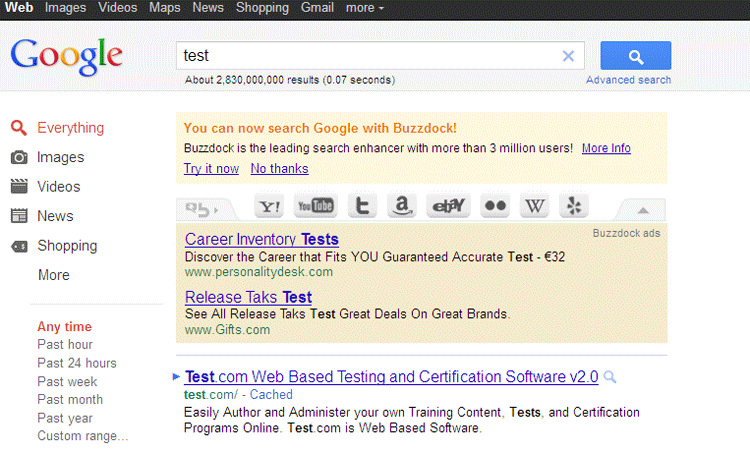 Buzzdock Ads is an adware program that inserts advertisement listings above your Google search results. Some victims of Buzzdock Ads infections have also experienced other browser hijack-related symptoms such as 'new tab' settings changes or unwarranted usage of system resources. While Buzzdock Ads is especially associated with the Addict-Thing add-on, Buzzdock Ads installations are also promoted in the disguise of fake software updates. Since, unless you enjoy looking at extra advertisements, Buzzdock Ads doesn't have any advantages for PC users, SpywareRemove.com malware experts recommend removing Buzzdock Ads with an anti-malware product – particularly since Buzzdock Ads is also associated with other undesirable behavior that's typical for adware and other low-level PC threats.
The Buzz on Buzzdock Ads's Advertising Scheme
Unlike some PC threats that attempt to conceal themselves from obvious perusal, Buzzdock Ads doesn't attempt to hide, and a Buzzdock Ads infection should be immediately obvious as soon as you see extra advertisements along with your next Google search. Along with these advertisements, Buzzdock Ads also displays an option to disable or temporarily close itself, although malware experts have verified that this option doesn't close or remove all associated Buzzdock Ads components. Advertisements by Buzzdock Ads haven't been noted to promote malicious content, although Buzzdock Ads is unlikely to have the same safety features for sorting potentially-harmful advertisements that more reputable advertisement providers than itself tend to use.
As a BHO (or Browser Helper Object) that lacks the standard website-redirecting and homepage-changing attacks of most browser hijackers, Buzzdock Ads is only a low-level threat. However, SpywareRemove.com malware analysts stress that Buzzdock Ads is still a minor security risk and may hamper your PC's performance by using an unusual amount of system resources (RAM and CPU percentages). Changing your browser's settings or removing your browser will not resolve a Buzzdock Ads infection, since Buzzdock Ads also uses browser-independent components and has full compatibility with multiple browsers, including Chrome, Firefox and Internet Explorer.
Putting a Cork in Buzzdock Ads's Ad Network
Buzzdock Ads can be removed by appropriate anti-malware products whenever it's necessary, and SpywareRemove.com malware researchers encourage this as part of securing your browser against potential vulnerabilities. While removing Buzzdock Ads shouldn't be much of a problem, avoiding Buzzdock Ads is still preferable, and, thankfully, simple – since Buzzdock Ads has well-defined means of installing itself.
Buzzdock Ads is distributed primarily by the same bundled software packages that other types of adware and browser hijacker-based PC threats utilize. In particular, malware experts have linked Buzzdock Ads to fake Firefox updates and other faux browser installers that pretend to include an update – when, in fact, they're just installing Buzzdock Ads and other types of Potentially Unwanted Programs (PUPs) for your browser. Staying clear of download links that are from disreputable sources should be all that's required to keep Buzzdock Ads's little advertising ring out of your search results.
Technical Details
File System Modifications
Tutorials: If you wish to learn how to remove malware components manually, you can read the tutorials on how to find malware, kill unwanted processes, remove malicious DLLs and delete other harmful files. Always be sure to back up your PC before making any changes.
The following files were created in the system:%ALLUSERSPROFILE%\buzzdock\buzzdock.dll
File name: buzzdock.dllSize: 2.72 MB (2725376 bytes)
MD5: e5e854b2173850635d3938fe625e8362
Detection count: 843
File type: Dynamic link library
Mime Type: unknown/dll
Path: %ALLUSERSPROFILE%\buzzdock\buzzdock.dll
Group: Malware file
Last Updated: December 15, 2024
C:\ProgramData\Bonanza\Bonanza.dll
File name: Bonanza.dllSize: 2.89 MB (2894848 bytes)
MD5: 17554b17c17e4298df7167ef8f0031c4
Detection count: 87
File type: Dynamic link library
Mime Type: unknown/dll
Path: C:\ProgramData\Bonanza\Bonanza.dll
Group: Malware file
Last Updated: July 8, 2022
More files
Registry Modifications
HKEY..\..\..\..{RegistryKeys}SOFTWARE\Microsoft\Windows\CurrentVersion\Uninstall\{220EB34E-DC2B-4B04-AD40-A1C7C31731F2}SOFTWARE\Tarma Installer\Products\{220EB34E-DC2B-4B04-AD40-A1C7C31731F2}
Leave a Reply
Please note that we are not able to assist with billing and support issues regarding SpyHunter or other products. If you're having issues with SpyHunter, please get in touch with SpyHunter customer support through your SpyHunter . If you have SpyHunter billing questions, we recommend you check the Billing FAQ. For general suggestions or feedback, contact us.