Citadel Trojan
Posted: January 27, 2012
Threat Metric
The following fields listed on the Threat Meter containing a specific value, are explained in detail below:
Threat Level: The threat level scale goes from 1 to 10 where 10 is the highest level of severity and 1 is the lowest level of severity. Each specific level is relative to the threat's consistent assessed behaviors collected from SpyHunter's risk assessment model.
Detection Count: The collective number of confirmed and suspected cases of a particular malware threat. The detection count is calculated from infected PCs retrieved from diagnostic and scan log reports generated by SpyHunter.
Volume Count: Similar to the detection count, the Volume Count is specifically based on the number of confirmed and suspected threats infecting systems on a daily basis. High volume counts usually represent a popular threat but may or may not have infected a large number of systems. High detection count threats could lay dormant and have a low volume count. Criteria for Volume Count is relative to a daily detection count.
Trend Path: The Trend Path, utilizing an up arrow, down arrow or equal symbol, represents the level of recent movement of a particular threat. Up arrows represent an increase, down arrows represent a decline and the equal symbol represent no change to a threat's recent movement.
% Impact (Last 7 Days): This demonstrates a 7-day period change in the frequency of a malware threat infecting PCs. The percentage impact correlates directly to the current Trend Path to determine a rise or decline in the percentage.
| Ranking: | 5,635 |
|---|---|
| Threat Level: | 2/10 |
| Infected PCs: | 123,773 |
| First Seen: | January 27, 2012 |
|---|---|
| Last Seen: | March 8, 2025 |
| OS(es) Affected: | Windows |
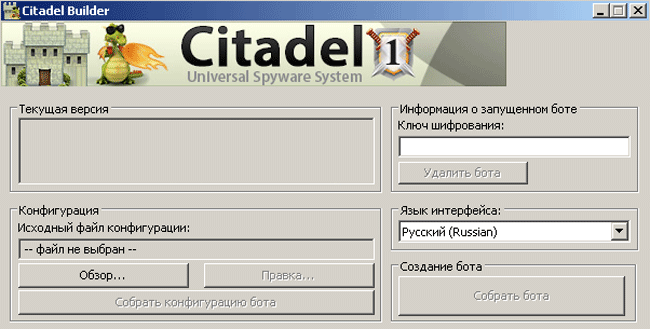 Citadel Trojan is a variant of Keylogger Zeus (AKA ZeuS) that's been provided with additional support by its criminal maintenance team. Citadel Trojan's revamp of the basic ZeuS template has included a number of improvements and fixes, such as increased support for stealing personal information from Chrome brands of web browsers and more intricate screen-monitoring abilities than what Keylogger Zeus offers by default. Because Citadel Trojan is capable of all of Keylogger Zeus's basic functions that are geared towards stealing bank-related information, SpywareRemove.com malware researchers consider Citadel Trojan an extremely high-level threat to your computer's security and privacy. Symptoms of Citadel Trojan's presence may be minor or nonexistent, and you should utilize appropriate anti-malware software to detect Citadel Trojan before Citadel Trojan can steal bank account-related information or other fiscal data.
Citadel Trojan – an Ironically-Named Bastion Against Bank Security
Citadel Trojan, as an upgraded and improved version of Keylogger Zeus, is built for and capable of all the basic functions that Keylogger Zeus is capable of – including recording your keyboard input (or keylogging), monitoring of financial websites like bankofamerica.com to steal relevant information, and scans of files that are likely to hold private data, such as passwords. Like Zeus, Citadel Trojan infects basic system processes to avoid detection; other than unusual resource usage by processes like svchost.exe, symptoms of Citadel Trojan's attacks may not be very obvious or visible. Consequentially, SpywareRemove.com malware researchers strongly recommend that you use anti-malware programs to scan your PC on a regular basis as the best defense against potential Citadel Trojan attacks.
Citadel Trojan has also been given several updates that make Citadel Trojan even more dangerous than Keylogger Zeus. Many of these features are sold by Citadel Trojan's criminal designers as separate add-ons that may or may not be present for any specific Citadel Trojan infection. Some significant additions include:
- Improved Chrome compatibility that allows Citadel Trojan to function in Chrome as well as other browsers (such as Internet Explorer and Firefox) that Zeus was already capable of handling.
- Support for increased evasion of anti-malware scanners on an update-by-update basis (although this support comes at a high price tag of nearly four hundred dollars initially and fifteen dollars per update).
- An unusual feature that may spell good news for some victims of Citadel Trojan attacks – an automatic shutdown function that triggers if Citadel Trojan detects a Russian or Ukrainian keyboard. The legal implications of this function strongly imply that Citadel Trojan's designers may actually be based in one of these two regions.
The Social Side of Citadel Trojan's Evolution
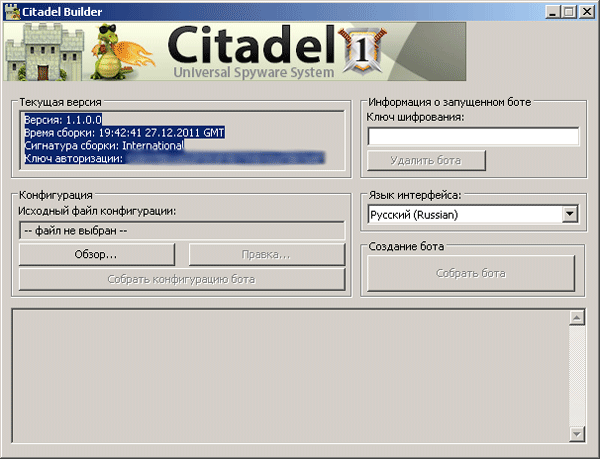
SpywareRemove.com malware researchers have also perceived that Citadel Trojan's standout feature is most probably its marketing and social support for criminal clients. Because Citadel Trojan is designed and sold to other criminals as an expensive but potentially profitable malware kit, Citadel Trojan's creators have placed heavy emphasis on providing long term support for their clients. Citadel Trojan has even included extra features that allow Citadel Trojan's clients to communicate easily with the Citadel Trojan development team for the purpose of fixing bugs and suggesting features. This shift from the less-supported style of marketing that's been in use by other keyloggers, such as ZeuS, is indicative that Citadel Trojan may be a threat to your PC for a very long time to come.
If you've recently used anti-malware scanners to cure a Citadel Trojan infection, you should be aware of the possibility that financial data and other types of personal info may have already been sent to Citadel Trojan's client-end users. SpywareRemove.com malware experts recommend that you change all important passwords and other security-related information after resolving a Citadel Trojan problem, to insure that future account hijacks and other attacks are unable to take place.
Technical Details
File System Modifications
Tutorials: If you wish to learn how to remove malware components manually, you can read the tutorials on how to find malware, kill unwanted processes, remove malicious DLLs and delete other harmful files. Always be sure to back up your PC before making any changes.
The following files were created in the system:%AllUsersProfile%\Application Data\Citadel Trojan
File name: %AllUsersProfile%\Application Data\Citadel TrojanGroup: Malware file
%UserProfile%\Start Menu\Programs\Startup\<reveton_filename>.dll.lnk
File name: %UserProfile%\Start Menu\Programs\Startup\<reveton_filename>.dll.lnkFile type: Shortcut
Mime Type: unknown/lnk
Group: Malware file
%UserProfile%\AppData\Roaming\Microsoft\Windows\Start Menu\Programs\Startup\<reveton_filename>dll.lnk
File name: %UserProfile%\AppData\Roaming\Microsoft\Windows\Start Menu\Programs\Startup\<reveton_filename>dll.lnkFile type: Shortcut
Mime Type: unknown/lnk
Group: Malware file
Leave a Reply
Please note that we are not able to assist with billing and support issues regarding SpyHunter or other products. If you're having issues with SpyHunter, please get in touch with SpyHunter customer support through your SpyHunter . If you have SpyHunter billing questions, we recommend you check the Billing FAQ. For general suggestions or feedback, contact us.