Expandsearchanswers.com
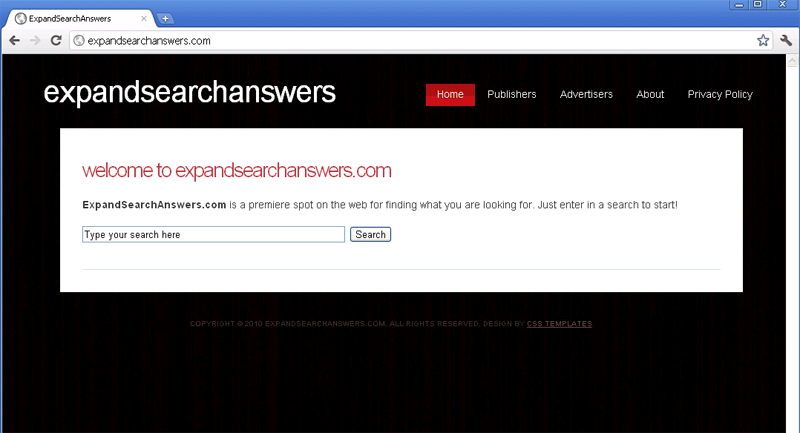 Although Expandsearchanswers.com certainly will expand your horizons, Expandsearchanswers.com does this by exposing you to malicious browser-redirecting Trojans and irrelevant spam websites. Its appearance in the form of a benign search engine disguises Expandsearchanswers.com's real purpose, which is to force you to visit Expandsearchanswers.com and click on links for sites that pay revenue back to Expandsearchanswers.com's web masters. Because SpywareRemove.com malware analysts have found that Expandsearchanswers.com doesn't use the safety measures that real search engines use and is explicitly involved with browser hijackers, it's recommended for you to avoid any contact with Expandsearchanswers.com whenever possible. If your browser begins redirecting you to Expandsearchanswers.com for no reason, chances are high that you've been infected by a browser hijacker for Expandsearchanswers.com, which should be removed with an appropriate anti-malware product.
Why Expandsearchanswers.com Isn't a Great Place for Your Online Searches
Expandsearchanswers.com has a harmless appearance that makes Expandsearchanswers.com look like a bare bones but functional search engine site, but Expandsearchanswers.com has no real search engine functionality. Instead of sorting through websites that are related to your search terms, Expandsearchanswers.com provides you with links to irrelevant advertisement-based sites. Some of these sites may be involved in drive-by-download attacks, phishing scams or marketing rogue security products, and SpywareRemove.com malware research team recommends that you avoid them as well as Expandsearchanswers.com itself.
Visits to Expandsearchanswers.com or exposure to other types of malicious sites can cause your PC to become infected with Expandsearchanswers.com's characteristic browser hijacker. This browser-redirecting Trojan functions in a manner that's very similar to a Google Redirect Virus, as noted with these symptoms:
- A browser hijacker for Expandsearchanswers.com will redirect you to Expandsearchanswers.com whenever you try to use another search engine.
- You may also find that your homepage or new tabs have been set to Expandsearchanswers.com.
- Although you may be able to change your browser settings to stop these attacks on a temporary basis, an active browser hijacker for Expandsearchanswers.com will undo any changes that you make at the first opportunity.
The Real Answer That You're Looking For - How to Banish Expandsearchanswers.com from Your Browser
SpywareRemove.com malware experts have also noted that Expandsearchanswers.com, 'premiere spot on the web' though Expandsearchanswers.com claims to be, is actually a clone of other fake search engines like get-information.com, search-fast-results.com, get-answers-fast.com, search-query.com, information-seeking.com and quick-search-results.com. These sites should be considered identical to Expandsearchanswers.com both in terms of attacks and overall danger to your PC.
If you find that your browser is being redirected to Expandsearchanswers.com or a similar website, you should immediately use a trustworthy anti-malware program to scan your computer. Since browser-redirecting Trojans like the ones that are used by Expandsearchanswers.com will embed themselves in baseline Windows components, you should scan your entire PC and not simply try to undo the symptoms that manifest themselves in a specific web browser.
Technical Details
File System Modifications
Tutorials: If you wish to learn how to remove malware components manually, you can read the tutorials on how to find malware, kill unwanted processes, remove malicious DLLs and delete other harmful files. Always be sure to back up your PC before making any changes.
The following files were created in the system:%WINDOWS%\system\BCBSMP35.BPL
File name: %WINDOWS%\system\BCBSMP35.BPLMime Type: unknown/BPL
%WINDOWS%\system32\sstray.exe
File name: %WINDOWS%\system32\sstray.exeFile type: Executable File
Mime Type: unknown/exe
%Documents and Settings%\All Users\Application Data\Microsoft\Network\Downloader\qmgr1.dat
File name: %Documents and Settings%\All Users\Application Data\Microsoft\Network\Downloader\qmgr1.datFile type: Data file
Mime Type: unknown/dat
%Documents and Settings%\All Users\Application Data\mazuki.dll
File name: %Documents and Settings%\All Users\Application Data\mazuki.dllFile type: Dynamic link library
Mime Type: unknown/dll
%Documents and Settings%\All Users\Application Data\Microsoft\Network\Downloader\qmgr0.dat
File name: %Documents and Settings%\All Users\Application Data\Microsoft\Network\Downloader\qmgr0.datFile type: Data file
Mime Type: unknown/dat
Registry Modifications
HKEY..\..\..\..{Subkeys}HKCU\Software\Microsoft\Windows\CurrentVersion\Run "[random].exe"
Leave a Reply
Please note that we are not able to assist with billing and support issues regarding SpyHunter or other products. If you're having issues with SpyHunter, please get in touch with SpyHunter customer support through your SpyHunter . If you have SpyHunter billing questions, we recommend you check the Billing FAQ. For general suggestions or feedback, contact us.