Home Malware Cleaner
Posted: February 20, 2012
Threat Metric
The following fields listed on the Threat Meter containing a specific value, are explained in detail below:
Threat Level: The threat level scale goes from 1 to 10 where 10 is the highest level of severity and 1 is the lowest level of severity. Each specific level is relative to the threat's consistent assessed behaviors collected from SpyHunter's risk assessment model.
Detection Count: The collective number of confirmed and suspected cases of a particular malware threat. The detection count is calculated from infected PCs retrieved from diagnostic and scan log reports generated by SpyHunter.
Volume Count: Similar to the detection count, the Volume Count is specifically based on the number of confirmed and suspected threats infecting systems on a daily basis. High volume counts usually represent a popular threat but may or may not have infected a large number of systems. High detection count threats could lay dormant and have a low volume count. Criteria for Volume Count is relative to a daily detection count.
Trend Path: The Trend Path, utilizing an up arrow, down arrow or equal symbol, represents the level of recent movement of a particular threat. Up arrows represent an increase, down arrows represent a decline and the equal symbol represent no change to a threat's recent movement.
% Impact (Last 7 Days): This demonstrates a 7-day period change in the frequency of a malware threat infecting PCs. The percentage impact correlates directly to the current Trend Path to determine a rise or decline in the percentage.
| Threat Level: | 10/10 |
|---|---|
| Infected PCs: | 12 |
| First Seen: | February 20, 2012 |
|---|---|
| Last Seen: | September 18, 2019 |
| OS(es) Affected: | Windows |
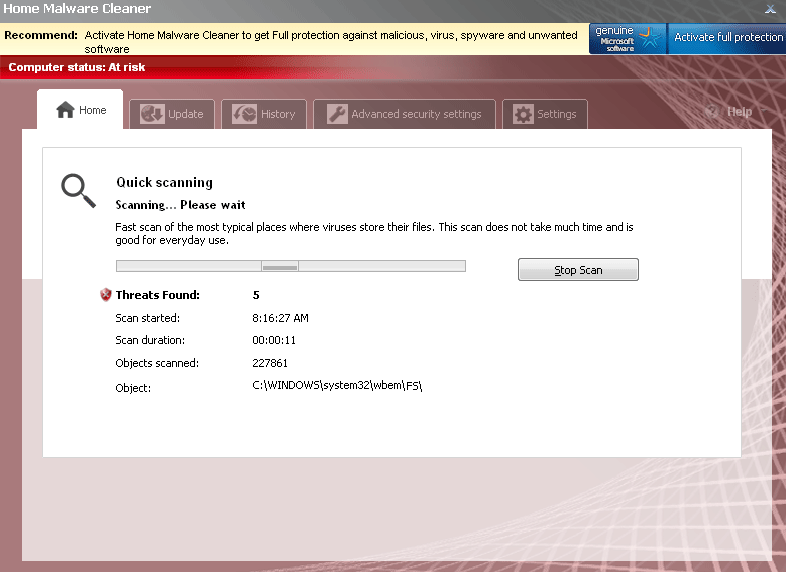 Home Malware Cleaner should be considered to be anything but hygienic, since SpywareRemove.com malware researchers have traced Home Malware Cleaner's past through disreputable scamware like Malware Protection Center and all the way back to evidence of browser hijacks, attacks against PC security software and fraudulent security features. Even though Home Malware Cleaner has the appearance of a polished and reputable anti-malware scanner, there isn't a single virus or Trojan in the world that Home Malware Cleaner could detect or remove, and system analysis information from Home Malware Cleaner should always be considered inaccurate. If your PC is under attack by Home Malware Cleaner, you should consider expelling Home Malware Cleaner with a legitimate security product or anti-malware scanner, along with any Trojans or other PC threats that may have been installed with Home Malware Cleaner in the first place.
Home Malware Cleaner – a Clone of Fake Anti-Malware Functions That Shares Its Ancestors' Taint
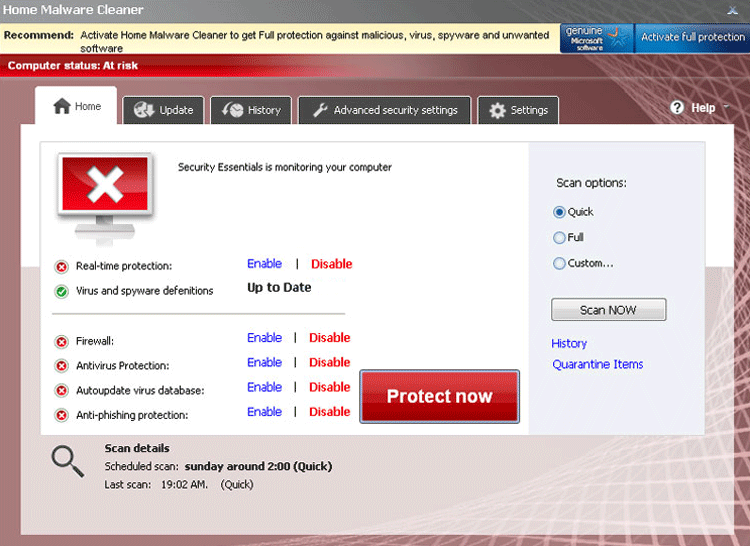
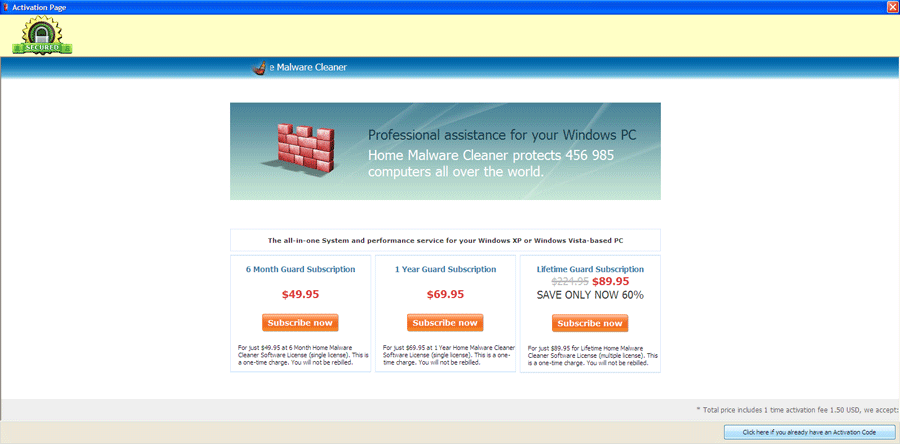
Home Malware Cleaner uses an official-looking interface that claims to offer defense against viruses, spyware and other types of malicious software, but, unlike a real anti-malware scanner, Home Malware Cleaner isn't coded to detect or remove any kind of PC threat. Although Home Malware Cleaner will displays its fair share of alerts and scanner results, the information that's contained therein will always portray fake infection notifications and other issues that aren't actually in existence on your PC. Because its value as a security product is nonexistent, Home Malware Cleaner's alerts, warnings and other efforts at communication should always be ignored, particularly since they may lead you to perform unwittingly self-destructive acts against your computer.
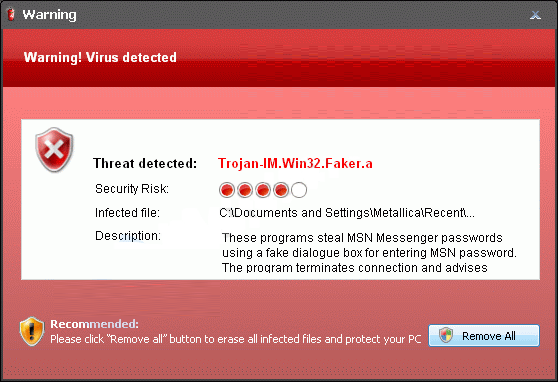
Examples that SpywareRemove.com malware research team has gleaned of some of Home Malware Cleaner's fraudulent warning messages include:
Security Center Alert
To help protect your computer, Security Center has blocked some features of this program.
Name: Win64.BIT.Looker.exe
Risk: High
ERROR MESSAGE:
Warning
Warning! Virus detected
Threat Detected: Trojan-Spy.HTML.Sunfraud.a
Security Center
Unauthorized remote connection!
Your system is making an unauthorized personal data transfer to a remote computer!
Warning! Unauthorized personal data transfer is detected! It may be your personal credit card details, logins and passwords, browsing habits or information about files you have downloaded.
To protect your private data, please click 'Prevent Connection' button below.
System warning
No real-time malware, spyware and virus protection was found. Click here to activate.
WARNING! 371 threats detected
Detected malicious programs can damage your computer and compromise your privacy. It’s strongly recommended to remove them immediatly [sic]!
Potential risks: Infecting other computers on your network
Continue unprotected Remove all threats now
Warning! Identity theft attempt detected
Hidden connection IP: 128.154.26.11
Target: Microsoft Corporation keys
Insecurity Internet activity. Threat of virus attack
Due to insecure Internet browsing your PC can easily get infected with viruses, worms and Trojans without knowledge, and that can lead to system slowdown, freezes and crashes. Also insecure Internet activity can result in revealing your personal information. To get full advanced real-time protection for PC and Internet activity, register your antivirus software.
Beyond its fake anti-malware features, Home Malware Cleaner is also guilty of being a clone of other rogue anti-malware products from the FakeVimes family that use the same appearance and basic functions. Some examples of Home Malware Cleaner clones that should be considered just as dangerous to your PC as Home Malware Cleaner could be are Privacy Guard Pro, Extra Antivirus, Fast Antivirus 2009, Presto TuneUp, Windows Security Suite, Smart Virus Eliminator, Packed.Generic.245, Volcano Security Suite, Windows Enterprise Suite, Enterprise Suite, Additional Guard, Live PC Care, PC Live Guard, Live Enterprise Suite, Security Antivirus, My Security Wall, CleanUp Antivirus, Smart Security and PrivacyGuard Pro 2.0.
Leaving Your Computer Sparklingly Clean from a Distinct Lack of Home Malware Cleaner
Even with appropriate anti-malware software on your PC, deleting Home Malware Cleaner may be difficult due to secondary functions that SpywareRemove.com malware experts have observed from Home Malware Cleaner and other members of its family. Some other attacks that you may notice while trying to delete Home Malware Cleaner consist of:
- The appearance of random trash files on your hard drive. These files aren't harmful, but will continue to appear due to Home Malware Cleaner creating them to label as fake infections.
- Programs that are blocked without your permission, with or without the occurrence of additional fake error messages.
- Browser hijacks that redirect your browser to unsafe sites or away from safe ones.
However, once Home Malware Cleaner is disabled via Safe Mode or other methods, removing Home Malware Cleaner with any appropriate anti-malware program should be a fairly easy task for anyone.
Technical Details
File System Modifications
Tutorials: If you wish to learn how to remove malware components manually, you can read the tutorials on how to find malware, kill unwanted processes, remove malicious DLLs and delete other harmful files. Always be sure to back up your PC before making any changes.
The following files were created in the system:%ALLUSERSPROFILE%\Application Data\cac25b\HMcac_8001.exe
File name: HMcac_8001.exeSize: 2.96 MB (2965504 bytes)
MD5: 49f21906c7143bd3384609ead1aa3b87
Detection count: 5
File type: Executable File
Mime Type: unknown/exe
Path: %ALLUSERSPROFILE%\Application Data\cac25b
Group: Malware file
Last Updated: February 21, 2012
%ALLUSERSPROFILE%\d1e546\HMd1e_8020.exe
File name: HMd1e_8020.exeSize: 2.96 MB (2965504 bytes)
MD5: 28e1aa7f81799d7e7ff481d8bd313510
Detection count: 5
File type: Executable File
Mime Type: unknown/exe
Path: %ALLUSERSPROFILE%\d1e546
Group: Malware file
Last Updated: February 21, 2012
%Programs%\Home Malware Cleaner.lnk
File name: %Programs%\Home Malware Cleaner.lnkFile type: Shortcut
Mime Type: unknown/lnk
Group: Malware file
%Desktop%\Home Malware Cleaner.lnk
File name: %Desktop%\Home Malware Cleaner.lnkFile type: Shortcut
Mime Type: unknown/lnk
Group: Malware file
%StartMenu%\Home Malware Cleaner.lnk
File name: %StartMenu%\Home Malware Cleaner.lnkFile type: Shortcut
Mime Type: unknown/lnk
Group: Malware file
%CommonAppData%\[RANDOM]\ASE.ico
File name: %CommonAppData%\[RANDOM]\ASE.icoMime Type: unknown/ico
Group: Malware file
%CommonAppData%\[RANDOM]\[RANDOM].exe
File name: %CommonAppData%\[RANDOM]\[RANDOM].exeFile type: Executable File
Mime Type: unknown/exe
Group: Malware file
%CommonAppData%\[RANDOM]\[RANDOM].cfg
File name: %CommonAppData%\[RANDOM]\[RANDOM].cfgMime Type: unknown/cfg
Group: Malware file
%AppData%\Home Malware Cleaner\Instructions.ini
File name: %AppData%\Home Malware Cleaner\Instructions.iniMime Type: unknown/ini
Group: Malware file
%AppData%\Home Malware Cleaner\ScanDisk_.exe
File name: %AppData%\Home Malware Cleaner\ScanDisk_.exeFile type: Executable File
Mime Type: unknown/exe
Group: Malware file
%AppData%\Microsoft\Internet Explorer\Quick Launch\Home Malware Cleaner.lnk
File name: %AppData%\Microsoft\Internet Explorer\Quick Launch\Home Malware Cleaner.lnkFile type: Shortcut
Mime Type: unknown/lnk
Group: Malware file
Registry Modifications
HKEY_LOCAL_MACHINE\SOFTWARE\Microsoft\..{RunKeys}HKEY_CURRENT_USER\Software\Microsoft\Windows\CurrentVersion\Run "Home Malware Cleaner" "%CommonAppData%\[RANDOM]\[RANDOM].exe" /s /d
Additional Information
| # | Message |
|---|---|
| 1 | System Alert malicious applications, which may contain Trojans, were found on your computer and are able to be removed immediately. Click here to remove these potentially harmful items using Home Malware Cleaner. |
| 2 | Warning! Access conflict detected! An unidentified program is trying to access system process address space. Process Name: AllowedForm Location: C:\Windows\...\taskmgr.exe |
| 3 | Warning! Identity theft attempt detected |
| 4 | Warning! Virus detected Threat Detected: Trojan-PSW.VBS.Half Description: This is a VBScript-virus. It steals user's passwords. |
Leave a Reply
Please note that we are not able to assist with billing and support issues regarding SpyHunter or other products. If you're having issues with SpyHunter, please get in touch with SpyHunter customer support through your SpyHunter . If you have SpyHunter billing questions, we recommend you check the Billing FAQ. For general suggestions or feedback, contact us.