'Las operaciones sobre las actividades ilegales' Ransomware
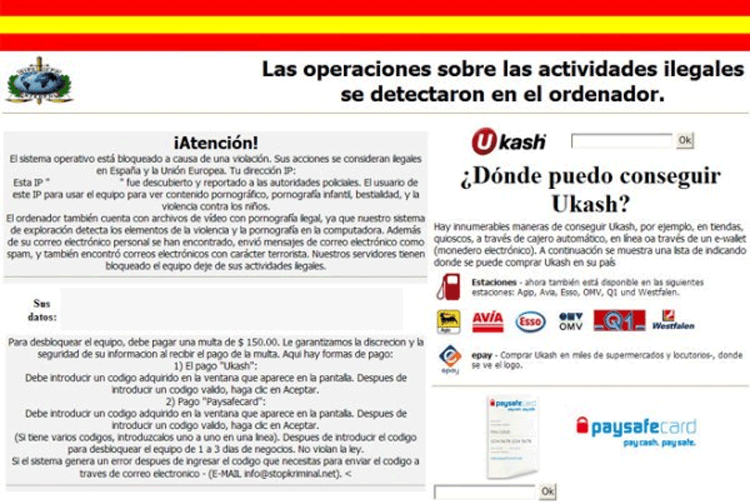 The 'Las operaciones sobre las actividades ilegales se detectaron en el ordenador' fake notification is a fake alert that's used by a new variant of ransomware Trojan that's derived from older Trojans that use similar warning messages (such as 'La policia ESPAÑOLA, METROPOLITAN POLICE' Attention! Illegal activity was revealed!' or 'Die offizielle Mitteilung des Bundeskriminalamtes'). Although the 'Las operaciones sobre las actividades ilegales se detectaron en el ordenador' fake notification is a new variant, ransomware Trojans that use this error message stick to standard ransomware attacks that were also in use by their predecessors, including threatening you with fraudulent legal action and locking your PC out of Windows. However, since the 'Las operaciones sobre las actividades ilegales se detectaron en el ordenador' fake notification screen isn't representative of any genuine-legal authority, SpywareRemove.com malware researchers recommend that you remove the Trojan that's responsible with appropriate anti-malware program, instead of paying the 'Las operaciones sobre las actividades ilegales se detectaron en el ordenador' ransom fee.
The Crucial Deceit in Any 'Las operaciones sobre las actividades ilegales se detectaron en el ordenador' Error Screen
'Las operaciones sobre las actividades ilegales se detectaron en el ordenador,' (translated from Spanish as 'Operations related to illegal activities were detected on your computer' is a fake error screen that displaces the normal Windows startup screen and presents a threatening message about imminent legal action. Like most other types of ransomware Trojan messages, 'Las operaciones sobre las actividades ilegales se detectaron en el ordenador' fake notifications will pretend that the infected PC has been detected conducting illegal activities, often of a pornographic nature. However, 'Las operaciones sobre las actividades ilegales se detectaron en el ordenador' Trojans are incapable of detecting such actions, and aren't designed by legitimate-legal entities.
SpywareRemove.com malware experts note without surprise that the 'Las operaciones sobre las actividades ilegales se detectaron en el ordenador' fake notification goes on to request one hundred and fifty dollars via digital currency-transferral services, or 'Las operaciones sobre las actividades ilegales se detectaron en el ordenador' fake notification will supposedly delete files on your PC. Besides being an unbelievable bluff from a message that claims to be from a legitimate police force, 'Las operaciones sobre las actividades ilegales se detectaron en el ordenador' Trojans are also incapable of deleting your files or even encrypting your information – this warning message is just a fraudulent warning that you can ignore with perfect safety.
The Right Way to Reject a 'Las operaciones sobre las actividades ilegales se detectaron en el ordenador' Ransom Scam
If you see a 'Las operaciones sobre las actividades ilegales se detectaron en el ordenador' error screen on your PC, your computer has been infected with a ransomware Trojan and will need to be disinfected immediately. SpywareRemove.com malware researchers were happy to find that 'Las operaciones sobre las actividades ilegales se detectaron en el ordenador' Trojans lack any additional defensive functions that weren't already present in similar ransomware Trojans, and so any good anti-malware program with an up-to-date threat database should be able to remove a 'Las operaciones sobre las actividades ilegales se detectaron en el ordenador' Trojan without any problems.
However, before you can scan your PC to delete a 'Las operaciones sobre las actividades ilegales se detectaron en el ordenador' ransomware Trojan, you'll need to disable the Trojan to be allowed into Windows at all. This only requires the usage of Safe Mode or an external boot (for example, by booting Windows from a CD) to work around the 'Las operaciones sobre las actividades ilegales se detectaron en el ordenador' Trojan's startup routine. After that, a complete scan with your choice of anti-malware product will get rid of the 'Las operaciones sobre las actividades ilegales se detectaron en el ordenador' Trojan and insure the safety of your PC without costing you a penny.
Technical Details
File System Modifications
Tutorials: If you wish to learn how to remove malware components manually, you can read the tutorials on how to find malware, kill unwanted processes, remove malicious DLLs and delete other harmful files. Always be sure to back up your PC before making any changes.
The following files were created in the system:[SET OF RANDOM CHARACTERS].exe
File name: [SET OF RANDOM CHARACTERS].exeFile type: Executable File
Mime Type: unknown/exe
Registry Modifications
HKEY..\..\..\..{Subkeys}HKEY_LOCAL_MACHINE\SOFTWARE\Microsoft\Windows NT\CurrentVersion\Winlogon\"Shell" = "[SET OF RANDOM CHARACTERS].exe"
Leave a Reply
Please note that we are not able to assist with billing and support issues regarding SpyHunter or other products. If you're having issues with SpyHunter, please get in touch with SpyHunter customer support through your SpyHunter . If you have SpyHunter billing questions, we recommend you check the Billing FAQ. For general suggestions or feedback, contact us.