P Antispyware 09
Posted: April 15, 2009
Threat Metric
The following fields listed on the Threat Meter containing a specific value, are explained in detail below:
Threat Level: The threat level scale goes from 1 to 10 where 10 is the highest level of severity and 1 is the lowest level of severity. Each specific level is relative to the threat's consistent assessed behaviors collected from SpyHunter's risk assessment model.
Detection Count: The collective number of confirmed and suspected cases of a particular malware threat. The detection count is calculated from infected PCs retrieved from diagnostic and scan log reports generated by SpyHunter.
Volume Count: Similar to the detection count, the Volume Count is specifically based on the number of confirmed and suspected threats infecting systems on a daily basis. High volume counts usually represent a popular threat but may or may not have infected a large number of systems. High detection count threats could lay dormant and have a low volume count. Criteria for Volume Count is relative to a daily detection count.
Trend Path: The Trend Path, utilizing an up arrow, down arrow or equal symbol, represents the level of recent movement of a particular threat. Up arrows represent an increase, down arrows represent a decline and the equal symbol represent no change to a threat's recent movement.
% Impact (Last 7 Days): This demonstrates a 7-day period change in the frequency of a malware threat infecting PCs. The percentage impact correlates directly to the current Trend Path to determine a rise or decline in the percentage.
| Threat Level: | 10/10 |
|---|---|
| Infected PCs: | 16 |
| First Seen: | July 24, 2009 |
|---|---|
| Last Seen: | January 10, 2019 |
| OS(es) Affected: | Windows |
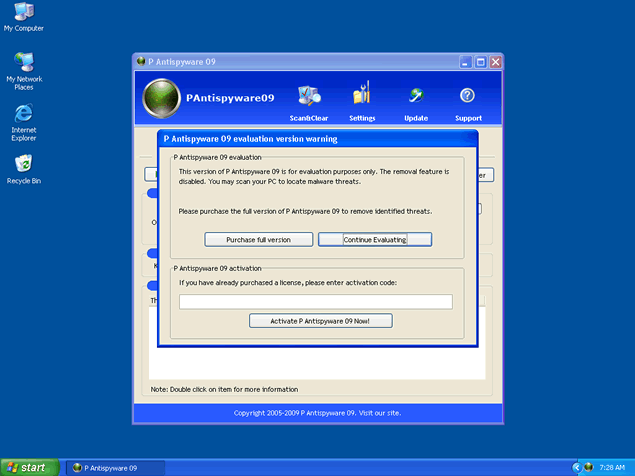
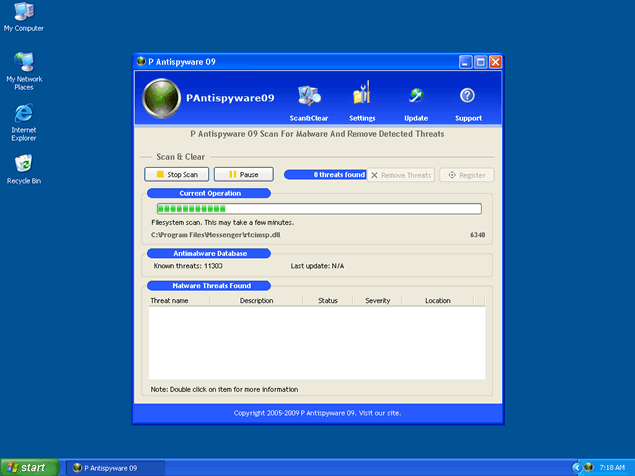 P Antispyware 09, a rogue anti-spyware program, uses false advertising and fake scan results in order to trick you into purchasing this software, under the pretense that it will protect your system from infection. Certain web sites will greet you with pop-up windows notifying you of the infection, which you are persuaded to combat by running a fraudulent online scanner.
This scan is accompanied by numerous reports of infections and it is suggested that you download and install P Antispyware 09. Once this application has been installed it will be configured to start automatically when Windows loads. The scan that occurs may report back fictitious results, in an attempt to intimidate the user into purchasing the counterfeit "full" version of P Antispyware 09.
Aliases
More aliases (22)
Technical Details
File System Modifications
Tutorials: If you wish to learn how to remove malware components manually, you can read the tutorials on how to find malware, kill unwanted processes, remove malicious DLLs and delete other harmful files. Always be sure to back up your PC before making any changes.
The following files were created in the system:pas.exe
File name: pas.exeSize: 964.6 KB (964608 bytes)
MD5: bf756495ac80076554ef10e04e577b99
Detection count: 57
File type: Executable File
Mime Type: unknown/exe
Group: Malware file
Last Updated: December 11, 2009
setup[1].exe
File name: setup[1].exeSize: 1.22 MB (1225773 bytes)
MD5: cbad878ad22ca50209f5e0521550cb5f
Detection count: 52
File type: Executable File
Mime Type: unknown/exe
Group: Malware file
Last Updated: December 11, 2009
Leave a Reply
Please note that we are not able to assist with billing and support issues regarding SpyHunter or other products. If you're having issues with SpyHunter, please get in touch with SpyHunter customer support through your SpyHunter . If you have SpyHunter billing questions, we recommend you check the Billing FAQ. For general suggestions or feedback, contact us.