Privacy Guard 2010
Posted: December 2, 2010
Threat Metric
The following fields listed on the Threat Meter containing a specific value, are explained in detail below:
Threat Level: The threat level scale goes from 1 to 10 where 10 is the highest level of severity and 1 is the lowest level of severity. Each specific level is relative to the threat's consistent assessed behaviors collected from SpyHunter's risk assessment model.
Detection Count: The collective number of confirmed and suspected cases of a particular malware threat. The detection count is calculated from infected PCs retrieved from diagnostic and scan log reports generated by SpyHunter.
Volume Count: Similar to the detection count, the Volume Count is specifically based on the number of confirmed and suspected threats infecting systems on a daily basis. High volume counts usually represent a popular threat but may or may not have infected a large number of systems. High detection count threats could lay dormant and have a low volume count. Criteria for Volume Count is relative to a daily detection count.
Trend Path: The Trend Path, utilizing an up arrow, down arrow or equal symbol, represents the level of recent movement of a particular threat. Up arrows represent an increase, down arrows represent a decline and the equal symbol represent no change to a threat's recent movement.
% Impact (Last 7 Days): This demonstrates a 7-day period change in the frequency of a malware threat infecting PCs. The percentage impact correlates directly to the current Trend Path to determine a rise or decline in the percentage.
| Threat Level: | 10/10 |
|---|---|
| Infected PCs: | 5 |
| First Seen: | December 2, 2010 |
|---|---|
| Last Seen: | August 17, 2022 |
| OS(es) Affected: | Windows |
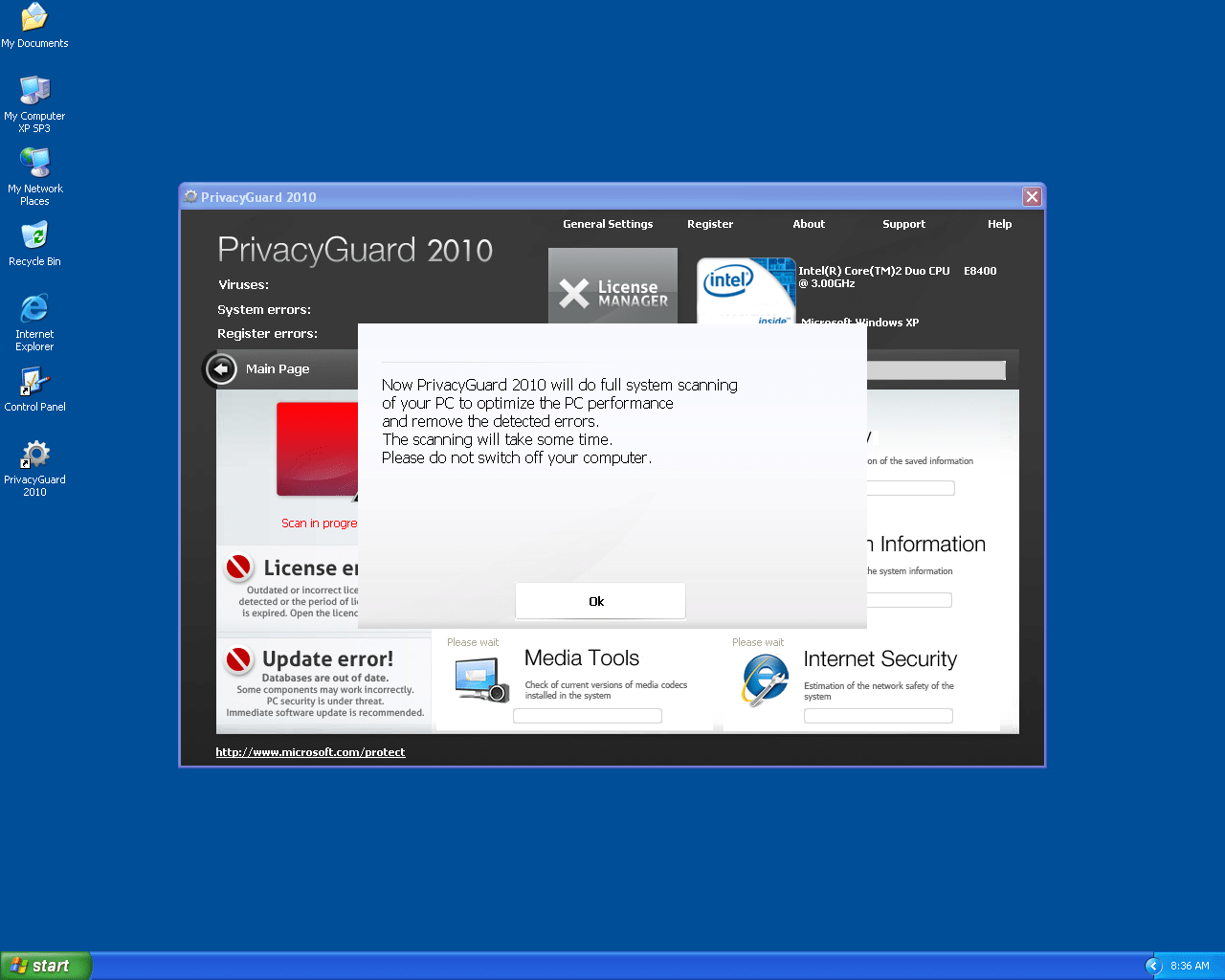 Privacy Guard 2010 is a clone of other rogue anti-virus programs distributed by a Trojan that imitates Microsoft Security Essentials. Like the other threats it copies, Privacy Guard 2010 will create false positive infection warnings and redirect your browser towards Privacy Guard 2010's homepage to force you to purchase an activation key. However, since Privacy Guard 2010 is only making all of these threats up and will attack your computer security in a variety of ways, it's suggested that you delete Privacy Guard 2010 instead of buying a key for Privacy Guard 2010.
Privacy Guard 2010 is a 2010 Threat that Still Wild in 2011
Privacy Guard 2010 is a member of a large rogue security software family that distribute themselves with the help of the Trojan called Fake Microsoft Security Essentials Alert Malware. One of Fake Microsoft Security Essentials Alert's fake errors can be seen below:
Threat prevention solution found
Security system analysis has revealed critical file system vulnerability caused by severe malware attacks.
Risk of system files infection:
The detected vulnerability may result in unauthorized access to private information and hard drive data with a seriuos [sic] possibility of irreversible data loss and unstable PC performance. To remove the malware please run a full system scan. Press 'OK' to install the software necessary to initiate system files check. To complete the installation process please reboot your computer.
These errors are created to trick you into thinking that the threat being installed by Fake Microsoft Security Essentials Alert is a real anti-malware application. Along with Privacy Guard 2010, Fake Microsoft Security Essentials Alert can install such threats as Windows Software Guard, Pest Detector 4.1, Windows Software Protection, Windows Safety Protection and Red Cross Antivirus.
Once the Fake Microsoft Security Essentials Alert Trojan plops Privacy Guard 2010 onto your PC, you'll be struggling against a fresh batch of fake errors:
Warning!
Name: [file executable]
Name: [file executable path]
Application that seems to be a key-logger is detected. System information security is at risk. It is recommended to enable the security mode and run total System scanning.
System Security Warning
Attempt to modify register key entries is detected. Register entries analysis is recommended.
System component corrupted!
System reboot error has occurred due to lsass.exe system process failure.
This may be caused by severe malware infections.
Automatic restore of lsass.exe backup copy completed.
The correct system performance can not be resumed without eliminating the cause of lsass.exe corruption.
Although these messages may appear convincing, Privacy Guard 2010 can't detect real keyloggers or other PC threats – these errors exist for one purpose, and that's to make you panic and buy Privacy Guard 2010's activated version to make them stop appearing! Likewise, all the other functions Privacy Guard 2010 offers, such as system analysis and Internet security, are also faked.
Put Your Guard Up Against Privacy Guard 2010
Privacy Guard 2010 isn't satisfied with just warning you about nonexistent threats; Privacy Guard 2010 will also attack your computer with:
- Malfunctioning applications. Privacy Guard 2010 will use errors similar to those above to make it seem like an application has failed because of an infection, but Privacy Guard 2010 is the real cause of this problem. Anti-virus programs and Windows tools like Task Manager are extremely likely to be affected by these types of attacks.
- Web browser hijacks. You may find your homepage changed to one related to Privacy Guard 2010, your search results redirecting you to hostile websites, or your ability to visit safe websites nullified. These hijacks frequently take the form of fake errors that try to make you think that a harmless website is dangerous or vice versa.
To tackle all of these problems and remove them all in one fell sweep, you need to remove Privacy Guard 2010. Trying to delete Privacy Guard 2010 by deleting the folders and files is unlikely to work and may cause other issues, so it's suggested that you rely on a good anti-malware program.
If necessary, you can use Safe Mode to stop Privacy Guard 2010 from launching automatically. Unless Privacy Guard 2010 is completely inactive while you scan your computer, your attempts at taking out Privacy Guard 2010 may fail even if you're using an excellent-quality scanner.
Technical Details
File System Modifications
Tutorials: If you wish to learn how to remove malware components manually, you can read the tutorials on how to find malware, kill unwanted processes, remove malicious DLLs and delete other harmful files. Always be sure to back up your PC before making any changes.
The following files were created in the system:%PROGRAMFILES%\PC\PrivacyGuard 2010\PrivacyGuard2010.exe
File name: PrivacyGuard2010.exeSize: 2.34 MB (2341376 bytes)
MD5: 8988274b7adf73faf0854a94f340291c
Detection count: 48
File type: Executable File
Mime Type: unknown/exe
Path: %PROGRAMFILES%\PC\PrivacyGuard 2010
Group: Malware file
Last Updated: December 2, 2010
Leave a Reply
Please note that we are not able to assist with billing and support issues regarding SpyHunter or other products. If you're having issues with SpyHunter, please get in touch with SpyHunter customer support through your SpyHunter . If you have SpyHunter billing questions, we recommend you check the Billing FAQ. For general suggestions or feedback, contact us.