ULocker Ransomware
Posted: October 3, 2012
Threat Metric
The following fields listed on the Threat Meter containing a specific value, are explained in detail below:
Threat Level: The threat level scale goes from 1 to 10 where 10 is the highest level of severity and 1 is the lowest level of severity. Each specific level is relative to the threat's consistent assessed behaviors collected from SpyHunter's risk assessment model.
Detection Count: The collective number of confirmed and suspected cases of a particular malware threat. The detection count is calculated from infected PCs retrieved from diagnostic and scan log reports generated by SpyHunter.
Volume Count: Similar to the detection count, the Volume Count is specifically based on the number of confirmed and suspected threats infecting systems on a daily basis. High volume counts usually represent a popular threat but may or may not have infected a large number of systems. High detection count threats could lay dormant and have a low volume count. Criteria for Volume Count is relative to a daily detection count.
Trend Path: The Trend Path, utilizing an up arrow, down arrow or equal symbol, represents the level of recent movement of a particular threat. Up arrows represent an increase, down arrows represent a decline and the equal symbol represent no change to a threat's recent movement.
% Impact (Last 7 Days): This demonstrates a 7-day period change in the frequency of a malware threat infecting PCs. The percentage impact correlates directly to the current Trend Path to determine a rise or decline in the percentage.
| Threat Level: | 10/10 |
|---|---|
| Infected PCs: | 7 |
| First Seen: | October 3, 2012 |
|---|---|
| Last Seen: | March 6, 2024 |
| OS(es) Affected: | Windows |
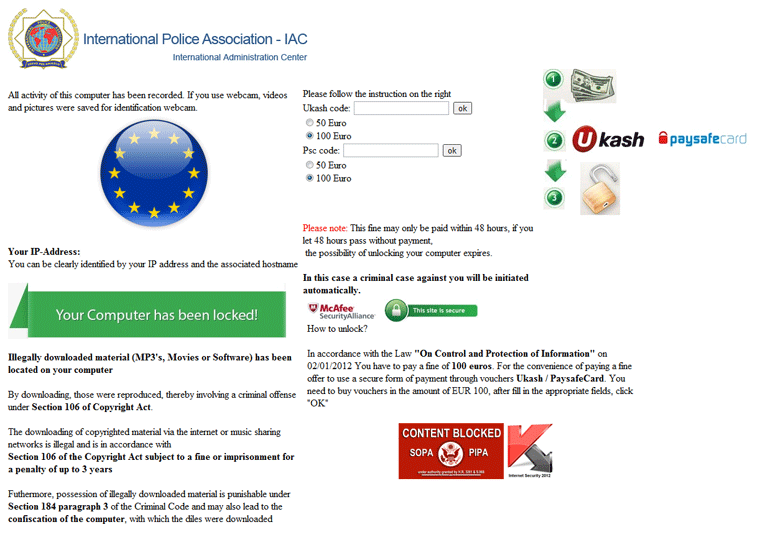 Ulocker is a form of police ransomware that attempts to detect the target computer's country (based on the IP address) and display a region-specific legal alert by the International Police Association. While Ulocker's pop-ups claim that your PC has been locked down due to criminal activity occurring, SpywareRemove.com malware researchers note that Ulocker isn't affiliated with the IPA and doesn't have any valid reason to lock your computer. To unlock your PC, Ulocker may request a Ukash or Paysafecard payment, although these fines are unnecessary for removing Ulocker, which should always be considered malicious, criminal, fraudulent and a high-level threat to your PC's safety. Appropriate measures for disabling and deleting Ulocker Trojans are included in the rest of this article.
Ulocker: the Police Ransomware with Unlimited Linguistics Skills
Ulocker is part of the rising surge of ransomware Trojans that have significantly increased development within the past few years. First seen in July of this year on a private forum for carding (an activity associated with credit card fraud), the Ulocker package is sold to criminals who wish to create their own variants of ransomware Trojans, with support included for various languages.
Ulocker appears to have been born in Russia, although Ulocker attacks have been found to target numerous countries, as SpywareRemove.com malware researchers note with this list:
- Austria
- Cyprus
- Germany
- Finland
- France
- Greece
- Italy
- the Netherlands
- Poland
- Portugal
- Romania
- Spain
- Sweden
- Switzerland
After detecting which of these countries your PC is based in, Ulocker locks your computer and launches an alert that includes fake IPA credentials (such as the organization's logo). While this pop-up will insist that you've committed some crime that's guilty of causing Ulocker to lock your computer, SpywareRemove.com malware researchers can confirm that Ulocker isn't related to any attempts to detect actual computer crimes and isn't supported by the International Police Association. Paying the ransom that Ulocker demands (usually via Ukash or Paysafecard) does nothing but spend your money for no benefits to your PC, and you should consider Ulocker a hostile Trojan to be removed promptly.
Picking the 'Lock' Part of a Ulocker Infection
Besides its basic attacks, Ulocker may also make changes to the Registry that harm your computer's security – for instance, by disabling your firewall or other critical programs. Given that Ulocker can be a high-level threat to your PC's safety, Ulocker's removal should always be accomplished quickly and with a good anti-malware application.
If Ulocker blocks the software that you'd use to remove Ulocker and related PC threats, SpywareRemove.com malware research team encourages you to use a Safe Mode boot or a boot from an external device (USB flash drive, etc) to prevent Ulocker from starting. By default, Ulocker starts with Windows, which makes using your computer as normal while Ulocker is installed highly difficult.
no soy una maquina