Awola
Posted: September 25, 2007
Threat Metric
The following fields listed on the Threat Meter containing a specific value, are explained in detail below:
Threat Level: The threat level scale goes from 1 to 10 where 10 is the highest level of severity and 1 is the lowest level of severity. Each specific level is relative to the threat's consistent assessed behaviors collected from SpyHunter's risk assessment model.
Detection Count: The collective number of confirmed and suspected cases of a particular malware threat. The detection count is calculated from infected PCs retrieved from diagnostic and scan log reports generated by SpyHunter.
Volume Count: Similar to the detection count, the Volume Count is specifically based on the number of confirmed and suspected threats infecting systems on a daily basis. High volume counts usually represent a popular threat but may or may not have infected a large number of systems. High detection count threats could lay dormant and have a low volume count. Criteria for Volume Count is relative to a daily detection count.
Trend Path: The Trend Path, utilizing an up arrow, down arrow or equal symbol, represents the level of recent movement of a particular threat. Up arrows represent an increase, down arrows represent a decline and the equal symbol represent no change to a threat's recent movement.
% Impact (Last 7 Days): This demonstrates a 7-day period change in the frequency of a malware threat infecting PCs. The percentage impact correlates directly to the current Trend Path to determine a rise or decline in the percentage.
| Threat Level: | 10/10 |
|---|---|
| Infected PCs: | 36 |
| First Seen: | July 24, 2009 |
|---|---|
| OS(es) Affected: | Windows |
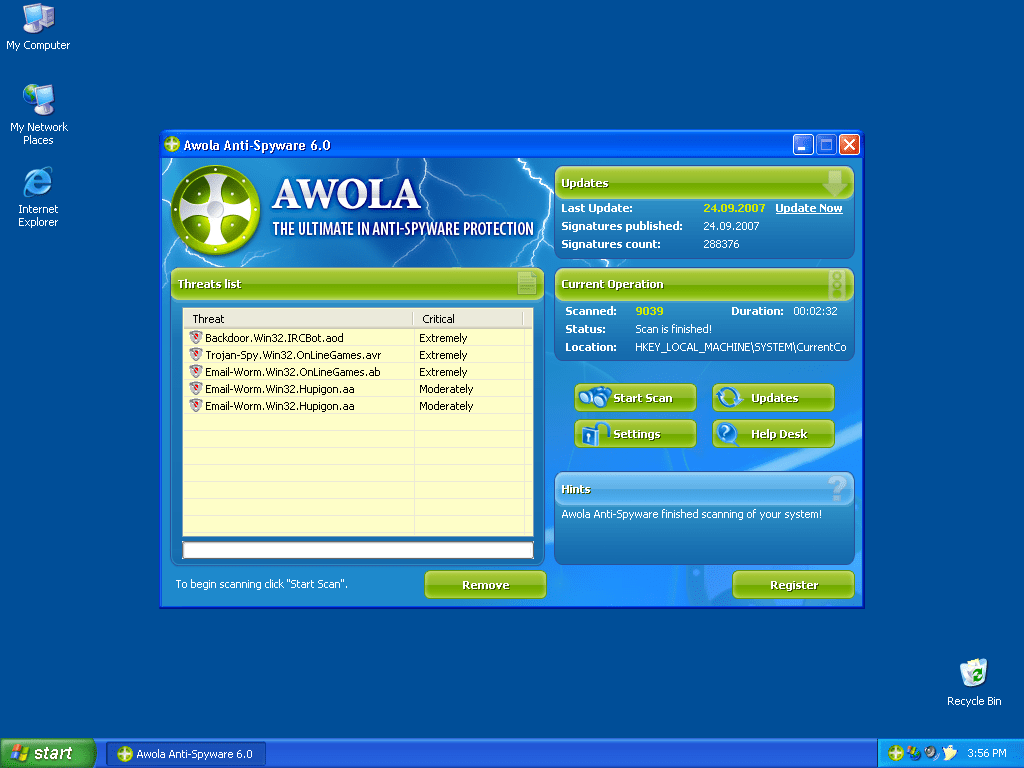 Awola is a rogue anti-spyware application that is often downloaded and installed without user knowledge or consent. Awola is often downloaded and installed by a Trojan called Zlob. Once installed, Awola will display a fake security message similar to a Windows notification pops up saying your PC is infected with malware. Awola's warning message is used to lure you into purchasing, downloading and installing their program to remove the imaginary spyware.
Aliases
Technical Details
File System Modifications
Tutorials: If you wish to learn how to remove malware components manually, you can read the tutorials on how to find malware, kill unwanted processes, remove malicious DLLs and delete other harmful files. Always be sure to back up your PC before making any changes.
The following files were created in the system:Awola6.exe
File name: Awola6.exeSize: 485.88 KB (485888 bytes)
MD5: 94fffe80eebc9881cdbaeaf0efb22d3a
Detection count: 75
File type: Executable File
Mime Type: unknown/exe
Group: Malware file
Last Updated: December 11, 2009
Awola.exe, setup[1].exe
File name: Awola.exe, setup[1].exeSize: 222.72 KB (222720 bytes)
MD5: a7cc088b030f6c0e8ff750b9727ea202
Detection count: 62
File type: Executable File
Mime Type: unknown/exe
Group: Malware file
Last Updated: December 11, 2009
Awola.exe
File name: Awola.exeSize: 489.98 KB (489984 bytes)
MD5: 4af5dd113eb122d14003d268c08ca28d
Detection count: 39
File type: Executable File
Mime Type: unknown/exe
Group: Malware file
Last Updated: December 11, 2009
sxtpo.exe
File name: sxtpo.exeSize: 13.82 KB (13824 bytes)
MD5: dbeef56b7438c574944d493259124cc6
Detection count: 38
File type: Executable File
Mime Type: unknown/exe
Group: Malware file
Last Updated: December 11, 2009
More files
Just by removing AWOLA files will not remove the spyware. A notice to install AWOLA will appear and will not go away unless you "end task" guhlxzeezzu.exe from the task manager. Once guhlxzeezzu.exe and AWOLA.exe have been stopped: 1. Search files and folders erasing guhlxzeezzu along with AWOLA files. 2. Search the registry removing AWOLA, guhlxzeezzu and other questionable files located in the same folders as Awola and guhlxzeezzu. Good luck
Thank you!
Per Jeremy\'s comment you must also remove the process that causes the pop up that says your computer is infected. But it may not be the same name he lists. I figured out which process it was by deleting dubious named ones until the pop went away. This was a little tedious as I had to delete a process then move the cursor around the icon in the task bar and see if it went away. Ultimately it was a file named TDEDK.exe. But I would bet money that the awola people change that name all of the time.
the one that did it for me was aknsy.exe That .exe restarted itself after a reboot, i had to delete it out of registry as well.
The process name that I had to remove in order to stop the pop up was vvydc.exe. Im sure this will change in the future.
I have done all this, searched the task manager for bothe ht Awola.exe and guhlxzeezzu.exe and don't see them there. YET I still have the faux "your computer is infected" notice on my taskbar. There is however one called GWMDMMSG.ex which bears a suspicious resemplance to the files mentioned. I, however don't just want to end process and remove it unless I was sure. Is there a way I can find out? It is not labelled STSYEM, but is instead has the comps admin name as its User Name
Yes, you will need to hunt for the file in startup, and the memory resident program was named "ytkvn.exe" for me. The file resides in the "documents and settings/%user%/application data" folder. I found it by simply looking at the creation date of all the files there. The Awola folder, the ytkvn.exe file, and an ini file were all created the day my troubles with Awola began, so I removed them all. I also highly recommend using the "Autoruns" utility that is on the Microsoft site to find and remove the offending program from startup. It allows you to see every program and registry key that is executed when windows begin. This program used to be a part of WindowsSystemInternals before Microsoft bought it. It is a very useful utility. I found the program masquerading as a "Microsoft System Adapter", but the file name revealed it as the culprit. If you're having trouble identifying the file (its name does seem to be variable), I recommend Googling each and every process in the task manager. They should all be ID-ed as some thing that looks reasonable and familiar. The exe filename that brings up nothing in a Google search is the one Awola is running.
Now if only we could get a program that was free to do this for us. A rather long and tedious process to get rid of all of this. I've found that the exe has changed to hoahj.exe Might be different for everyone. Good luck killing this.
I had this spyware also and after deleting it I had to delete the process as well to get rid of the popup...it was neither of the names mentioned above...I finally got rid of it by deleting the .exe file.
the one i had to remove was YMRK.EXE , definetely look at your registry and find the one that doesnt fit in.
Thank you. I was going out of my mind trying to get rid of Awola and after following the instruction on this page I did. Thanks a bunch. Also to add to the process, I believe it is safe to say John is correct in Awola changes the name for that poppup bubble exe. I was lucky enough that I open Task Manager frequently and actually know which ones was never there in the first place. The name for my exe is PAQQZX.exe for that darn bubble. Basically the safest bet is to go though all the exe that are presented in scrambled mix of letters that doesn't make any sense.
I am trying to go into :Add remove programs" to remove Awola. It loads, but a large portion of the "Add/Remove programs" list is completely black. The sections of the list that I can see does not contain Awola. Is there any way to get the black to dissapear so I can locate Awola from the "Add / Remove" program list?
AWOLA does NOT appear in the Task Manager. Maybe it did, but they have removed that loop-hole. Task Manager has been tampered with, too. Any new advice?