Mysearchdial Toolbar
Posted: May 14, 2013
Threat Metric
The following fields listed on the Threat Meter containing a specific value, are explained in detail below:
Threat Level: The threat level scale goes from 1 to 10 where 10 is the highest level of severity and 1 is the lowest level of severity. Each specific level is relative to the threat's consistent assessed behaviors collected from SpyHunter's risk assessment model.
Detection Count: The collective number of confirmed and suspected cases of a particular malware threat. The detection count is calculated from infected PCs retrieved from diagnostic and scan log reports generated by SpyHunter.
Volume Count: Similar to the detection count, the Volume Count is specifically based on the number of confirmed and suspected threats infecting systems on a daily basis. High volume counts usually represent a popular threat but may or may not have infected a large number of systems. High detection count threats could lay dormant and have a low volume count. Criteria for Volume Count is relative to a daily detection count.
Trend Path: The Trend Path, utilizing an up arrow, down arrow or equal symbol, represents the level of recent movement of a particular threat. Up arrows represent an increase, down arrows represent a decline and the equal symbol represent no change to a threat's recent movement.
% Impact (Last 7 Days): This demonstrates a 7-day period change in the frequency of a malware threat infecting PCs. The percentage impact correlates directly to the current Trend Path to determine a rise or decline in the percentage.
| Ranking: | 318 |
|---|---|
| Threat Level: | 5/10 |
| Infected PCs: | 462,872 |
| First Seen: | May 14, 2013 |
|---|---|
| Last Seen: | March 10, 2025 |
| OS(es) Affected: | Windows |
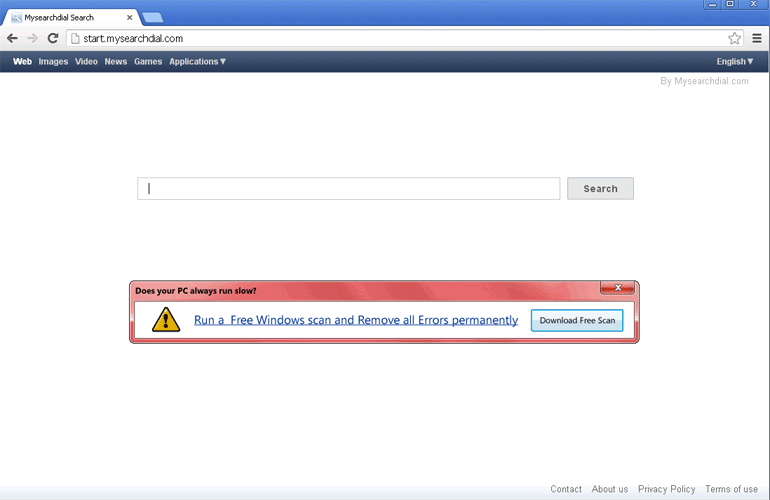 Often associated with its web browser add-on, which may modify your browser in undesirable ways, Start.mysearchdial.com is a search site that offloads its actual search functions to search engines like Google – with the addition of extra advertisements. Start.mysearchdial.com isn't dangerous to your PC, but SpywareRemove.com malware researchers usually suggest removing add-ons related to sites like Start.mysearchdial.com that have limited benefits or no benefits to the user, since such browser plugins often may cause problems related to your web-browsing performance or your web-browsing privacy. Although Start.mysearchdial.com's toolbar does have normal instructions for uninstallation, to make sure that all of its changes are reverted entirely, it's preferable for you to use a competent anti-malware product to delete it.
Where the Start of Your Start.mysearchdial.com Problems Begin
Since Start.mysearchdial.com doesn't have any major functions besides redirecting you to the results of other search sites, most PC users are expected to have little contact with Start.mysearchdial.com intentionally. Common exposure to Start.mysearchdial.com usually is precipitated through the MySearchDial Toolbar, a browser add-on that changes your homepage and search settings to promote Start.mysearchdial.com. SpywareRemove.com malware researchers also have noted that this add-on accesses non-confidential information related to your browsing history and has a limited ability to manage other browser add-ons and themes – functions that generally are considered unnecessarily invasive and may impact your web-browsing performance negatively. On the other hand, Start.mysearchdial.com hasn't been caught using these functions to deliver any kind of genuine PC threats to the affected computers, and so, for now, the MySearchDial Toolbar is categorized as a PUP (or Potentially Unwanted Program).
Start.mysearchdial.com's add-on is, of course, available on the Start.mysearchdial.com website, but also may be distributed by unrelated applications that install it automatically. Standard programs using such tactics usually include file download managers and media players. Ordinarily, a high degree of caution for any optional browser-based components during the installation process of a program can help you to avoid any unwanted browser redirects to Start.mysearchdial.com, but SpywareRemove.com malware experts also must warn of the potential for the Start.mysearchdial.com's plugin being installed entirely without your consent.
Turning Back the Dial on Start.mysearchdial.com's Ad-Festooned Searches
Start.mysearchdial.com and its plugin may not hold any advantages for you as a web-surfer, but nor do they include any kind of malicious content (at least, as this article as being written) that SpywareRemove.com malware researchers have discerned. In general, removing plugins related to Start.mysearchdial.com should be considered a matter of simple PC maintenance, akin to cleaning out any unwanted application, cookie or junk file.
To its credit, Start.mysearchdial.com does provide removal instructions for its software. However, to be certain of deleting all browser changes and components involved in the MySearchDial Toolbar's installation, SpywareRemove.com malware research team recommends using a good anti-malware program, either as the sole means of deleting the add-on or as a system 'cleanup' scan after the fact.
Aliases
Technical Details
File System Modifications
Tutorials: If you wish to learn how to remove malware components manually, you can read the tutorials on how to find malware, kill unwanted processes, remove malicious DLLs and delete other harmful files. Always be sure to back up your PC before making any changes.
The following files were created in the system:%SYSTEMDRIVE%\AdwCleaner\Quarantine\C\Users\<username>\AppData\Roaming\Mysearchdial\UpdateProc\UpdateTask.exe.vir
File name: UpdateTask.exe.virSize: 104.96 KB (104960 bytes)
MD5: 6611f0e57aa3223fa798be3f6d1df458
Detection count: 11,336
Mime Type: unknown/vir
Path: %SYSTEMDRIVE%\AdwCleaner\Quarantine\C\Users\<username>\AppData\Roaming\Mysearchdial\UpdateProc\UpdateTask.exe.vir
Group: Malware file
Last Updated: July 27, 2022
%SYSTEMDRIVE%\Users\<username>\AppData\Local\Temp\upd.exe
File name: upd.exeSize: 109.05 KB (109056 bytes)
MD5: 7d6cddf14256d0ebc06d61eee50c0187
Detection count: 10,535
File type: Executable File
Mime Type: unknown/exe
Path: %SYSTEMDRIVE%\Users\<username>\AppData\Local\Temp\upd.exe
Group: Malware file
Last Updated: July 2, 2023
C:\System Volume Information\_restore{DD0CF2F7-77D2-4945-B346-6B5613DA5B5D}\RP73\A0050582.exe
File name: A0050582.exeSize: 109.05 KB (109056 bytes)
MD5: 2eac89def001ca16963472c2676e2b4e
Detection count: 2,391
File type: Executable File
Mime Type: unknown/exe
Path: C:\System Volume Information\_restore{DD0CF2F7-77D2-4945-B346-6B5613DA5B5D}\RP73\A0050582.exe
Group: Malware file
Last Updated: March 13, 2022
%SYSTEMDRIVE%\os. 19621\Intel\os.17860\Jefther\AppData\Local\Temp\51581uninstall.exe
File name: 51581uninstall.exeSize: 306.68 KB (306688 bytes)
MD5: 9f81fea4d9046dbc6566cf9233388ee6
Detection count: 2,113
File type: Executable File
Mime Type: unknown/exe
Path: %SYSTEMDRIVE%\os. 19621\Intel\os.17860\Jefther\AppData\Local\Temp\51581uninstall.exe
Group: Malware file
Last Updated: February 9, 2025
C:\System Volume Information\_restore{DD0CF2F7-77D2-4945-B346-6B5613DA5B5D}\RP70\A0048092.exe
File name: A0048092.exeSize: 109.05 KB (109056 bytes)
MD5: 7529e5841bf768f79fbfb26dd5d9921e
Detection count: 1,696
File type: Executable File
Mime Type: unknown/exe
Path: C:\System Volume Information\_restore{DD0CF2F7-77D2-4945-B346-6B5613DA5B5D}\RP70\A0048092.exe
Group: Malware file
Last Updated: March 9, 2022
%SYSTEMDRIVE%\os. 19621\Intel\os.17860\Jefther\AppData\Local\Temp\58032uninstall.exe
File name: 58032uninstall.exeSize: 618.49 KB (618496 bytes)
MD5: b977e943d006e6c5a75db326a023559b
Detection count: 586
File type: Executable File
Mime Type: unknown/exe
Path: %SYSTEMDRIVE%\os. 19621\Intel\os.17860\Jefther\AppData\Local\Temp\58032uninstall.exe
Group: Malware file
Last Updated: December 13, 2023
F:\Users\<username>\AppData\Local\Temp\8934uninstall.exe
File name: 8934uninstall.exeSize: 298.49 KB (298496 bytes)
MD5: e1cbd15f0cd01171c8b98eb19803b220
Detection count: 244
File type: Executable File
Mime Type: unknown/exe
Path: F:\Users\<username>\AppData\Local\Temp\8934uninstall.exe
Group: Malware file
Last Updated: May 13, 2021
%APPDATA%\mysearchdial\UpdateProc\UpdateTask.exe
File name: UpdateTask.exeSize: 132.6 KB (132608 bytes)
MD5: eb09d68c78a8131b3b82a088c10f02a0
Detection count: 159
File type: Executable File
Mime Type: unknown/exe
Path: %APPDATA%\mysearchdial\UpdateProc
Group: Malware file
Last Updated: March 23, 2016
%PROGRAMFILES%\Mysearchdial\1.8.21.0\bh\mysearchdial.dll
File name: mysearchdial.dllSize: 279.96 KB (279960 bytes)
MD5: 704cea7b5616c0d7c2be5b789178aa8b
Detection count: 19
File type: Dynamic link library
Mime Type: unknown/dll
Path: %PROGRAMFILES%\Mysearchdial\1.8.21.0\bh
Group: Malware file
Last Updated: October 22, 2021
C:\$Recycle.Bin\S-1-5-21-2085162970-30705004-2126004856-1001\$RTWH4C8\BackUp Santi\Archivos de programa\Mysearchdial\1.8.29.0\uninstall.exe
File name: uninstall.exeSize: 683.52 KB (683520 bytes)
MD5: b0bd18d4f4d56786729fe66e003a8ff9
Detection count: 19
File type: Executable File
Mime Type: unknown/exe
Path: C:\$Recycle.Bin\S-1-5-21-2085162970-30705004-2126004856-1001\$RTWH4C8\BackUp Santi\Archivos de programa\Mysearchdial\1.8.29.0\uninstall.exe
Group: Malware file
Last Updated: May 21, 2022
%PROGRAMFILES%\Mysearchdial\1.8.29.0\mysearchdialsrv.exe
File name: mysearchdialsrv.exeSize: 381.84 KB (381848 bytes)
MD5: 543989e937758094a3690d69ee7c9ccc
Detection count: 5
File type: Executable File
Mime Type: unknown/exe
Path: %PROGRAMFILES%\Mysearchdial\1.8.29.0
Group: Malware file
Last Updated: November 20, 2019
mysearchdialSetup.exe
File name: mysearchdialSetup.exeSize: 643.64 KB (643648 bytes)
MD5: f8bd05e5c1fd8471d6b99f30f292370f
Detection count: 2
File type: Executable File
Mime Type: unknown/exe
Group: Malware file
Last Updated: March 31, 2014
More files
Registry Modifications
CLSID{0400EBCA-042C-4000-AA89-9713FBEDB671}{0BD19251-4B4B-4B94-AB16-617106245BB7}{3004627E-F8E9-4E8B-909D-316753CBA923}{3281114F-BCAB-45E3-80D9-A6CD64D4E636}{44533FCB-F9FB-436A-8B6B-CF637B2D465A}{44B29DDD-CF7A-454A-A275-A322A398D93F}{4ED063C9-4A0B-4B44-A9DC-23AFF424A0D3}{82E74373-58AB-47EB-B0F0-A1D82BB8EB5C}{A4DE94DB-DF03-45A3-8A5D-D1B7464B242D}{AA0F50A8-2618-4AE4-A779-9F7378555A8F}{B2DB115C-8278-4947-9A07-57B53D1C4215}{B97FC455-DB33-431D-84DB-6F1514110BD5}{bebbc426-4f16-4567-8fe1-be198c982027}{C292AD0A-C11F-479B-B8DB-743E72D283B0}{C358B3D0-B911-41E3-A276-E7D43A6BA56D}{C67281E0-78F5-4E49-9FAE-4B1B2ADAF17B}{CA5CAA63-B27C-4963-9BEC-CB16A36D56F8}{D40753C7-8A59-4C1F-BE88-C300F4624D5B}{E72E9312-0367-4216-BFC7-21485FA8390B}{EF5625A3-37AB-4BDB-9875-2A3D91CD0DFD}{F6CCB6C9-127E-44AE-8552-B94356F39FFE}{FBC322D5-407E-4854-8C0B-555B951FD8E3}{FFD25630-2734-4AE9-88E6-21BF6525F3FE}File name without pathMySearchDial.lnkMySearchDial.urlRegexp file mask%APPDATA%\MySearchDial\UpdateProc\UpdateTask.exe%LOCALAPPDATA%\mysearchdial-speeddial.crx%LOCALAPPDATA%\mysearchdial.crx%LOCALAPPDATA%\speedial.crx%TEMP%\Mysearchdial.xml%UserProfile%\Local Settings\Application Data\mysearchdial-speeddial.crx%UserProfile%\Local Settings\Application Data\mysearchdial.crx%WinDir%\System32\Tasks\MySearchDial%WinDir%\Tasks\MySearchDial.jobHKEY..\..\..\..{RegistryKeys}SOFTWARE\Classes\esrv.mysearchdialESrvcSOFTWARE\Classes\esrv.mysearchdialESrvc.1SOFTWARE\Classes\mysearchdial.mysearchdialappCoreSOFTWARE\Classes\mysearchdial.mysearchdialappCore.1SOFTWARE\Classes\mysearchdial.mysearchdialdskBndSOFTWARE\Classes\mysearchdial.mysearchdialdskBnd.1SOFTWARE\Classes\mysearchdial.mysearchdialHlprSOFTWARE\Classes\mysearchdial.mysearchdialHlpr.1Software\Microsoft\Internet Explorer\Approved Extensions\{3004627E-F8E9-4E8B-909D-316753CBA923}Software\Microsoft\Internet Explorer\Approved Extensions\{EF5625A3-37AB-4BDB-9875-2A3D91CD0DFD}Software\Microsoft\Internet Explorer\DOMStorage\mysearchdial.comSOFTWARE\Microsoft\Internet Explorer\Low Rights\ElevationPolicy\{219046AE-358F-4CF1-B1FD-2B4DE83642A8}SOFTWARE\Microsoft\Internet Explorer\LowRegistry\DOMStorage\mysearchdial.comSOFTWARE\Microsoft\Internet Explorer\LowRegistry\DOMStorage\start.mysearchdial.comSOFTWARE\Microsoft\Internet Explorer\SearchScopes\{77AA745B-F4F8-45DA-9B14-61D2D95054C8}SOFTWARE\Microsoft\Windows NT\CurrentVersion\Schedule\CompatibilityAdapter\Signatures\MySearchDial.jobSOFTWARE\Microsoft\Windows NT\CurrentVersion\Schedule\CompatibilityAdapter\Signatures\MySearchDial.job.fpSOFTWARE\Microsoft\Windows NT\CurrentVersion\Schedule\TaskCache\Tree\MySearchDialSoftware\Microsoft\Windows\CurrentVersion\Ext\Settings\{3004627E-F8E9-4E8B-909D-316753CBA923}Software\Microsoft\Windows\CurrentVersion\Ext\Settings\{EF5625A3-37AB-4BDB-9875-2A3D91CD0DFD}Software\Microsoft\Windows\CurrentVersion\Ext\Stats\{3004627E-F8E9-4E8B-909D-316753CBA923}Software\Microsoft\Windows\CurrentVersion\Ext\Stats\{EF5625A3-37AB-4BDB-9875-2A3D91CD0DFD}SOFTWARE\Microsoft\Windows\CurrentVersion\Policies\Ext\CLSID\{24F7FA54-28C4-F68E-7893-917955A67E7A}Software\Microsoft\Windows\CurrentVersion\RunOnce\Del1169149Software\mysearchdialSoftware\mysearchdial.comSoftware\mysearchdial\mysearchdialSOFTWARE\Wow6432Node\Microsoft\Internet Explorer\Low Rights\ElevationPolicy\{219046AE-358F-4CF1-B1FD-2B4DE83642A8}SOFTWARE\Wow6432Node\Microsoft\Internet Explorer\SearchScopes\{77AA745B-F4F8-45DA-9B14-61D2D95054C8}SOFTWARE\Wow6432Node\Microsoft\Internet Explorer\Toolbar\{3004627E-F8E9-4E8B-909D-316753CBA923}SOFTWARE\Wow6432Node\Microsoft\Tracing\MySearchDial_RASAPI32SOFTWARE\Wow6432Node\Microsoft\Tracing\MySearchDial_RASMANCSSOFTWARE\Wow6432Node\Microsoft\Windows\CurrentVersion\explorer\Browser Helper Objects\{EF5625A3-37AB-4BDB-9875-2A3D91CD0DFD}SOFTWARE\Wow6432Node\mysearchdialHKEY_LOCAL_MACHINE\Software\[APPLICATION]\Microsoft\Windows\CurrentVersion\Uninstall..{Uninstaller}mysearchdial
Mysearchdial has infected my computer, toolbar, & internet explorer
I do not remember authorizing MySearchDial to be installed on my computer. PLEASE HELP ME DELETE IT AND ALL OF ITS
COMPONENTS.
Thank You
I want this blank thing off my computer you should not be allowed to do this to people.
When i go in to "uninstall programs" and click "uninstall mysearchdial" it says i don't have the authority or something even though im the only user on this computer
I've been trying to get rid of Mysearchdial for ages and its still on my start up program.Please help.I do want my normal Google Search,ABV.BG mail start up page.
This replaced my normal GOOGLE.co.uk default search engine at some point in the last hours.
I cannot remove it so far after various approaches.
Here it is:
http://start.mysearchdial.com/?f=1&a=wnzp_14_14_ie&cd=2XzuyEtN2Y1L1QzutDtDtBtBtCyD0Dzyzz0DyBtC0A0AyE0BtN0D0Tzu0SzztByCtN1L2XzutBtFtCzztFzztFtDtN1L1CzutCyEtDtAtDyD1V1TtN1L1G1B1V1N2Y1L1Qzu2StAzy0DtD0C0FyByCtG0FyBzztCtGzz0BtByCtG0B0D0FyEtGtD0D0B0FyByEzy0CtD0BzztA2QtN1M1F1B2Z1V1N2Y1L1Qzu2SyCtC0A0DzyzyyE0AtGtBtAzyyDtGyD0DyC0AtGzytA0DyEtGtDyBzy0AyEyD0AtC0DyD0E0C2Q&cr=918884001&ir=
What can I do?!
Now is the time for all good men to come to the aid of their country.
To fully uninstall it, all I did was go to "Start, uninstall a program" & I found "MysearchDial". I clicked uninstall. Once it was done, it still popped up on Internet explorer, but don't worry. From there, go to "tools", "Internet Options", & where the "home page" section is at the top, delete "mysearchdial.com" & click "default", or whatever you wish for the home page to be. Then click "apply" at the bottom. Hope that helps!
Mysearchdial is a seriously invasive software that is insideously placed unwanted on most peoples PC's. It interfeers with normal operation to such an extent that normal internet use is compremised. Isn't it about time this company is made to pay for their unwanted and unliked actions by paying a huge fine or something similar to shut down their antisocial operations' The explanation at the start of this blog speaks very highly of Mysearchdial saying they are not malicious and do not put virus's on PC.s. I'm sorry but I do not agree, I am very carefull as to what I put on or allow to be put on my PC but Mysearchdial has still managed to get on my PC. To me it is a vicious unwanted software and as such is again to me worse than a virus and as such should be made illegal. Iam still trying to get this crap off of my PC.
Ping them back. Just use ping start.mysearchdial.com -t and let it run on background.
If everybody who has become target of these criminals (term loaned from video) would work this way, there would not be single operator that would aloud these criminals operate.
Ordinary dudes did perform something that US and Columbia governements was not able to do. If you do not believe, Google los pepes.
Do not pay anything assosiate with these criminals (term loaned from video on this page) just reply them directly like pinging them back.
I've downloaded the app but still can't remove virus