PCPrivacyCleaner
Posted: May 29, 2008
Threat Metric
The following fields listed on the Threat Meter containing a specific value, are explained in detail below:
Threat Level: The threat level scale goes from 1 to 10 where 10 is the highest level of severity and 1 is the lowest level of severity. Each specific level is relative to the threat's consistent assessed behaviors collected from SpyHunter's risk assessment model.
Detection Count: The collective number of confirmed and suspected cases of a particular malware threat. The detection count is calculated from infected PCs retrieved from diagnostic and scan log reports generated by SpyHunter.
Volume Count: Similar to the detection count, the Volume Count is specifically based on the number of confirmed and suspected threats infecting systems on a daily basis. High volume counts usually represent a popular threat but may or may not have infected a large number of systems. High detection count threats could lay dormant and have a low volume count. Criteria for Volume Count is relative to a daily detection count.
Trend Path: The Trend Path, utilizing an up arrow, down arrow or equal symbol, represents the level of recent movement of a particular threat. Up arrows represent an increase, down arrows represent a decline and the equal symbol represent no change to a threat's recent movement.
% Impact (Last 7 Days): This demonstrates a 7-day period change in the frequency of a malware threat infecting PCs. The percentage impact correlates directly to the current Trend Path to determine a rise or decline in the percentage.
| Threat Level: | 10/10 |
|---|---|
| Infected PCs: | 1,358 |
| First Seen: | July 24, 2009 |
|---|---|
| Last Seen: | May 10, 2024 |
| OS(es) Affected: | Windows |
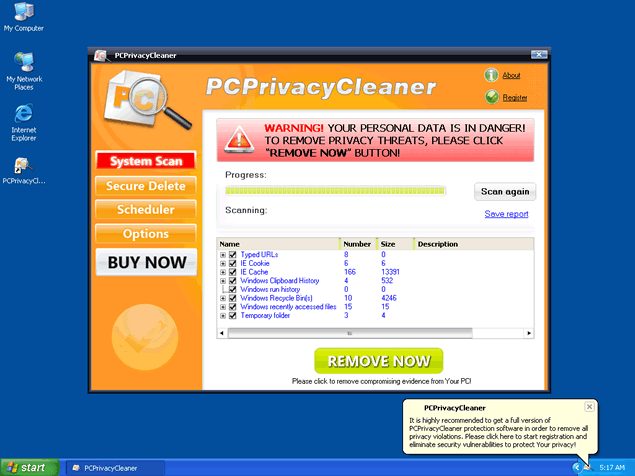 PCPrivacyCleaner, or PC Privacy Cleaner, is a rogue registry cleaner application. PCPrivacyCleaner is often downloaded and installed by a Trojan, through browser security holes, or via other unconventional and unethical mechanisms. PCPrivacyCleaner
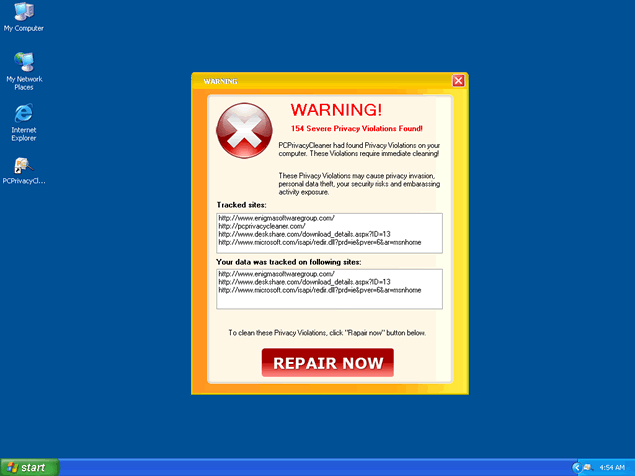
usually promoted via a Zlob Codec installer found on adult websites. PCPrivacyCleaner may pop up notifications of imaginary security and privacy risks in an attempt to get the user to purchase the full version. PCPrivacyCleaner fake warning message states:
"Warning! Your Personal Data is in Danger
To remove privacy threats, please click remove now button!"
PCPrivacyCleaner may generate system slowdown and instability. PCPrivacyCleaner may prove difficult to manually remove. PCPrivacyCleaner has the ability to recreate itself after reboot and its "System scan" messages may continue pop up on your task manager.


Aliases
More aliases (34)
Technical Details
File System Modifications
Tutorials: If you wish to learn how to remove malware components manually, you can read the tutorials on how to find malware, kill unwanted processes, remove malicious DLLs and delete other harmful files. Always be sure to back up your PC before making any changes.
The following files were created in the system:privacyclean.exe
File name: privacyclean.exeSize: 894.97 KB (894976 bytes)
MD5: e29f4c6c50f501e533f3cbb159a83aff
Detection count: 70
File type: Executable File
Mime Type: unknown/exe
Group: Malware file
Last Updated: June 3, 2010
PCPC_Setup_Free.exe
File name: PCPC_Setup_Free.exeSize: 934.35 KB (934352 bytes)
MD5: 8a2b0065089222ba5779c92ce44871ff
Detection count: 60
File type: Executable File
Mime Type: unknown/exe
Group: Malware file
Last Updated: December 11, 2009
pcpc.exe
File name: pcpc.exeSize: 678.35 KB (678352 bytes)
MD5: 10c51863af229b40b0375fc39b37c7b8
Detection count: 31
File type: Executable File
Mime Type: unknown/exe
Group: Malware file
Last Updated: December 11, 2009
PCPC_Setup_Free[1].exe, pcpc.exe
File name: PCPC_Setup_Free[1].exe, pcpc.exeSize: 565.71 KB (565712 bytes)
MD5: 791283849378cb86f9926517a7cd53f5
Detection count: 1
File type: Executable File
Mime Type: unknown/exe
Group: Malware file
Last Updated: December 11, 2009
More files
Registry Modifications
File name without pathPrivacy Protector.urlprivacyclean.exeSpyware&Malware Protection.url
I was working on my PC and got a message that Internet Explorer detected some harmful files and suggested I install PCPtivacyCleaner. It thought it was odd since I ran my utility programs earlier and found nothing wrong. I tried to close the install box and the program started to install by itself. It finally locked up my PC after getting stuck in a loop. Now, my PC keeps rebooting when I get to my desktop. I can not get safe mode or it's options to work. Do you have any suggestions? How can I remove it, if I can't get to my desktop? I'd appreciate any help you can give me. I run my business on the PC. Thank you.
I have PC Tools Spyware Doctor with anti virus a pop up stating high risk and I hit the block button as soon as I done that this Privacy Centre was running on my PC doing all sorts of scans, I tried resetting to an ealiar date and none of it work even in safe mode the same program was running, I tried setting to the last known safe configuration that did not work, I cant download any programs to remove it because you are not able to access any part of your computer therefore it has to be done manually thats OK if you are fully upto speed with computer language, I would have thought the anti virus I have would have prevented this bad experience from happening it would appear there are to many providers out there looking for business at my expense. thank anyway