Searchya! Toolbar
Posted: August 24, 2012
Threat Metric
The following fields listed on the Threat Meter containing a specific value, are explained in detail below:
Threat Level: The threat level scale goes from 1 to 10 where 10 is the highest level of severity and 1 is the lowest level of severity. Each specific level is relative to the threat's consistent assessed behaviors collected from SpyHunter's risk assessment model.
Detection Count: The collective number of confirmed and suspected cases of a particular malware threat. The detection count is calculated from infected PCs retrieved from diagnostic and scan log reports generated by SpyHunter.
Volume Count: Similar to the detection count, the Volume Count is specifically based on the number of confirmed and suspected threats infecting systems on a daily basis. High volume counts usually represent a popular threat but may or may not have infected a large number of systems. High detection count threats could lay dormant and have a low volume count. Criteria for Volume Count is relative to a daily detection count.
Trend Path: The Trend Path, utilizing an up arrow, down arrow or equal symbol, represents the level of recent movement of a particular threat. Up arrows represent an increase, down arrows represent a decline and the equal symbol represent no change to a threat's recent movement.
% Impact (Last 7 Days): This demonstrates a 7-day period change in the frequency of a malware threat infecting PCs. The percentage impact correlates directly to the current Trend Path to determine a rise or decline in the percentage.
| Ranking: | 8,345 |
|---|---|
| Threat Level: | 5/10 |
| Infected PCs: | 24,452 |
| First Seen: | August 24, 2012 |
|---|---|
| Last Seen: | March 3, 2025 |
| OS(es) Affected: | Windows |
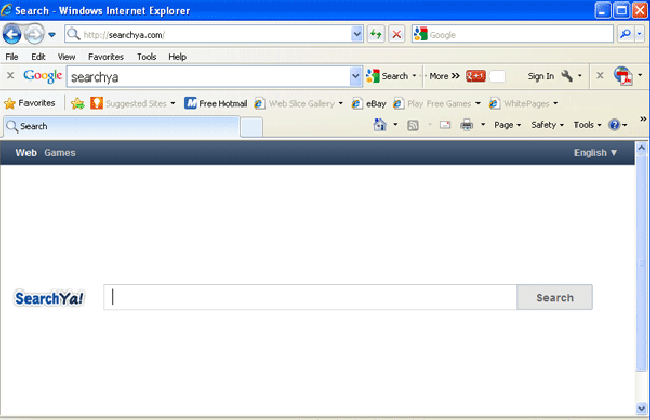 Searchya! Toolbar is a search engine toolbar that's used to promote the searchya.com website. Although Searchya! Toolbar and its associated site do possess search features, most PC users have expressed dissatisfaction with the quality of these functions, and malware researchers have found clear indications of Searchya! Toolbar including characteristics of a PUP or browser hijacker. To remove Searchya! Toolbar's unwanted browser changes, you should delete Searchya! Toolbar with a trustworthy anti-malware application; other removal methods may fail to remove all of Searchya! Toolbar's components, which are compatible with multiple types of web browsers. However, temporary contact with searchya.com and other symptoms of Searchya! Toolbar infections can be considered low-level risks that are unlikely to damage your PC if resolved in a timely fashion.
When Searchya! Toolbar Takes Your Searches to Its Own Places of Interest
Like many low-level browser hijackers and PUPs, Searchya! Toolbar's sole purpose is to redirect traffic to an associated website: the searchya.com domain. Searchya.com, in turn, provides search features similar to Google or Yahoo Search, although with substantially less accurate results that often include irrelevant links. SpywareRemove.com malware analysts have found that the most common browser modifications linked to Searchya! Toolbar attacks include changes to your homepage and redirects that trigger when you try to use unrelated search sites (Google, etc.).
Searchya! Toolbar attacks have expressed a wide degree of compatibility with various brands of web browsers, including Internet Explorer, Chrome and Firefox. Given that the Searchya! Toolbar is likely to include non-browser-specific components, SpywareRemove.com malware experts encourage you to use anti-malware products to detect and delete Searchya! Toolbar in its entirety, rather than attempting to disable Searchya! Toolbar in a specific browser.
Keeping Your PC Out of the Reach of the Searchya! Toolbar's Fishing Net
The Searchya! Toolbar is often installed unintentionally through bundled installers with games, media utilities and other programs that are distributed through unsafe sources. SpywareRemove.com malware researchers recommend keeping close tabs on any toolbars or other add-ons that are installed by programs from risky sources, since many such installers will allow you to opt out of an installation of Searchya! Toolbar or similar PUPs.
At this time, Searchya! Toolbar has been in distribution for at least half a year, with new Searchya! Toolbar attacks still being reported recently. As a low-level PC threat that resists deletion and hinders your ability to use reputable websites, Searchya! Toolbar should be considered an active, if minor danger to your computer. However, searchya.com has not been found to host overtly malicious content, although Searchya! Toolbar-related sites may expose you to PC threats unintentionally due to a lack of the appropriate safety protocols that are used by reputable search engines.
Technical Details
File System Modifications
Tutorials: If you wish to learn how to remove malware components manually, you can read the tutorials on how to find malware, kill unwanted processes, remove malicious DLLs and delete other harmful files. Always be sure to back up your PC before making any changes.
The following files were created in the system:%SYSTEMDRIVE%\AdwCleaner\Quarantine\C\Users\<username>\AppData\Roaming\SearchYa\UpdateProc\UpdateTask.exe.vir
File name: UpdateTask.exe.virSize: 85.5 KB (85504 bytes)
MD5: 0e2ef4c2f4f3b3c03ead568486ad54b8
Detection count: 6,464
Mime Type: unknown/vir
Path: %SYSTEMDRIVE%\AdwCleaner\Quarantine\C\Users\<username>\AppData\Roaming\SearchYa\UpdateProc\UpdateTask.exe.vir
Group: Malware file
Last Updated: December 13, 2022
%APPDATA%\searchya\UpdateProc\UpdateTask.exe
File name: UpdateTask.exeSize: 204.28 KB (204288 bytes)
MD5: 57727194c7f1a2b72f1a24845c7f902b
Detection count: 38
File type: Executable File
Mime Type: unknown/exe
Path: %APPDATA%\searchya\UpdateProc
Group: Malware file
Last Updated: March 23, 2016
C:\Program Files\SearchYa!\1.5.20.0\bh\searchya.dll
File name: C:\Program Files\SearchYa!\1.5.20.0\bh\searchya.dllFile type: Dynamic link library
Mime Type: unknown/dll
Group: Malware file
C:\Program Files\SearchYa!\1.5.20.0\escortShld.dll
File name: C:\Program Files\SearchYa!\1.5.20.0\escortShld.dllFile type: Dynamic link library
Mime Type: unknown/dll
Group: Malware file
C:\Program Files\SearchYa!\1.5.20.0\FavIcon
File name: C:\Program Files\SearchYa!\1.5.20.0\FavIconMime Type: unknown/0\FavIcon
Group: Malware file
C:\Program Files\SearchYa!\1.5.20.0\searchyaApp.dll
File name: C:\Program Files\SearchYa!\1.5.20.0\searchyaApp.dllFile type: Dynamic link library
Mime Type: unknown/dll
Group: Malware file
C:\Program Files\SearchYa!\1.5.20.0\searchyaEng.dll
File name: C:\Program Files\SearchYa!\1.5.20.0\searchyaEng.dllFile type: Dynamic link library
Mime Type: unknown/dll
Group: Malware file
C:\Program Files\SearchYa!\1.5.20.0\searchyasrv
File name: C:\Program Files\SearchYa!\1.5.20.0\searchyasrvMime Type: unknown/0\searchyasrv
Group: Malware file
C:\Program Files\SearchYa!\1.5.20.0\searchyaTlbr.dll
File name: C:\Program Files\SearchYa!\1.5.20.0\searchyaTlbr.dllFile type: Dynamic link library
Mime Type: unknown/dll
Group: Malware file
C:\Program Files\SearchYa!\1.5.20.0\uninstall
File name: C:\Program Files\SearchYa!\1.5.20.0\uninstallMime Type: unknown/0\uninstall
Group: Malware file
More files
Registry Modifications
Regexp file mask%WINDIR%\System32\Tasks\Searchya%WINDIR%\Tasks\Searchya.jobHKEY..\..\{Value}HKEY_CURRENT_USER\Software\Microsoft\Internet Explorer\Main "Start Page"HKEY_LOCAL_MACHINE\SOFTWARE\Microsoft\Internet Explorer\Toolbar "SearchYa Toolbar"HKEY..\..\..\..{Subkeys}HKEY_CLASSES_ROOT\esrv.searchyaESrvcHKEY_CLASSES_ROOT\esrv.searchyaESrvc\CurVerHKEY_CLASSES_ROOT\ironsource.searchyaappCoreHKEY_CLASSES_ROOT\ironsource.searchyaHlprHKEY_LOCAL_MACHINE\SOFTWARE\Classes\esrv.searchyaESrvcHKEY_LOCAL_MACHINE\Software\[APPLICATION]\Microsoft\Windows\CurrentVersion\Uninstall..{Uninstaller}HKEY_LOCAL_MACHINE\SOFTWARE\Microsoft\Windows\CurrentVersion\Uninstall\searchya
Leave a Reply
Please note that we are not able to assist with billing and support issues regarding SpyHunter or other products. If you're having issues with SpyHunter, please get in touch with SpyHunter customer support through your SpyHunter . If you have SpyHunter billing questions, we recommend you check the Billing FAQ. For general suggestions or feedback, contact us.