Trojan.Tobfy.M
Posted: June 10, 2013
Threat Metric
The following fields listed on the Threat Meter containing a specific value, are explained in detail below:
Threat Level: The threat level scale goes from 1 to 10 where 10 is the highest level of severity and 1 is the lowest level of severity. Each specific level is relative to the threat's consistent assessed behaviors collected from SpyHunter's risk assessment model.
Detection Count: The collective number of confirmed and suspected cases of a particular malware threat. The detection count is calculated from infected PCs retrieved from diagnostic and scan log reports generated by SpyHunter.
Volume Count: Similar to the detection count, the Volume Count is specifically based on the number of confirmed and suspected threats infecting systems on a daily basis. High volume counts usually represent a popular threat but may or may not have infected a large number of systems. High detection count threats could lay dormant and have a low volume count. Criteria for Volume Count is relative to a daily detection count.
Trend Path: The Trend Path, utilizing an up arrow, down arrow or equal symbol, represents the level of recent movement of a particular threat. Up arrows represent an increase, down arrows represent a decline and the equal symbol represent no change to a threat's recent movement.
% Impact (Last 7 Days): This demonstrates a 7-day period change in the frequency of a malware threat infecting PCs. The percentage impact correlates directly to the current Trend Path to determine a rise or decline in the percentage.
| Threat Level: | 8/10 |
|---|---|
| Infected PCs: | 54 |
| First Seen: | January 2, 2013 |
|---|---|
| OS(es) Affected: | Windows |
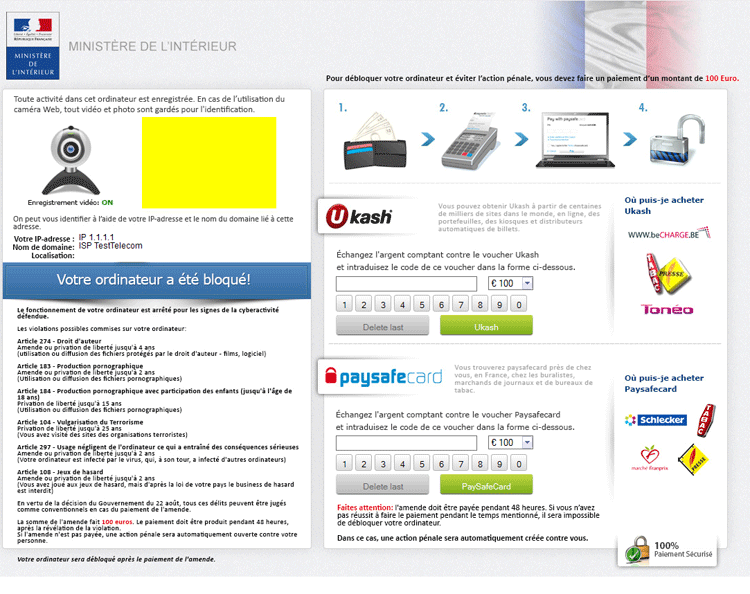 Trojan.Tobfy.M or Trojan.Win32.Tobfy.M is a Police Ransomware Trojan that detects the victim's IP address and displays a regionally-appropriate warning message while also locking Windows. The Win32/Tobfy family has included numerous variants, and its attack campaign still is undergoing development and distribution, with Trojan.Tobfy.M as just one of the most recently-emerged PC threats from the family. Fortunately, Trojan.Tobfy.M's attacks are easy to identify, and always claim that your PC has been locked to force you to pay a legal fine for unauthorized online activities (which Trojan.Tobfy.M actually cannot detect). Instead of paying the completely illegal fine that Trojan.Tobfy.M requests, SpywareRemove.com malware experts recommend deleting Trojan.Tobfy.M with an anti-malware product of your choice – after, of course, you prevent Trojan.Tobfy.M from starting (with tips for such provided in this article).
Trojan.Tobfy.M: a Fresh Label for a Scam Almost as Old as File Piracy
As a criminal employee in the ransomware business, Trojan.Tobfy.M makes its profits by creating the same kinds of misleading and downright illegal warning messages that are part of such PC threats as 'Attention! Votre ordinateur a ete pour violation' ransomware, the FBI Cybercrime Division Virus, the France Ministère de l’Intérieur Virus, the POLITIE Belgique Police Fédérale Virus, 'Sur votre ordinateur est infecté' French Ransomware, the United Kingdom Police Ukash Virus or Votre ordinateur est bloqué Gendarmerie Ransomware. By detecting your PC's IP address, Trojan.Tobfy.M can load an alert that's configured for your country and includes references to your national flag, local laws and law enforcement agencies such as the French Ministry of the Interior.
With these deceptive details in place, Trojan.Tobfy.M uses its alert to accuse you of using your computer for common criminal actions like viewing forbidden subgenres of erotica or distributing copyright-protected files. Trojan.Tobfy.M claims that you must pay a Paysafecard or Ukash fee before you can re-access your Windows account, which is blocked by Trojan.Tobfy.M's pop-up. SpywareRemove.com malware experts emphasize that no version of Trojan.Tobfy.M has any kind of legal authority, and especially that paying Trojan.Tobfy.M will not unlock your computer.
The Toll-Free Trojan.Tobfy.M Antidote
Police Ransomware Trojans, such as a typical Trojan.Tobfy.M infection, almost always need to be disabled before their actual deletion can be effected. To do so, SpywareRemove.com malware researchers usually suggest using the Safe Mode feature or a flash drive with a backup OS to access an operating system while being unaffected by Trojan.Tobfy.M's pop-up. After that, anti-malware products can delete Trojan.Tobfy.M perfectly legally, and without any risk of your PC suffering from any other consequences (such as file encryption or deletion) that Trojan.Tobfy.M may threaten in the case that you don't pay its ransom.
Variants of Trojan.Tobfy.M, like other members of the Tobfy family, sometimes are identified by other aliases, especially due to their similarities to other Police Trojans. Some of these include LockScreen, Winlock, Yakes, Kryptik, Jorik and Ransomlock.
Grounds for the distribution of Trojan.Tobfy.M infections still are undergoing analysis, but similar PC threats often are distributed via secondary Trojans that are installed through spam links and/or website exploits.
Aliases
More aliases (78)
Technical Details
File System Modifications
Tutorials: If you wish to learn how to remove malware components manually, you can read the tutorials on how to find malware, kill unwanted processes, remove malicious DLLs and delete other harmful files. Always be sure to back up your PC before making any changes.
The following files were created in the system:%USERPROFILE%\winlogon.exe
File name: winlogon.exeSize: 98.16 KB (98169 bytes)
MD5: 3a11238f2050c19c86c58dc413b2e781
Detection count: 65
File type: Executable File
Mime Type: unknown/exe
Path: %USERPROFILE%
Group: Malware file
Last Updated: April 16, 2013
D:\Users\<username>\pfqwtsmfvhchthnfrtzjkwh.exe
File name: pfqwtsmfvhchthnfrtzjkwh.exeSize: 80.89 KB (80896 bytes)
MD5: 2be9adeaf486fcc5e83262a8148671ae
Detection count: 19
File type: Executable File
Mime Type: unknown/exe
Path: D:\Users\Beat
Group: Malware file
Last Updated: January 28, 2013
%USERPROFILE%\leujmhjeaeqbucvbdirmjsv.exe
File name: leujmhjeaeqbucvbdirmjsv.exeSize: 71.16 KB (71168 bytes)
MD5: 1517dca1ae70dcb64cb01bf690bc805f
Detection count: 14
File type: Executable File
Mime Type: unknown/exe
Path: %USERPROFILE%
Group: Malware file
Last Updated: April 2, 2013
%TEMP%\wlsidten.exe
File name: wlsidten.exeSize: 76.28 KB (76288 bytes)
MD5: 8c345aca1f1575ff40d93163445f9257
Detection count: 5
File type: Executable File
Mime Type: unknown/exe
Path: %TEMP%
Group: Malware file
Last Updated: January 21, 2013
leujmhjeaeqbucvbdirmjsv.exe
File name: leujmhjeaeqbucvbdirmjsv.exeSize: 70B (70 bytes)
MD5: 1517DCA1AE70DCB64CB01BF690BC805F
File type: Executable File
Mime Type: unknown/exe
Group: Malware file
Leave a Reply
Please note that we are not able to assist with billing and support issues regarding SpyHunter or other products. If you're having issues with SpyHunter, please get in touch with SpyHunter customer support through your SpyHunter . If you have SpyHunter billing questions, we recommend you check the Billing FAQ. For general suggestions or feedback, contact us.