VirLock Ransomware
Posted: December 10, 2014
Threat Metric
The following fields listed on the Threat Meter containing a specific value, are explained in detail below:
Threat Level: The threat level scale goes from 1 to 10 where 10 is the highest level of severity and 1 is the lowest level of severity. Each specific level is relative to the threat's consistent assessed behaviors collected from SpyHunter's risk assessment model.
Detection Count: The collective number of confirmed and suspected cases of a particular malware threat. The detection count is calculated from infected PCs retrieved from diagnostic and scan log reports generated by SpyHunter.
Volume Count: Similar to the detection count, the Volume Count is specifically based on the number of confirmed and suspected threats infecting systems on a daily basis. High volume counts usually represent a popular threat but may or may not have infected a large number of systems. High detection count threats could lay dormant and have a low volume count. Criteria for Volume Count is relative to a daily detection count.
Trend Path: The Trend Path, utilizing an up arrow, down arrow or equal symbol, represents the level of recent movement of a particular threat. Up arrows represent an increase, down arrows represent a decline and the equal symbol represent no change to a threat's recent movement.
% Impact (Last 7 Days): This demonstrates a 7-day period change in the frequency of a malware threat infecting PCs. The percentage impact correlates directly to the current Trend Path to determine a rise or decline in the percentage.
| Ranking: | 13,355 |
|---|---|
| Threat Level: | 10/10 |
| Infected PCs: | 415 |
| First Seen: | December 10, 2014 |
|---|---|
| Last Seen: | February 14, 2025 |
| OS(es) Affected: | Windows |
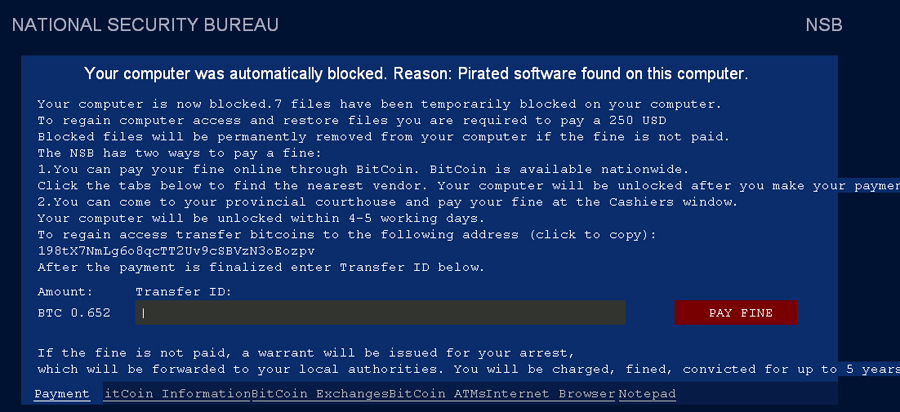 The VirLock Ransomware is a virus that unlawfully restricts your access to arbitrary files to force you to pay a ransom fee. Although the VirLock Ransomware displays messages claiming that this attack is part of a legal effort to suppress software piracy, the VirLock Ransomware is unrelated to any law enforcement agency of any nation. Like any virus, the VirLock Ransomware should be regarded as threatening software. Making regular backups and having anti-malware software available, removing the VirLock Ransomware and other threats with a propensity for locking your files shouldn't require paying any illegal fees.
Why Your Files are a Matter of 'National Security'
The VirLock Ransomware is a recent variant of ransomware only confirmed in the last month of 2014, although the techniques the VirLock Ransomware uses are heavily reminiscent of old threats like the International Cyber Security Protection Alliance Virus. While blocking your access to randomly-determined files on your PC, the VirLock Ransomware loads a JPG-based warning message that threatens legal action against any computer users who fail to pay the file-unlocking fine. Malware experts still are examining the full extent of the VirLock Ransomware's attacks. However, due to being a virus, the VirLock Ransomware infects files on your PC with its personal code. This attack diverges from traditional ransomware payloads, which include deleting, replacing or encrypting the victim's data. As a result, trying to launch any infected file will execute the VirLock Ransomware.
Oddly, the VirLock Ransomware's warning message includes an option for paying your fee at a local courthouse, seemingly as a ploy to make the VirLock Ransomware's alert appear legitimate. Despite its warning claiming affiliation with a non-specific 'National Security Bureau (which could refer to China or Slovakia, for example), the VirLock Ransomware is not supported by any legal institution. The first option for a ransom payment uses a BitCoin-based fund transfer, which is typical for the cash transactions of threatening software.
VirLock Ransomware's warning message includes formats targeting English speakers, although its legal references aren't oriented to any individual nation. As usual, the VirLock Ransomware claims that the victim is operating under a theoretical time limit before other penalties are implemented (such as jail time). Also as usual, malware researchers find no evidence of the VirLock Ransomware including other, time-based attacks to supplement the baseline file infections.
Unlocking Your Files from a Virus's Tampering
Although its inclusion of a virus-based file infection strategy is mildly unusual, the VirLock Ransomware also shows signs of being a shallowly-designed strategy with a visible lack of the intricacies of prior threats. As a rule, you always should regard suspicious legal messages claiming to block files on your PC at random as attacks against your system. Telltale signs of ransomware messages can include failures to provide appropriate references or attempts to extort money. As per usual virus removal protocols, all potentially infected files should be scanned by AV tools that can delete VirLock Ransomware without harming the original file data. Alternately, you may use your security software to remove all infected files and restore previous copies from any uninfected backup sources.
Malware researchers have yet to confirm any distribution models for the VirLock Ransomware, but common techniques associated with ransomware include browser-based attacks, fake e-mail attachments and vulnerabilities for Flash or JavaScript. Because of its virus classification, VirLock Ransomware should be assumed to be capable of compromising other files on both your PC and any removable devices and containing the VirLock Ransomware should be a priority for any computer user.
Aliases
More aliases (88)
Technical Details
File System Modifications
Tutorials: If you wish to learn how to remove malware components manually, you can read the tutorials on how to find malware, kill unwanted processes, remove malicious DLLs and delete other harmful files. Always be sure to back up your PC before making any changes.
The following files were created in the system:eiMULLsL.exe
File name: eiMULLsL.exeSize: 201.72 KB (201728 bytes)
MD5: 3f07e1cbd27b259b507bcabbb0941971
Detection count: 92
File type: Executable File
Mime Type: unknown/exe
Group: Malware file
Last Updated: December 10, 2014
%ALLUSERSPROFILE%\mcMUcIAk\TOgggoow.exe
File name: TOgggoow.exeSize: 198.65 KB (198656 bytes)
MD5: 1ec6d6e9c339201a74beefb31077ddc1
Detection count: 92
File type: Executable File
Mime Type: unknown/exe
Path: %ALLUSERSPROFILE%\mcMUcIAk
Group: Malware file
Last Updated: July 18, 2016
C:\Users\<username>\Desktop\New folder\file.exe
File name: file.exeSize: 2.21 MB (2215936 bytes)
MD5: 62feaf87ce183b1a900471cc50aaedb4
Detection count: 9
File type: Executable File
Mime Type: unknown/exe
Path: C:\Users\<username>\Desktop\New folder
Group: Malware file
Last Updated: February 18, 2022
%USERPROFILE%\nWUwAokA\tEwkkIIo.exe
File name: tEwkkIIo.exeSize: 200.19 KB (200192 bytes)
MD5: 66197f7baf42db37f35074bbad0c13ea
Detection count: 7
File type: Executable File
Mime Type: unknown/exe
Path: %USERPROFILE%\nWUwAokA
Group: Malware file
Last Updated: July 18, 2016
%ALLUSERSPROFILE%\JEUEoUgo\ECEkMkMk.exe
File name: ECEkMkMk.exeSize: 2.03 MB (2030592 bytes)
MD5: fae49fe8f00dbea695c0279538606ee1
Detection count: 7
File type: Executable File
Mime Type: unknown/exe
Path: %ALLUSERSPROFILE%\JEUEoUgo
Group: Malware file
Last Updated: July 22, 2016
%ALLUSERSPROFILE%\iCskEgwM\DUokEEgU.exe
File name: DUokEEgU.exeSize: 2.09 MB (2096128 bytes)
MD5: 623ee7285d0c215de78cec880e30eb33
Detection count: 7
File type: Executable File
Mime Type: unknown/exe
Path: %ALLUSERSPROFILE%\iCskEgwM
Group: Malware file
Last Updated: July 22, 2016
%APPDATA%\DarkEye2.exe
File name: DarkEye2.exeSize: 2.67 MB (2679808 bytes)
MD5: 04963b5d27d46e01b9ca833afb6f682d
Detection count: 5
File type: Executable File
Mime Type: unknown/exe
Path: %APPDATA%
Group: Malware file
Last Updated: May 2, 2016
More files
Registry Modifications
HKEY..\..\..\..{RegistryKeys}SOFTWARE\Microsoft\Windows\CurrentVersion\Run\gsQoAIAM.exeSOFTWARE\Microsoft\Windows\CurrentVersion\Run\NmYcsoAc.exeSOFTWARE\Microsoft\Windows\CurrentVersion\Run\PywYQwIg.exeSOFTWARE\Microsoft\Windows\CurrentVersion\Run\qEoYgUIU.exeSOFTWARE\Wow6432Node\Microsoft\Windows\CurrentVersion\Run\gsQoAIAM.exeSOFTWARE\Wow6432Node\Microsoft\Windows\CurrentVersion\Run\NmYcsoAc.exeSOFTWARE\Wow6432Node\Microsoft\Windows\CurrentVersion\Run\qEoYgUIU.exe
Additional Information
| # | Message |
|---|---|
| 1 | NATIONAL SECURITY BUREAU Your computer was automatically blocked. Reason: Pirated software found on this computer. Your computer is now blocked. 7 files have been temporarily blocked on your computer. To regain computer access and restore files you are required to pay a 250 USD Blocked files will be permanently removed from your computer if the fine is not paid. The NSB has two ways to pay a fine: 1.You can pay your fine online through BitCoin. BitCoin is available nationwide. Click the tabs below to find the nearest vendor. Your computer will be unlocked after you make your payment Your computer will be unlocked within 4-5 working days. To regain access transfer bitcoins to the following address (click to copy): 198tX7NmLg6o8qcTT2Uv9cSBVzN3oEozpv After the payment is finalized enter Transfer ID below. Amount: Transfer ID: BTC 0.652 PAY FINE If the fine is not paid, a warrant will be issues for your arrest, Which will be forwarded to your local authorities. You will be charged, fined, convicted for up to 5 years. Payment |
Leave a Reply
Please note that we are not able to assist with billing and support issues regarding SpyHunter or other products. If you're having issues with SpyHunter, please get in touch with SpyHunter customer support through your SpyHunter . If you have SpyHunter billing questions, we recommend you check the Billing FAQ. For general suggestions or feedback, contact us.